Citrix Provisioning Services has a feature within the “Provisioning Services Console” that allows you to stop/restart/start the streaming service on another server:
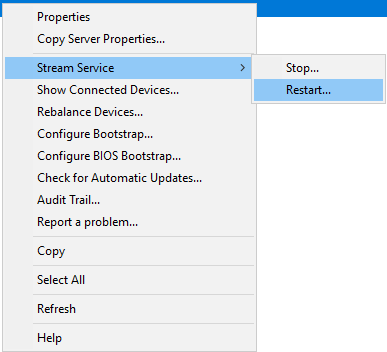
This feature worked with Server 2008R2 but with 2012R2 and greater it stopped working. Citrix partially identified the issue here:
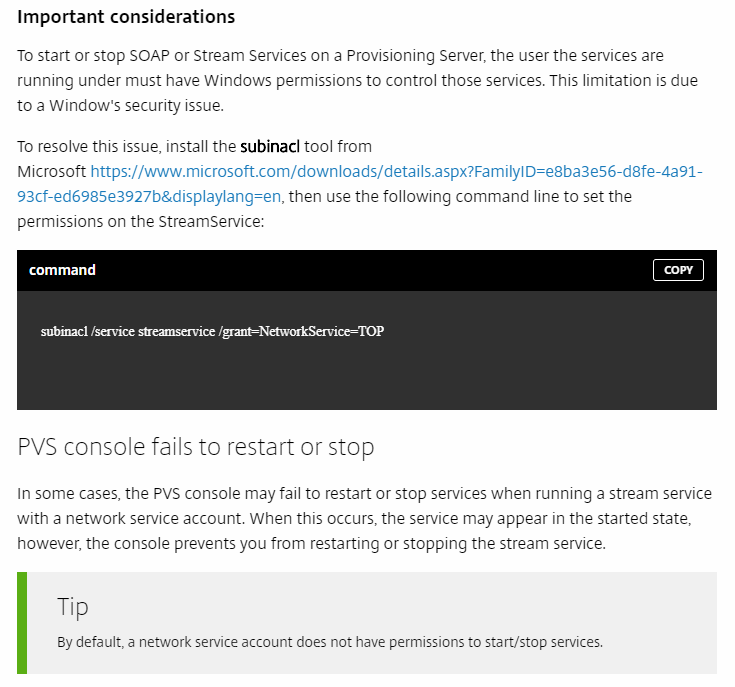
I was exploring starting and stopping the streaming service on other PVS servers from the Console and I found this information was incorrect. Adding the NetworkService does NOT enable the streaming service to be stop/started/restarted from other machines. The reason is the NETWORKSERVICE is a LOCAL account on the machine itself. When it attempts to reach out and communicate with another system it is translated into a proper SID, which matches the machine account. Since that SID communicating across the wire does not have access to the service you get a failure.
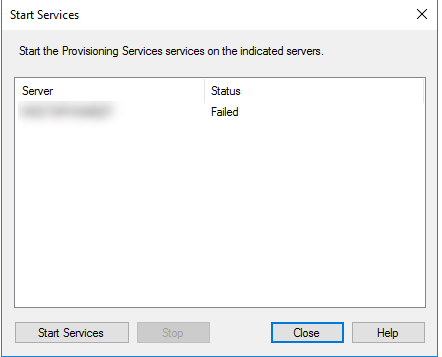
In order to fix this properly__ we can add either the machine account permissions for each PVS Server on each service OR we can add all machine accounts into a security group and add that__ as permissions to manipulate the service on each PVS Server.
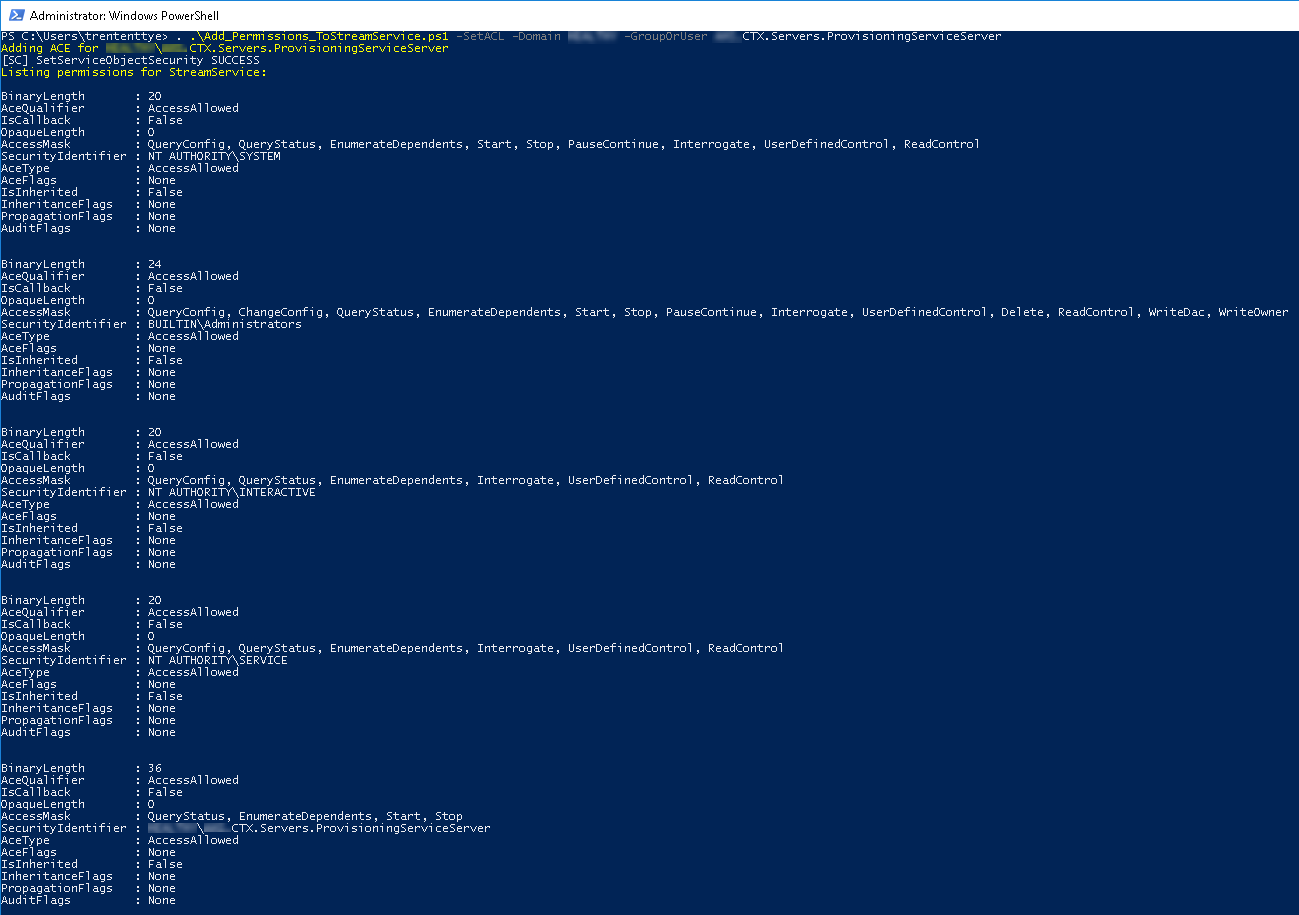
I created a PowerShell script to enable easily add a group, user or machine account to the Streaming Service. It will also list all the permissions:
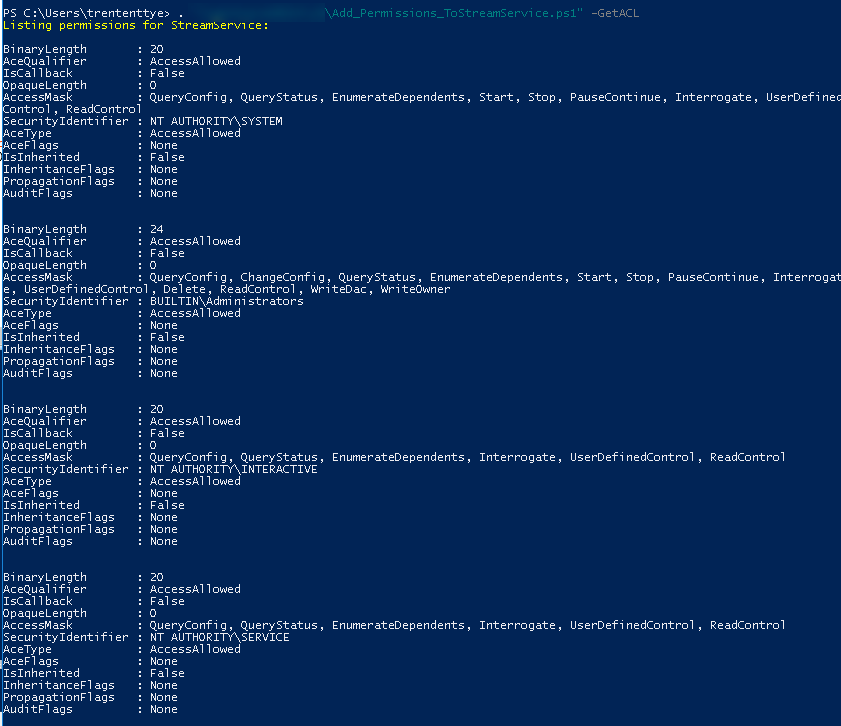
An example adding a Group to the permissions to the service:
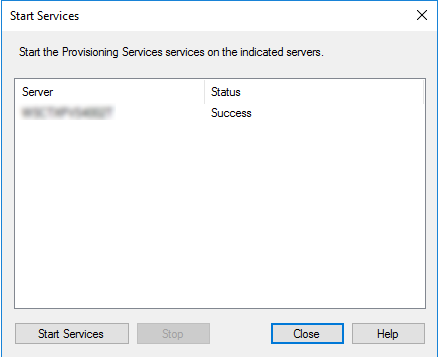
And now we can start the service remotely:
In order to get this working entirely I recommend the following steps:
- Create a Group (eg, “CTX.Servers.ProvisioningServiceServer”)
- Add all the PVS Machine Accounts into that group
- Reboot your PVS server to gain that group membership token
- Run the powershell script on each machine to add the group permission to the streaming service:
. .\Add_Permissions_ToStreamService.ps1 -SetACL -Domain Bottheory -GroupOrUser CTX.Servers.ProvisioningServiceServe - Done!
And now the script:
<#
    .SYNOPSIS
      Adds a user or group to the permission set on the Citrix Streaming Service to enable remote service manipulation

    .DESCRIPTION
      Adds a user or group to the permission set on the Citrix Streaming Service to enable remote service manipulation.  This enables
      more precisely targeted permissions and allows security groups with the machine accounts of the PVS servers as members to
      remotely manipulate the streaming service.  Previously, a service account would be required to be set on the streaming service,
      not anymore!

    .PARAMETER GetACL
        Gets the Access Control List of the Streaming Service

    .PARAMETER SetACL
        Sets the mode to configuring the Streaming Service ACL

    .PARAMETER GroupOrUser
        The friendly name of a Group, User or Machine account

    .PARAMETER Domain
        The name of the active directory domain

    .EXAMPLE
        .\Add_Permissions_ToStreamService.ps1 -GetACL

    .EXAMPLE
        .\Add_Permissions_ToStreamService.ps1 -SetACL -GroupOrUser trententtye -Domain BOTTHEORY

    .INPUTS
        None

    .OUTPUTS
        None

    .NOTES

      Author: Trentent Tye
      Editor: Trentent Tye
      Company: TheoryPC

      History
      Last Change: 2018.05.01 TT: Script created

	.LINK


<blockquote class="wp-embedded-content" data-secret="BpbrGeCpiU">
  <a href="http://theorypc.ca/">Home</a>
</blockquote>
    #>

## help from here: https://rohnspowershellblog.wordpress.com/2013/03/19/viewing-service-acls/

param(
  [parameter(Mandatory=$false)][switch]$GetACL,
  [Parameter(Mandatory=$false)][switch]$SetACL,
  [Parameter(Mandatory=$false)][string]$Domain,
  [Parameter(Mandatory=$false)][string]$GroupOrUser
)

#ErrorAction Preferences
$ErrorActionPreference = "Stop"

Add-Type  @"
  [System.FlagsAttribute]
  public enum ServiceAccessFlags : uint
  {
      QueryConfig = 1,
      ChangeConfig = 2,
      QueryStatus = 4,
      EnumerateDependents = 8,
      Start = 16,
      Stop = 32,
      PauseContinue = 64,
      Interrogate = 128,
      UserDefinedControl = 256,
      Delete = 65536,
      ReadControl = 131072,
      WriteDac = 262144,
      WriteOwner = 524288,
      Synchronize = 1048576,
      AccessSystemSecurity = 16777216,
      GenericAll = 268435456,
      GenericExecute = 536870912,
      GenericWrite = 1073741824,
      GenericRead = 2147483648
  }
"@

#Get ACL of the streaming service and present it

function Get-StreamServiceACL {
    Write-Host "Listing permissions for StreamService: `r`n" -ForegroundColor Yellow
    $Sddl = sc.exe sdshow StreamService | where { $_ }
    $sd = New-Object System.Security.AccessControl.RawSecurityDescriptor ($Sddl)
    foreach ($acl in $sd.DiscretionaryAcl) {
        Write-Host "BinaryLength       : $($acl.BinaryLength)"
        Write-Host "AceQualifier       : $($acl.AceQualifier)"
        Write-Host "IsCallback         : $($acl.IsCallback)"
        Write-Host "OpaqueLength       : $($acl.OpaqueLength)"

        try {
            Write-Host "AccessMask         : $([ServiceAccessFlags]$acl.AccessMask)" #bitwise operation
        } catch {
            Write-Host "AccessMask         : $($acl.AccessMask)"
        }
        try {
            $objSID = New-Object System.Security.Principal.SecurityIdentifier ($acl.SecurityIdentifier.Value)
            $objUser = $objSID.Translate( [System.Security.Principal.NTAccount])
            Write-Host "SecurityIdentifier : $($objUser.Value)"
        } catch {
            Write-Host "SecurityIdentifier : $($acl.SecurityIdentifier)"
        }
        Write-Host "AceType            : $($acl.AceType)"
        Write-Host "AceFlags           : $($acl.AceFlags)"
        Write-Host "IsInherited        : $($acl.IsInherited)"
        Write-Host "InheritanceFlags   : $($acl.InheritanceFlags)"
        Write-Host "PropagationFlags   : $($acl.PropagationFlags)"
        Write-Host "AuditFlags         : $($acl.AuditFlags)"
        Write-Host "`r`n"
    }
    break
}

if ($getACL -or ($PSBoundParameters.Count -eq 0)) {
    Get-StreamServiceACL
}

if ($SetACL) {
    if (($GroupOrUser) -and ($Domain)) {
        Write-Host "Adding ACE for $Domain\$GroupOrUser" -ForegroundColor Yellow
        $aceQualifer = [System.Security.AccessControl.AceQualifier]::AccessAllowed
        $aceType = [System.Security.AccessControl.AceType]::AccessAllowed
        $aceFlags = [System.Security.AccessControl.AceFlags]::None
        $InheritanceFlags = [System.Security.AccessControl.InheritanceFlags]::None
        $PropagationFlags = [System.Security.AccessControl.PropagationFlags]::None
        $AuditFlags = [System.Security.AccessControl.AuditFlags]::None

        $objGroup = New-Object System.Security.Principal.NTAccount("$Domain", "$GroupOrUser")
        $strSID = $objGroup.Translate([System.Security.Principal.SecurityIdentifier])

        $accessMask = [int]60   # QueryStatus, EnumerateDependents, Start, Stop

        #need to add ACE to service
        $systemCommonAce = [System.Security.AccessControl.CommonAce]::new($aceFlags, $aceQualifer, $accessMask, $($strSid.Value), $false, $null)

        $Sddl = sc.exe sdshow StreamService | where { $_ }
        $sd = New-Object System.Security.AccessControl.RawSecurityDescriptor ($Sddl)
        $serviceCount = $sd.DiscretionaryAcl.Count
        $sd.DiscretionaryAcl.InsertAce($serviceCount, $systemCommonAce)
        sc.exe sdset streamservice $sd.GetSddlForm(3)
        Get-StreamServiceACL
    }

}