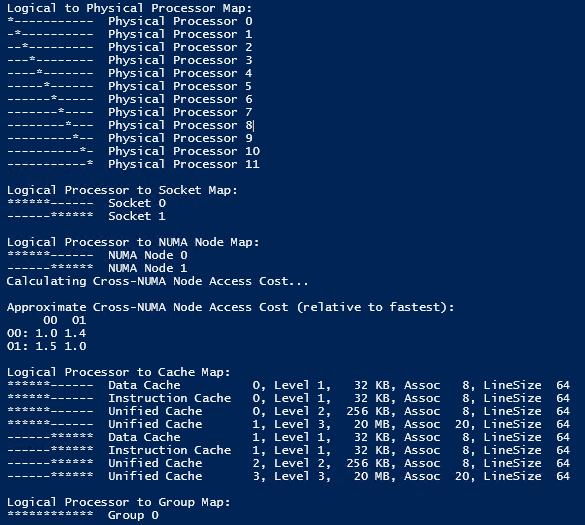
I have only tested this in VMWare, but it seems to work. I have shamelessly stole the main code from here:
#Are we on a NUMA-aware system?  If we are, we will assign NIC's to NUMA specific CPU's.  If not then it's just to the one pool.
    $procInfo = @"
using System;
using System.Diagnostics;
using System.ComponentModel;
using System.Runtime.InteropServices;

namespace Windows
{
    public class Kernel32
    {
        [StructLayout(LayoutKind.Sequential)]
        public struct PROCESSORCORE
        {
            public byte Flags;
        };

        [StructLayout(LayoutKind.Sequential)]
        public struct NUMANODE
        {
            public uint NodeNumber;
        }

        public enum PROCESSOR_CACHE_TYPE
        {
            CacheUnified,
            CacheInstruction,
            CacheData,
            CacheTrace
        }

        [StructLayout(LayoutKind.Sequential)]
        public struct CACHE_DESCRIPTOR
        {
            public byte Level;
            public byte Associativity;
            public ushort LineSize;
            public uint Size;
            public PROCESSOR_CACHE_TYPE Type;
        }

        [StructLayout(LayoutKind.Explicit)]
        public struct SYSTEM_LOGICAL_PROCESSOR_INFORMATION_UNION
        {
            [FieldOffset(0)]
            public PROCESSORCORE ProcessorCore;
            [FieldOffset(0)]
            public NUMANODE NumaNode;
            [FieldOffset(0)]
            public CACHE_DESCRIPTOR Cache;
            [FieldOffset(0)]
            private UInt64 Reserved1;
            [FieldOffset(8)]
            private UInt64 Reserved2;
        }

        public enum LOGICAL_PROCESSOR_RELATIONSHIP
        {
            RelationProcessorCore,
            RelationNumaNode,
            RelationCache,
            RelationProcessorPackage,
            RelationGroup,
            RelationAll = 0xffff
        }

        public struct SYSTEM_LOGICAL_PROCESSOR_INFORMATION
        {
            public UIntPtr ProcessorMask;
            public LOGICAL_PROCESSOR_RELATIONSHIP Relationship;
            public SYSTEM_LOGICAL_PROCESSOR_INFORMATION_UNION ProcessorInformation;
        }

        [DllImport(@"kernel32.dll", SetLastError=true)]
        public static extern bool GetLogicalProcessorInformation(
            IntPtr Buffer,
            ref uint ReturnLength
        );

        private const int ERROR_INSUFFICIENT_BUFFER = 122;

        public static SYSTEM_LOGICAL_PROCESSOR_INFORMATION[] MyGetLogicalProcessorInformation()
        {
            uint ReturnLength = 0;
            GetLogicalProcessorInformation(IntPtr.Zero, ref ReturnLength);
            if (Marshal.GetLastWin32Error() == ERROR_INSUFFICIENT_BUFFER)
            {
                IntPtr Ptr = Marshal.AllocHGlobal((int)ReturnLength);
                try
                {
                    if (GetLogicalProcessorInformation(Ptr, ref ReturnLength))
                    {
                        int size = Marshal.SizeOf(typeof(SYSTEM_LOGICAL_PROCESSOR_INFORMATION));
                        int len = (int)ReturnLength / size;
                        SYSTEM_LOGICAL_PROCESSOR_INFORMATION[] Buffer = new SYSTEM_LOGICAL_PROCESSOR_INFORMATION[len];
                        IntPtr Item = Ptr;
                        for (int i = 0; i < len; i++)
                        {
                            Buffer[i] = (SYSTEM_LOGICAL_PROCESSOR_INFORMATION)Marshal.PtrToStructure(Item, typeof(SYSTEM_LOGICAL_PROCESSOR_INFORMATION));
                            Item += size;
                        }
                        return Buffer;
                    }
                }
                finally
                {
                    Marshal.FreeHGlobal(Ptr);
                }
            }
            return null;
        }
    }
}
"@
        $cp = New-Object CodeDom.Compiler.CompilerParameters
	    $cp.CompilerOptions = "/unsafe"
	    $cp.WarningLevel = 4
	    $cp.TreatWarningsAsErrors = $false
        $cp.ReferencedAssemblies.Add("System.dll")

        Add-Type -TypeDefinition $procInfo -CompilerParameters $cp

        $NumaNode = [Windows.Kernel32]::MyGetLogicalProcessorInformation()
        $numberOfNumaNodes = ($NumaNode | where {$_.Relationship -eq "RelationNumaNode"}).count

        if ($numberOfNumaNodes -ge 2) {
            #NUMA detected
            $NUMA = $true
I was going to use this to detect NUMA and configure a network adapter RSS based upon NUMA configuration… But I’m getting lazy and am going to ignore it. But I don’t want this code to go away. So here it is. A way to detect if you are on a NUMA system in a guest VM in Powershell.
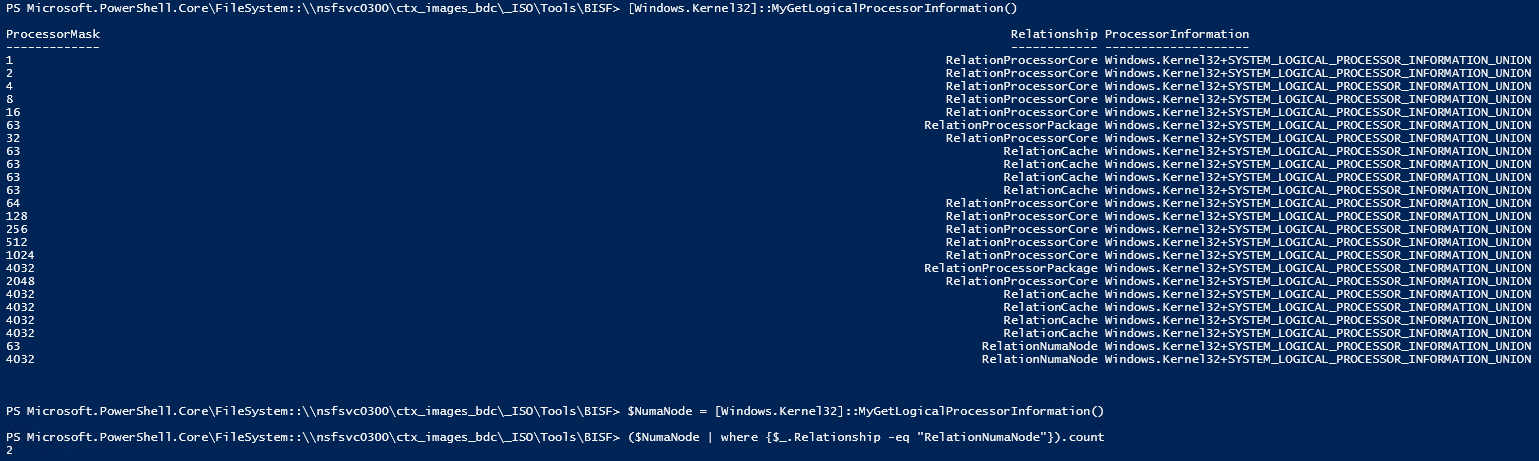
If you have greater than “1” for the NumaNode count then NUMA is present.
CoreInfo.exe result on the same system: