I’ve used the Web Capacity Analysis Tool (WCAT) in the past to measure the performance of Citrix Web Interface with some success. So I thought this tool would be perfect for load testing Storefront. I loaded up Fiddler, set up the WCAT extension, captured a web logon and then application launch. The whole process looked like this:
Pretty simple right?
I logged on with Domain Passthrough authentication, I clicked on an application and I was done. I have my customizations added in as well. But what is actually happening? How long does each step of the actual process take? To determine this answer, we go to Fiddler to capture our flow so we can examine each step.
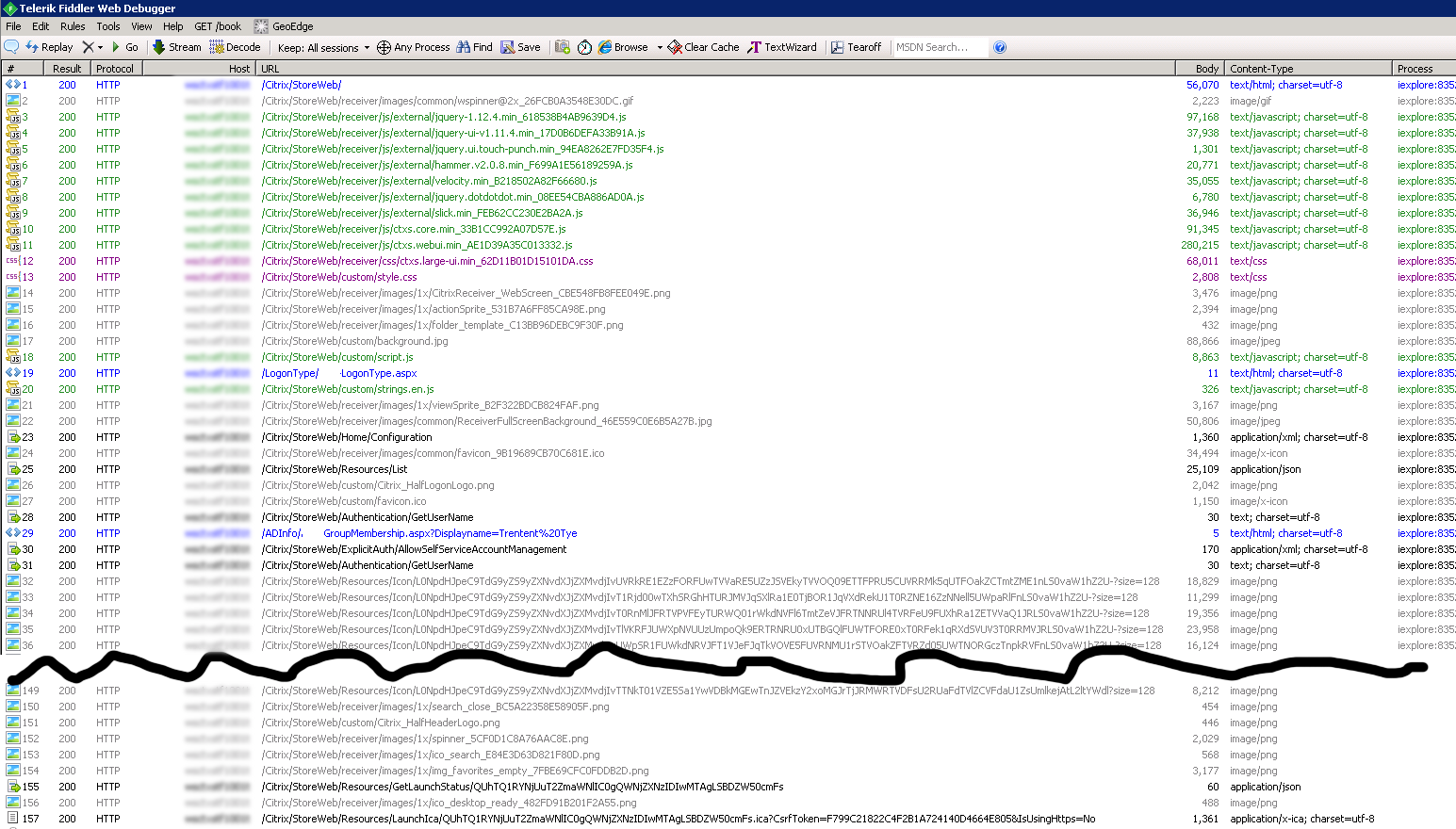
I truncated all the icon resource calling. You can see it calls around 120 individual icon URLs. I have my two custom ‘helpers’ (ADInfo and LogonType) that determine logon preference and whether we should get workspace control enabled or disabled (LogonType.aspx and GroupMembership.aspx).
So the actual calls to Storefront revolve around 7 unique queries to the Storefront server. They are:
/Home/Configuration
/Resources/List
/Authentication/GetUserName
/ExplicitAuth/AllowSelfServiceAccountManagement
/Authentication/GetUserName
/Resources/GetLaunchStatus/<string>
/Resources/LaunchIca/<string
Fortunately, Citrix has documented how these need to be configured to successfully call these services.
With all this setup, I took my scenario file and executed it. Nothing appeared to happen. I broke down the scenario file into the individual calls and found where it was breaking. This Citrix documentation explains it nicely:
Cross-site request forgery token
To protect against cross-site request forgery (CSRF) attacks, the Web Proxy APIs require that a CSRF token be supplied by the client, unless specified otherwise. This is a random string generated by the Web Proxy for the duration of the session and communicated to the client using a session cookie. Clients must read the value of this cookie and send it back to the Web Proxy in most API calls, as either the value of a header named Csrf-Token (note the hyphen) for POST requests, or as the value of a query string parameter named CsrfToken for GET requests.
The part in bold and underlined, is troublesome with WCAT. WCAT does not appear to have this ability (read the value of a cookie and set a header to send it back to the web proxy). What Storefront does, is send back a set-cookie back to the client which WCAT has no problem with… but the data Storefront sends back is multiple values within that set-cookie command. And this is a problem.

This is supposed to take this ‘Set-Cookie’ command and set two different values:
| Cookie | Value |
| CsrfToken | FE2148E03989CB263CCD82A5888BF039 |
| path | /Citrix/StoreWeb/ |
But what WCAT does is create a single cookie that looks like this:
| Cookie | Value |
| cookie | CsrfToken=FE2148E03989CB263CCD82A5888BF039; path=/Citrix/StoreWeb/; |
WCAT creates a cookie with the entirety of a string value instead of separating them out. Is there a way to parse this Set-Cookie command so that these are stored correctly?
Unfortunately, I was not able to find a way to do this with WCAT.
However, we can use Powershell to accomplish this job. Ryan Butler has created a script to query the Storefront services to generate an ICA file. This script is about 90% of what I need, however I’m not interested in doing an explicit logon, I want to do Domain Passthrough (integrateWindows) authentication, and I want to simulate the process as was captured by Fiddler, so I’ll be calling the additional services (GetUserName, AllowSelfServiceAccountManagement, etc.) and capture the time required for each section.
My Storefront Logon/Stress testing script:
<#
.SYNOPSIS
   This script is a modification from Ryan Butler's get-ICAFile_v3_auth.ps1 file from here:
   https://github.com/ryancbutler/StorefrontICACreator/blob/master/get-ICAfile_v3_auth.ps1

   This script will execute an entire Citrix Storefront logon and application launch process.
   This script should be run in a loop for continous stress testing.
   Author: Trentent Tye
   Version: 2017.05.23
DESCRIPTION
   A Powershell v5 Script that utilizes invoke-webrequest to connect to a Citrix Storefront server and go through the logon and launch process
.PARAMETER store
   Storefront URL -- eg http://bottheory.local/Citrix/StoreWeb/
.PARAMETER loop
   Run this script forever or once
.PARAMETER stressComponent
   Loop the calls to StoreFront for one of the components.  The list of components available to stress:
   "Get Auth Methods"
   "Domain Pass-Through and Smart Card Authentication"
   "Resource Enumeration"
   "Get User Name - 1"
   "AllowSelfServiceAccountManagement"
   "Get User Name - 2"
   "ICA Launch.GetLaunchStatus"
   "ICA Launch.LaunchIca"
.EXAMPLE
   ./Stress_Storefront.ps1 -store "http://bottheory.local/Citrix/StoreWeb/" -loop $false
   ./Stress_Storefront.ps1 -store "http://storefront2.bottheory.local/Citrix/StoreWeb/" -loop $true
   ./Stress_Storefront.ps1 -store "http://storefront2.bottheory.local/Citrix/StoreWeb/" -stressComponent "Domain Pass-Through and Smart Card Authentication"

#>
Param
(
    [string]$store,
    [bool]$loop = $true,
    [string]$stressComponent

)

#if $loop == true then this will run forever
while ($loop) {

    #use a default store if not specified in the command line
    if (-not($store)) {
        $store = "http://storefront2.bottheory.local/Citrix/StoreWeb/"
    }

    #perf enhancement - disable invoke-webrequest progress bar
    $ProgressPreference = 'SilentlyContinue'

    #are we using http or https?  This is need for the X-Citrix-IsUsingHTTPS cookie.
    $httpOrhttps = $store.split(":")
    if ($httpOrhttps[0] -eq "https") {
        $httpOrhttps = "Yes"
    } else {
        $httpOrhttps = "No"
    }

    $StartMs = Get-Date

    #properties for stats to export to CSV
    $prop = New-Object System.Object
    $prop  | Add-Member -type NoteProperty -name "Runtime" -value $StartMs


    write-host  -ForegroundColor Yellow "Connecting to $store"
    $stage = "Initial Connection"
    #First connection to root of site
    $headers = @{
        "Accept"='application/xml, text/xml, */*; q=0.01';
        "Content-Length"="0";
        "X-Citrix-IsUsingHTTPS"="$httpOrhttps";
    }
    $duration = measure-command {Invoke-WebRequest -Uri $store -Method GET -Headers $headers -SessionVariable SFSession -UseBasicParsing} -ErrorAction Stop
    $prop  | Add-Member -type NoteProperty -name "$stage" -value $duration.TotalSeconds


    <#
    https://citrix.github.io/storefront-sdk/requests/#client-configuration
    Client Configuration
    #>
    $stage = "Client Configuration"
    write-host  -ForegroundColor Yellow "$stage"
    $headers = @{
    "Accept"='application/xml, text/xml, */*; q=0.01';
    "Content-Length"="0";
    "X-Requested-With"="XMLHttpRequest";
    "X-Citrix-IsUsingHTTPS"="$httpOrhttps";
    "Referer"=$store;
    }
    $duration = measure-command {Invoke-WebRequest -Uri ($store + "Home/Configuration") -Method POST -Headers $headers -ContentType "application/x-www-form-urlencoded" -WebSession $sfsession -UseBasicParsing}  -ErrorAction Stop
    $prop  | Add-Member -type NoteProperty -name "$stage" -value $duration.TotalSeconds


    # csrf cookie
    $csrf = $sfsession.cookies.GetCookies($store)|where{$_.name -like "CsrfToken"}
    $cookiedomain = $csrf.Domain


    <#
    https://citrix.github.io/storefront-sdk/requests/#authentication-methods
    Note
    The client must first make a POST request to /Resources/List. Since the user is not yet authenticated, this returns a challenge in the form of a CitrixWebReceiver- Authenticate header with the GetAuthMethods URL in the location field.
    #>
    $stage = "Get Authentication Methods"
    write-host  -ForegroundColor Yellow "$stage"
    $headers = @{
    "Content-Type"='application/x-www-form-urlencoded; charset=UTF-8';
    "Accept"='application/json, text/javascript, */*; q=0.01';
    "X-Citrix-IsUsingHTTPS"="$httpOrhttps";
    "Csrf-Token"=$csrf.value;
    "Referer"=$store;
    "format"='json&resourceDetails=Default';
    }

    $duration = measure-command {Invoke-WebRequest -Uri ($store + "Resources/List") -Method POST -Headers $headers -WebSession $SFSession} -ErrorAction Stop
    $prop  | Add-Member -type NoteProperty -name "$stage" -value $duration.TotalSeconds


    <#
    https://citrix.github.io/storefront-sdk/requests/#example-get-auth-methods
    #>
    $stage = "Get Auth Methods"
    write-host  -ForegroundColor Yellow "$stage"
    #Gets authentication methods
    $headers = @{
    "Accept"='application/xml, text/xml, */*; q=0.01';
    "Content-Length"="0";
    "X-Citrix-IsUsingHTTPS"="$httpOrhttps";
    "Referer"=$store;
    "Csrf-Token"=$csrf.value;
    }
    if ($stressComponent -eq $stage) {
    write-host -ForegroundColor Yellow "Stressing Component $stage"
    write-host -ForegroundColor Yellow "Duration of task:"
        while ($true) {
            (measure-command {Invoke-WebRequest -Uri ($store + "Authentication/GetAuthMethods") -Method POST -Headers $headers -WebSession $sfsession -UseBasicParsing}).TotalSeconds
        }
    } else {
        $duration = measure-command {Invoke-WebRequest -Uri ($store + "Authentication/GetAuthMethods") -Method POST -Headers $headers -WebSession $sfsession -UseBasicParsing} -ErrorAction Stop
        $prop  | Add-Member -type NoteProperty -name "$stage" -value $duration.TotalSeconds
    }


    <#
    https://citrix.github.io/storefront-sdk/requests/#domain-pass-through-and-smart-card-authentication
    Domain Pass-Through and Smart Card Authentication
    #>
    $stage = "Domain Pass-Through and Smart Card Authentication"
    write-host  -ForegroundColor Yellow "$stage"
    #Start Login Process
    $headers = @{
    "Accept"="application/xml, text/xml, */*; q=0.01";
    "Csrf-Token"=$csrf.Value;
    "X-Citrix-IsUsingHTTPS"="$httpOrhttps";
    "Content-Length"="0";
    }

    #Add cookies that would normally prompt
    $cookie = New-Object System.Net.Cookie
    $cookie.Name = "CtxsUserPreferredClient"
    $cookie.Value = "Native"
    $cookie.Domain = $cookiedomain
    $sfsession.Cookies.Add($cookie)

    $cookie = New-Object System.Net.Cookie
    $cookie.Name = "CtxsClientDetectionDone"
    $cookie.Value = "true"
    $cookie.Domain = $cookiedomain
    $sfsession.Cookies.Add($cookie)

    $cookie = New-Object System.Net.Cookie
    $cookie.Name = "CtxsHasUpgradeBeenShown"
    $cookie.Value = "true"
    $cookie.Domain = $cookiedomain
    $sfsession.Cookies.Add($cookie)

    if ($stressComponent -eq $stage) {
    write-host -ForegroundColor Yellow "Stressing Component $stage"
    write-host -ForegroundColor Yellow "Duration of task:"
        while ($true) {
            (measure-command {Invoke-WebRequest -Uri ($store + "DomainPassthroughAuth/Login") -Method POST -Headers $headers -WebSession $SFSession -UseDefaultCredentials -UseBasicParsing}).TotalSeconds
        }
    } else {
        $duration = measure-command {
            $content = Invoke-WebRequest -Uri ($store + "DomainPassthroughAuth/Login") -Method POST -Headers $headers -WebSession $SFSession -UseDefaultCredentials -UseBasicParsing
        } -ErrorAction Stop
        $prop  | Add-Member -type NoteProperty -name "$stage" -value $duration.TotalSeconds
    }


    <#
    https://citrix.github.io/storefront-sdk/how-the-api-works/#cookies
    CtxsAuthId - HttpOnly - Response indicating successful authentication - Protects against session fixation attacks
    #>
    #set CtxsAuthId cookie because we authenticated.
    foreach ($item in $content.Headers.'Set-Cookie'.Split(";")) {
        $values = $item.split("=")
        if ($values[0] -eq "CtxsAuthId") {
        $cookie = New-Object System.Net.Cookie
        $cookie.Name = "$($values[0])"
        $cookie.Value = "$($values[1])"
        $cookie.Domain = $cookiedomain
        $sfsession.Cookies.Add($cookie)
        }
    }


    <#
    https://citrix.github.io/storefront-sdk/requests/#resource-enumeration
    Typically, this request requires an authenticated session, indicated by the cookies ASP.NET_SessionId and CtxsAuthId. However, when the Web Proxy is configured to use an unauthenticated Store, an authenticated session is not required.
    The Web Proxy always performs a fresh enumeration for the user by communicating with the StoreFront Store service to pick up any changes that may have occurred.
    #>
    $stage = "Resource Enumeration"
    write-host  -ForegroundColor Yellow "$stage"
    #Gets resources and required ICA URL
    $headers = @{
    "Content-Type"='application/x-www-form-urlencoded; charset=UTF-8';
    "Accept"='application/json, text/javascript, */*; q=0.01';
    "X-Citrix-IsUsingHTTPS"="$httpOrhttps";
    "Csrf-Token"=$csrf.value;
    "Referer"=$store;
    "X-Requested-With"="XMLHttpRequest";
    }

    $body = @{
    "format"='json';
    "resourceDetails"='Default';
    }

    if ($stressComponent -eq $stage) {
    write-host -ForegroundColor Yellow "Stressing Component $stage"
    write-host -ForegroundColor Yellow "Duration of task:"
        while ($true) {
            (measure-command {Invoke-WebRequest -Uri ($store + "Resources/List") -Method POST -Headers $headers -body $body -WebSession $SFSession -UseBasicParsing}).TotalSeconds
        }
    } else {
        $duration = measure-command {
            $content = Invoke-WebRequest -Uri ($store + "Resources/List") -Method POST -Headers $headers -body $body -WebSession $SFSession -UseBasicParsing
        } -ErrorAction Stop
        $prop  | Add-Member -type NoteProperty -name "$stage" -value $duration.TotalSeconds
    }


    #save the list of applications we got from Storefront
    $resources = $content.content | ConvertFrom-Json
    write-host  -ForegroundColor Yellow "Found $($resources.resources.count) applications"


    <#
    https://citrix.github.io/storefront-sdk/requests/#get-user-name
    Use this request to obtain the full user name, as configured in Active Directory. If the full user name is unavailable, the user's logon name is returned instead.
    This request requires an authenticated session, indicated by the cookies ASP.NET_SessionId and CtxsAuthId. When using an unauthenticated Store, no user has actually logged on and an HTTP 403 response is returned.
    The Web Proxy uses the StoreFront Token Validation service to obtain the user name from the authentication token.
    #>
    $stage = "Get User Name - 1"
    write-host  -ForegroundColor Yellow "$stage"
    #getUserName
    $headers = @{
    "Accept"='text/plain, */*; q=0.01';
    "X-Citrix-IsUsingHTTPS"="$httpOrhttps";
    "Csrf-Token"=$csrf.value;
    "Referer"=$store;
    "X-Requested-With"="XMLHttpRequest";
    }

    if ($stressComponent -eq $stage) {
    write-host -ForegroundColor Yellow "Stressing Component $stage"
    write-host -ForegroundColor Yellow "Duration of task:"
        while ($true) {
            (measure-command {Invoke-WebRequest -Uri ($store + "Authentication/GetUserName") -Method POST -Headers $headers -WebSession $SFSession -UseBasicParsing}).TotalSeconds
        }
    } else {
        $duration = measure-command {
            $content = Invoke-WebRequest -Uri ($store + "Authentication/GetUserName") -Method POST -Headers $headers -WebSession $SFSession -UseBasicParsing
        } -ErrorAction Stop
        $prop  | Add-Member -type NoteProperty -name "$stage" -value $duration.TotalSeconds
    }


    <#
    undocumented?  For password self reset?
    #>
    $stage = "AllowSelfServiceAccountManagement"
    write-host  -ForegroundColor Yellow "$stage"
    #AllowSelfServiceAccountManagement?
    $headers = @{
    "Accept"='text/plain, */*; q=0.01';
    "X-Citrix-IsUsingHTTPS"="$httpOrhttps";
    "Csrf-Token"=$csrf.value;
    "Referer"=$store;
    "X-Requested-With"="XMLHttpRequest";
    }

    if ($stressComponent -eq $stage) {
    write-host -ForegroundColor Yellow "Stressing Component $stage"
    write-host -ForegroundColor Yellow "Duration of task:"
        while ($true) {
            (measure-command {Invoke-WebRequest -Uri ($store + "ExplicitAuth/AllowSelfServiceAccountManagement") -Method POST -Headers $headers -WebSession $SFSession -UseBasicParsing}).TotalSeconds
        }
    } else {
        $duration = measure-command {
            $content = Invoke-WebRequest -Uri ($store + "ExplicitAuth/AllowSelfServiceAccountManagement") -Method POST -Headers $headers -WebSession $SFSession -UseBasicParsing
        } -ErrorAction Stop
        $prop  | Add-Member -type NoteProperty -name "$stage" -value $duration.TotalSeconds
    }


    <#
    https://citrix.github.io/storefront-sdk/requests/#get-user-name
    Use this request to obtain the full user name, as configured in Active Directory. If the full user name is unavailable, the user's logon name is returned instead.
    This request requires an authenticated session, indicated by the cookies ASP.NET_SessionId and CtxsAuthId. When using an unauthenticated Store, no user has actually logged on and an HTTP 403 response is returned.
    The Web Proxy uses the StoreFront Token Validation service to obtain the user name from the authentication token.
    #>
    $stage = "Get User Name - 2"
    write-host  -ForegroundColor Yellow "$stage"
    $headers = @{
    "Accept"='text/plain, */*; q=0.01';
    "X-Citrix-IsUsingHTTPS"="$httpOrhttps";
    "Csrf-Token"=$csrf.value;
    "Referer"=$store;
    "X-Requested-With"="XMLHttpRequest";
    }

    if ($stressComponent -eq $stage) {
    write-host -ForegroundColor Yellow "Stressing Component $stage"
    write-host -ForegroundColor Yellow "Duration of task:"
        while ($true) {
            (measure-command {Invoke-WebRequest -Uri ($store + "Authentication/GetUserName") -Method POST -Headers $headers -WebSession $SFSession -UseBasicParsing}).TotalSeconds
        }
    } else {
        $duration = measure-command {
            $content = Invoke-WebRequest -Uri ($store + "Authentication/GetUserName") -Method POST -Headers $headers -WebSession $SFSession -UseBasicParsing
        } -ErrorAction Stop
        $prop  | Add-Member -type NoteProperty -name "$stage" -value $duration.TotalSeconds
    }


    #Download all the icons
    $stage = "Download all the icons"
    write-host  -ForegroundColor Yellow "$stage"
    $duration = measure-command {
        foreach ($iconurl in $resources.resources.iconurl) {
            Invoke-WebRequest -Uri ($store + $iconurl) -Method GET -Headers $headers -WebSession $SFSession -UseBasicParsing
        }
    } -ErrorAction Stop
    $prop  | Add-Member -type NoteProperty -name "$stage" -value $duration.TotalSeconds


    <#
    https://citrix.github.io/storefront-sdk/requests/#ica-launch
    LaunchIca is a GET instead of a POST.
    /Resources/ GetLaunchStatus/{id}	POST	Request whether the specified resource is ready to launch or not.
    /Resources/LaunchIca/{id}	GET	Request an ICA file for launching the specified resource.
    #>
    $stage = "ICA Launch"
    write-host  -ForegroundColor Yellow "$stage"


    #launch application
    $stage = "ICA Launch.GetLaunchStatus"

    if ($stressComponent -eq $stage) {
        write-host -ForegroundColor Yellow "Stressing Component $stage"
        write-host -ForegroundColor Yellow "Duration of task:"
        while ($true) {
            #Randomly select an application to launch like a random set of users
            $appToLaunch = $resources.resources[(Get-Random -Minimum 0 -Maximum ($resources.resources.count))]
            write-host  -ForegroundColor Yellow "GetLaunchStatus for application: $($appToLaunch.name)"
            (measure-command {Invoke-WebRequest -Uri ($store + $appToLaunch.launchstatusurl) -Method POST -Headers $headers -body $body -WebSession $SFSession -UseBasicParsing}).TotalSeconds
        }
    } else {
        #Randomly select an application to launch like a random set of users
        $appToLaunch = $resources.resources[(Get-Random -Minimum 0 -Maximum ($resources.resources.count))]
        write-host  -ForegroundColor Yellow "Launching application: $($appToLaunch.name)"
        $duration = measure-command {
            Invoke-WebRequest -Uri ($store + $appToLaunch.launchstatusurl) -Method POST -Headers $headers -body $body -WebSession $SFSession -UseBasicParsing
        } -ErrorAction stop
        $prop  | Add-Member -type NoteProperty -name "$stage" -value $duration.TotalSeconds
    }

    $stage = "ICA Launch.LaunchIca"
    if ($stressComponent -eq $stage) {
        write-host -ForegroundColor Yellow "Stressing Component $stage"
        write-host -ForegroundColor Yellow "Duration of task:"
        while ($true) {
            (measure-command {Invoke-WebRequest -Uri ($store + $appToLaunch.launchurl) -Method GET -Headers $headers -WebSession $SFSession -UseBasicParsing}).TotalSeconds
        }
    } else {
        $duration = measure-command {
            Invoke-WebRequest -Uri ($store + $appToLaunch.launchurl) -Method GET -Headers $headers -WebSession $SFSession -UseBasicParsing
        }
        $prop  | Add-Member -type NoteProperty -name "$stage" -value $duration.TotalSeconds
    }


    <#
    Export information to CSV
    #>
    $EndMs = Get-Date
    write-host "Loop took $($EndMs - $StartMs)"
    $prop  | Add-Member -type NoteProperty -name "Total Runtime" -value $($EndMs - $StartMs)
    $prop  | export-csv StressStorefront.csv -NoTypeInformation -Append
And this is the output:
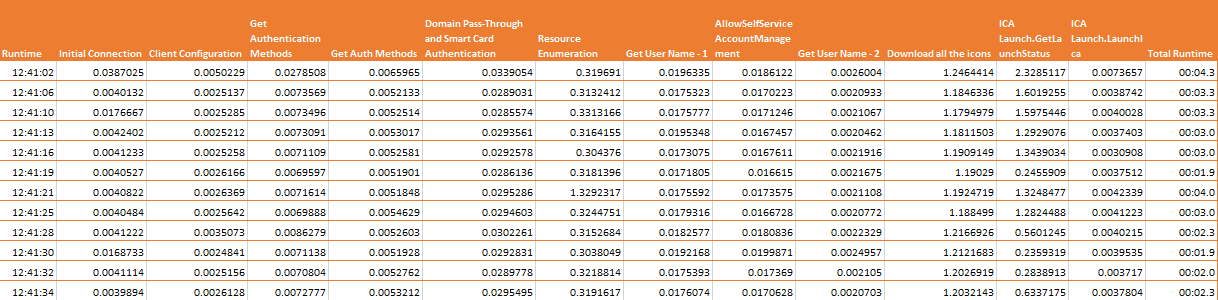
We can now run this script concurrently to simulate multiple clients. Or we could run it with a command like so:
powershell.exe -executionpolicy bypass -file "Stress_StoreFront.ps1" -stressComponent "Get Auth Methods
To stress an individual component. By stressing the individual component we can actually determine which process on the Storefront server deals with which service. So which components equals which service?
Get Auth Methods:

This component stresses “Citrix Receiver for Web”
Domain Pass-Through and Smart Card Authentication:

This component stresses “Citrix Receiver for Web” and “Citrix Delivery Services Authentication”
Resource Enumeration:

This component stresses “Citrix Receiver for Web” and “Citrix Delivery Services Resources”
Get User Name:

This component stresses “Citrix Receiver for Web”
AllowSelfServiceAccountManagement:

This component stresses “Citrix Receiver for Web” and “Citrix Delivery Services Authentication”
“GetLaunchStatus”

This component stresses “Citrix Delivery Services Resources”
LaunchIca
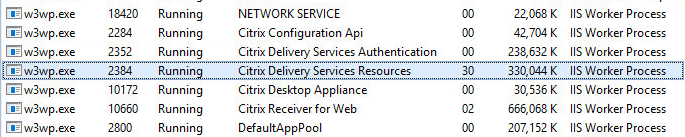
This component stresses “Citrix Delivery Services Resources”
Now that we have this script and we can see the where individual components cause stress, we can begin to push our Storefront server to find its limits and how the different configurations are impacted. I’ll write up my findings on the limits of Storefront next.