In my previous post, I was exploring taking URI parameters and passing them to an application.
The main issue we are facing is that Storefront launches the ica file via an iframe src. When launching the ica via this method the iframe does a simple ‘GET’ without passing any HEADER parameters - which is the only (documented) way to pass data to Storefront.
What can I do? I think what I need to do is create my own *custom* launchica command. Because this will be against an unauthenticated store we should be able remove the authentication portions AND any unique identifiers (eg, csrf data). Really, we just need the two options - the application to launch and the parameter to pass into it. I am NOT a web developer, I do not know what would be the best solution to this problem, but here is something I came up with.
My first thought is this needs to be a URL that must be queried and that URL must return a specific content-type. I know Powershell has lots of control over specifying things like this and I have some familiarity with Powershell so I’ve chosen that as my tool of choice to solve this problem.
In order to start I need to create or find something that will get data from a URL to powershell. Fortunately, a brilliant person by the name of Steve Lee solved this first problem for me.
What he created is a Powershell module that creates a HTTP listener than waits for a request. We can take this listener and modify it so it listens for our two variables (CTX_Application and NFuseAppCommandLine) and then returns a ICA file. Since this is an unauthenticated URL I had to remove the authentication feature of the script and I added a function to query the real Storefront services to generate the ICA file.
So what I’m envisioning is replacing the “LaunchIca” command with my custom one.
This is my modification of Steve’s script:
# Copyright (c) 2014 Microsoft Corp.
#
# Permission is hereby granted, free of charge, to any person obtaining a copy
# of this software and associated documentation files (the "Software"), to deal
# in the Software without restriction, including without limitation the rights
# to use, copy, modify, merge, publish, distribute, sublicense, and/or sell
# copies of the Software, and to permit persons to whom the Software is
# furnished to do so, subject to the following conditions:
#
# The above copyright notice and this permission notice shall be included in
# all copies or substantial portions of the Software.
#
# THE SOFTWARE IS PROVIDED "AS IS", WITHOUT WARRANTY OF ANY KIND, EXPRESS OR
# IMPLIED, INCLUDING BUT NOT LIMITED TO THE WARRANTIES OF MERCHANTABILITY,
# FITNESS FOR A PARTICULAR PURPOSE AND NONINFRINGEMENT. IN NO EVENT SHALL THE
# AUTHORS OR COPYRIGHT HOLDERS BE LIABLE FOR ANY CLAIM, DAMAGES OR OTHER
# LIABILITY, WHETHER IN AN ACTION OF CONTRACT, TORT OR OTHERWISE, ARISING FROM,
# OUT OF OR IN CONNECTION WITH THE SOFTWARE OR THE USE OR OTHER DEALINGS IN
# THE SOFTWARE.
#
# Modified by Trentent Tye for ICA file returning.

Function ConvertTo-HashTable {
    <#
    .Synopsis
        Convert an object to a HashTable
    .Description
        Convert an object to a HashTable excluding certain types.  For example, ListDictionaryInternal doesn't support serialization therefore
        can't be converted to JSON.
    .Parameter InputObject
        Object to convert
    .Parameter ExcludeTypeName
        Array of types to skip adding to resulting HashTable.  Default is to skip ListDictionaryInternal and Object arrays.
    .Parameter MaxDepth
        Maximum depth of embedded objects to convert.  Default is 4.
    .Example
        $bios = get-ciminstance win32_bios
        $bios | ConvertTo-HashTable
    #>

    Param (
        [Parameter(Mandatory=$true,ValueFromPipeline=$true)]
        [Object]$InputObject,
        [string[]]$ExcludeTypeName = @("ListDictionaryInternal","Object[]"),
        [ValidateRange(1,10)][Int]$MaxDepth = 4
    )

    Process {

        Write-Verbose "Converting to hashtable $($InputObject.GetType())"
        #$propNames = Get-Member -MemberType Properties -InputObject $InputObject | Select-Object -ExpandProperty Name
        $propNames = $InputObject.psobject.Properties | Select-Object -ExpandProperty Name
        $hash = @{}
        $propNames | % {
            if ($InputObject.$_ -ne $null) {
                if ($InputObject.$_ -is [string] -or (Get-Member -MemberType Properties -InputObject ($InputObject.$_) ).Count -eq 0) {
                    $hash.Add($_,$InputObject.$_)
                } else {
                    if ($InputObject.$_.GetType().Name -in $ExcludeTypeName) {
                        Write-Verbose "Skipped $_"
                    } elseif ($MaxDepth -gt 1) {
                        $hash.Add($_,(ConvertTo-HashTable -InputObject $InputObject.$_ -MaxDepth ($MaxDepth - 1)))
                    }
                }
            }
        }
        $hash
    }
}

Function Get-ICA {
    <#
    .Synopsis
        Queries An Anonymous Store for an ICA file and sets the LongCommand in the ICA with a URI parameter
    .Description
        This function will take 3 parameters, the store, the program and the additional parameters to pass to the program.
        It will then query and pull the required ICA file then make the substitution and return the result as TEXT.
        You may need to convert the result to application/ica.
    .Parameter Store
        URL to the store.  eg, "https://storefront.mydomain.local/Citrix/unauthWeb/"
    .Parameter Program
        The name of the program to launch.  eg, "Notepad 2016 - PLB"
    .Parameter LongCommand
        The extra command string to pass to the program.  Eg, "C:\Windows\WindowsUpdate.Log"
    .Example
        Get-ICA -Store "http://$env:COMPUTERNAME/Citrix/PLBWeb/" -Program "Notepad 2016 - PLB" -LongCommand "C:\Windows\WindowsUpdate.Log"
    #>
    Param (
    [Parameter()]
    [String] $Store = "",

    [Parameter()]
    [String] $Program = "",

    [Parameter()]
    [String] $LongCommand = ""
    )

    Process {

        Write-Verbose "Get-ICA - Gets required tokens"
        #Gets required tokens
        $headers = @{
        "Accept"='application/xml, text/xml, */*; q=0.01';
        "Content-Length"="0";
        "X-Citrix-IsUsingHTTPS"="Yes";
        "Referer"=$Store;
        }
        $result = Invoke-WebRequest -Uri ($Store + "Home/Configuration") -MaximumRedirection 0 -Method POST -Headers $headers -SessionVariable SFSession|Out-Null

        Write-Verbose "Get-ICA - Gets list of resources for the application"
        $headers = @{
        "Content-Type"='application/x-www-form-urlencoded; charset=UTF-8';
        "Accept"='application/json, text/javascript, */*; q=0.01';
        "X-Citrix-IsUsingHTTPS"= "Yes";
        "Referer"=$Store;
        "format"='json&resourceDetails=Default';
        }
        $content = Invoke-WebRequest -Uri ($Store + "Resources/List") -MaximumRedirection 0 -Method POST -Headers $headers -SessionVariable SFSession

        #Creates ICA file
        $resources = $content.content | convertfrom-json
        $resourceurl = $resources.resources | where{$_.name -like $Program}

        if ($resourceurl.count)
        {
            write-host "MULTIPLE APPS FOUND for $Program.  Check APP NAME!" -ForegroundColor Red
            $resourceurl|select id,name
        }
        else
        {
            Write-Verbose "Get-ICA - Getting ICA file"
            $icafile = Invoke-WebRequest -Uri ($Store + $resourceurl.launchurl) -MaximumRedirection 0 -Method GET -Headers $headers  -SessionVariable SFSession
            $icafile = $icafile.ToString()
            Write-Verbose "Get-ICA - adding LongCommand"
            $icafile = $icafile -replace "LongCommandLine=", "LongCommandLine=$LongCommand"
        }
        $icafile
    }
}

Function Start-HTTPListener {
    <#
    .Synopsis
        Creates a new HTTP Listener accepting PowerShell command line to execute
    .Description
        Creates a new HTTP Listener enabling a remote client to execute PowerShell command lines using a simple REST API.
        This function requires running from an elevated administrator prompt to open a port.

        Use Ctrl-C to stop the listener.  You'll need to send another web request to allow the listener to stop since
        it will be blocked waiting for a request.
    .Parameter Port
        Port to listen, default is 8888
    .Parameter URL
        URL to listen, default is /
    .Parameter Auth
        Authentication Schemes to use, default is IntegratedWindowsAuthentication
    .Example
        Start-HTTPListener -Port 80 -Url "Citrix/PLBWeb/ica_launcher" -Auth Anonymous
        Invoke-WebRequest -Uri "http://localhost/Citrix/PLBWeb/ica_launcher?CTX_Application=Notepad%202016%20-%20PLB&NFuse_AppCommandLine=C:\Windows\WindowsUpdate.log" -UseDefaultCredentials | Format-List *
    #>

    Param (
        [Parameter()]
        [Int] $Port = 8888,

        [Parameter()]
        [String] $Url = "",

        [Parameter()]
        [System.Net.AuthenticationSchemes] $Auth = [System.Net.AuthenticationSchemes]::IntegratedWindowsAuthentication
        )

    Process {
        $ErrorActionPreference = "Stop"

        $CurrentPrincipal = New-Object Security.Principal.WindowsPrincipal( [Security.Principal.WindowsIdentity]::GetCurrent())
        if ( -not ($currentPrincipal.IsInRole( [Security.Principal.WindowsBuiltInRole]::Administrator ))) {
            Write-Error "This script must be executed from an elevated PowerShell session" -ErrorAction Stop
        }

        if ($Url.Length -gt 0 -and -not $Url.EndsWith('/')) {
            $Url += "/"
        }

        $listener = New-Object System.Net.HttpListener
        $prefix = "http://*:$Port/$Url"
        $listener.Prefixes.Add($prefix)
        $listener.AuthenticationSchemes = $Auth
        try {
            $listener.Start()
            while ($true) {
                $statusCode = 200
                Write-Warning "Note that thread is blocked waiting for a request.  After using Ctrl-C to stop listening, you need to send a valid HTTP request to stop the listener cleanly."
                Write-Warning "Sending 'exit' command will cause listener to stop immediately"
                Write-Verbose "Listening on $port..."
                $context = $listener.GetContext()
                $request = $context.Request
                Write-Verbose "Request = $($request.QueryString)"


                if (-not $request.QueryString.HasKeys()) {
                    $commandOutput = "SYNTAX: command=<string> format=[JSON|TEXT|XML|NONE|CLIXML]"
                    $Format = "TEXT"
                } else {

                    #change command to parameters...
                    $CTX_Application = $request.QueryString.Item("CTX_Application")
                    $NFuse_AppCommandLine = $request.QueryString.Item("NFuse_AppCommandLine")

                    #uncomment next portion to allow remote exit of the listener
                    <#
                    if ($CTX_Application -eq "exit") {
                        Write-Verbose "Received command to exit listener"
                        return
                    }
                    #>

                    $Format = $request.QueryString.Item("format")
                    if ($Format -eq $Null) {
                        $Format = "JSON"
                    }

                    Write-Verbose "Application = $CTX_Application"
                    Write-Verbose "NFuse_AppCommandLine = $NFuse_AppCommandLine"
                    Write-Verbose "Format = $Format"


                    Write-Verbose "Executing Command"
                    ## execute command here...  --> ensure you change "PLBWeb" to your proper store
                    $script = get-ica -store "http://$env:COMPUTERNAME/Citrix/PLBWeb/" -Program "$CTX_Application" -LongCommand $NFuse_AppCommandLine
                    write-verbose "are we back yet?"

                    $commandOutput = $script.ToString()


                }


            Write-Verbose "Response:"
            if (!$script) {
                $script = [string]::Empty
            }
            Write-Verbose $script

            $response = $context.Response
            $response.StatusCode = $statusCode
            $response.ContentType = "application/x-ica; charset=utf-8"
            $buffer = [System.Text.Encoding]::UTF8.GetBytes($script)

            $response.ContentLength64 = $buffer.Length
            $output = $response.OutputStream
            $output.Write($buffer,0,$buffer.Length)
            $output.Close()
            }
        } finally {
            $listener.Stop()
        }
    }
And the command to start the HTTP listener:
ipmo "C:\swinst\HttpListener_1.0.1\HttpListener\HTTPListener.psm1"
#Example URL
#http://bottheory.local/Citrix/PLBWeb/ica_launcher?CTX_Application=Notepad%202016%20-%20PLB&NFuse_AppCommandLine=C:\Windows\WindowsUpdate.log
Start-HTTPListener -Port 80 -Url "Citrix/PLBWeb/ica_launcher" -Auth Anonymou
Eventually, this will need to be converted to a scheduled task or a service. When running the listener manually, it looks like this:

I originally planned to use the ‘WebAPI’ and create a custom StoreFront, but I really, really want to use the new Storefront UI. In addition, I do NOT want to have to copy a file around to each Storefront server to enable this feature. So I started to wonder if it would be possible to modify Storefront via the extensible customization API’s it provides. This involves adding javascript to the “C:\inetpub\wwwroot\Citrix\StoreWeb\custom\script.js” and modifying the “C:\inetpub\wwwroot\Citrix\StoreWeb\custom\style.css” files. To start, my goal is to mimic our existing functionality and UI to an extent that makes sense.
The Web Interface 5.4 version of this web launcher looked like this:
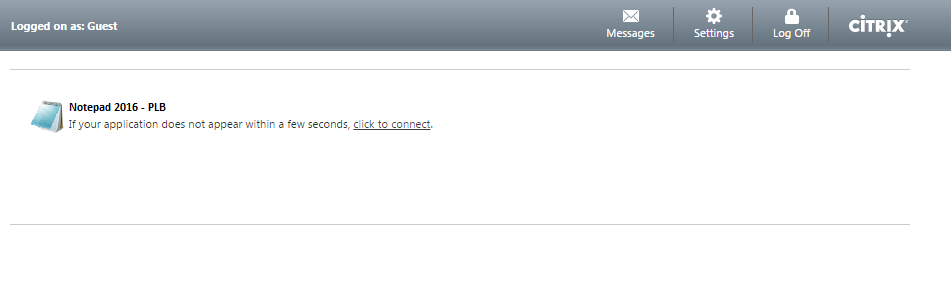
When you browse to the URL in Web Interface 5.4 the application is automatically launched. If it doesn’t launch, “click to connect” will launch it for you manually. This is the function and features I want.
Storefront, without any modifications, looks like this with an authenticated store:
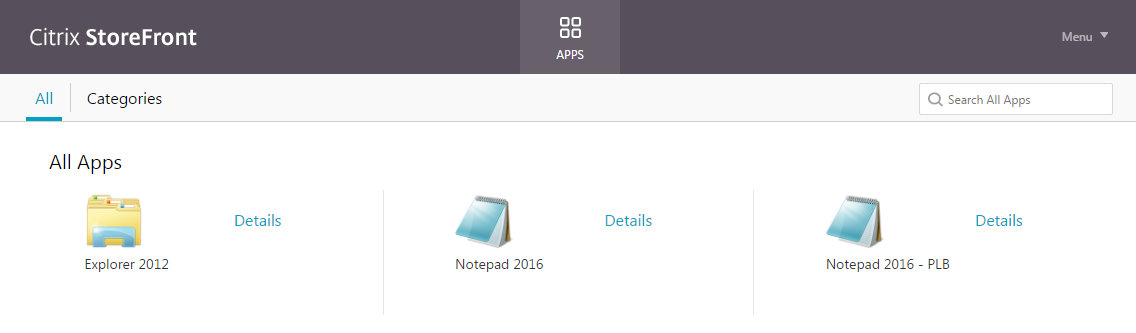
So, I need to make a few modifications.
- I need to hide all applications that are NOT my target application
- I need to add the additional messaging “If your application does not appear within a few seconds, click to connect.” with the underlined as a URL to our launcher.
-
I want to minimize the interface by hiding the toolbar. Since only one application will be displayed we do not need to see “All Categories Search All Apps” - I want to hide the ‘All Apps’ text
- I want to hide “Details”, we’re going to keep this UI minimal.
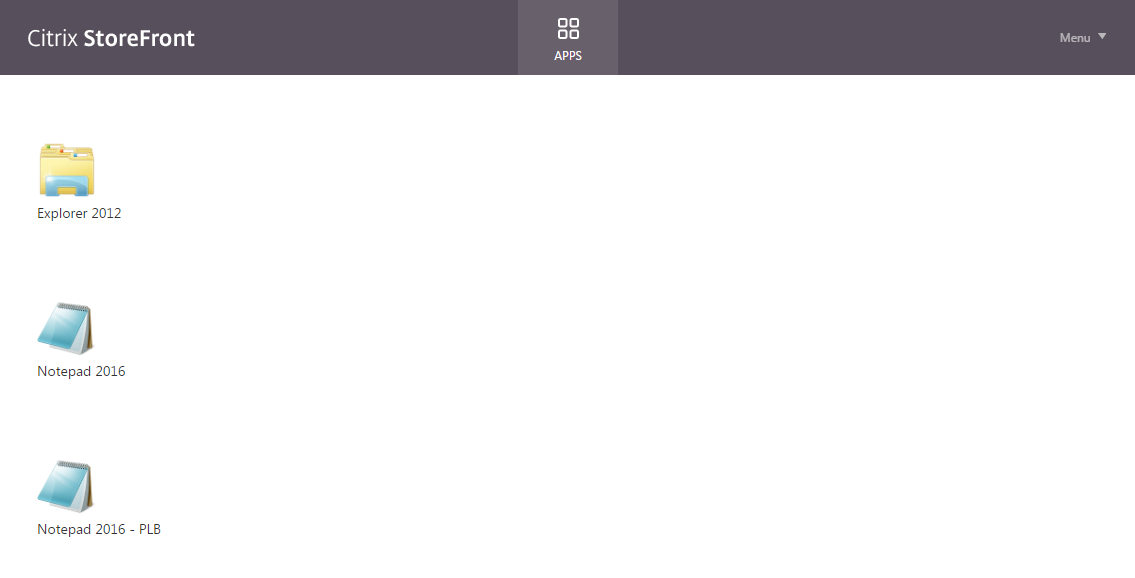
The beauty of Storefront, in its current incarnation, is most of this is CSS modifications. I made the following modifications to the CSS to get my UI minimalized:
/* removes "Apps | Categories    Search apps:" tool bar */
.large .myapps-view .store-toolbar, .large .desktops-view .store-toolbar, .large .tasks-view .store-toolbar, .large .store-view .store-toolbar {
	display : none;
}

/* this is to display a single app, we don't need to be told we're looking at 'All Apps' */
.largeTiles .store-view .store-apps-title {
	display : none;
}

/* hide the 'Details' link */
.largeTiles .storeapp-action-link, .taskapp-action-link {
	display : none;
}

/* stretch the app content to 100% of the width of the window */
.storeapp-list .storeapp, .storeapp-list .folder {
	width : 100%;
}

/* enlarge the app name text field to 100% of the screen width -- this allows our messaging to be read in it's entirety. */
.largeTiles .storeapp-name, .large .ruler-container {
	width : 100%;
}
This resulted in a UI that looked like this:
So now I want to remove all apps except my targeted application that should come in a query string.
I was curious if the ‘script.js’ would recognize the URI parameter passed to Storefront. I modified my ‘script.js’ with the following:
// Edit this file to add your customized JavaScript or load additional JavaScript files.

//grab the URL and parse out the parameters we want (application name, launch parameters)
var getUrlParameter = function getUrlParameter(sParam) {
	var sPageURL = decodeURIComponent(window.location.search.substring(1)),
		sURLVariables = sPageURL.split('&'),
		sParameterName,
		i;

	for (i = 0; i < sURLVariables.length; i++) {
		sParameterName = sURLVariables[i].split('=');

		if (sParameterName[0] === sParam) {
			return sParameterName[1] === undefined ? true : sParameterName[1];
		}
	}
};

var NFuse_AppCommandLine = getUrlParameter('NFuse_AppCommandLine');
var CTX_Application = getUrlParameter('CTX_Application');

console.log("NFuse_AppCommandLine " + NFuse_AppCommandLine);
console.log("CTX_Application " + CTX_Application);
Going to my URL and checking the ‘Console’ in Chrome revealed:
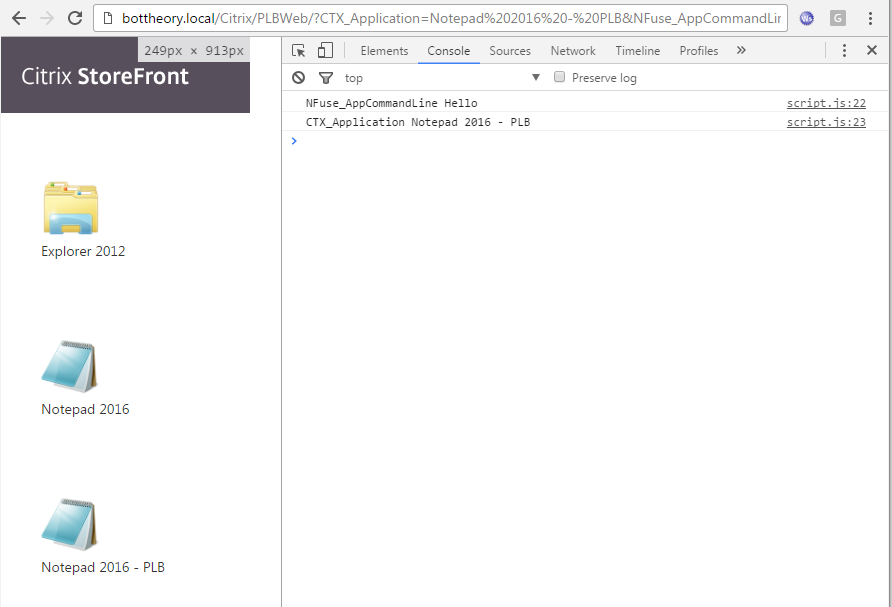
Yes, indeed, we are getting the URI parameters!
Great! So can we filter our application list to only display the app in the URI?
Citrix offers a bunch of ‘extensions’. Can one of them work for our purpose? This one sounds interesting:
excludeApp(app)
Exclude an application completely from all UI, even if it would normally be include
Can we do a simple check that if the application does not equal “CTX_Application” to exclude it?
The function looks like this:
CTXS.Extensions.excludeApp = function(app) {
    // return true or false if we don't match the target app name
	//we only want to show the application name found in the URI
	//if the app name does not equal the URI name then we hide it.
	if (app.name!= CTX_Application) {
		return true;
	}
}
Did it work?
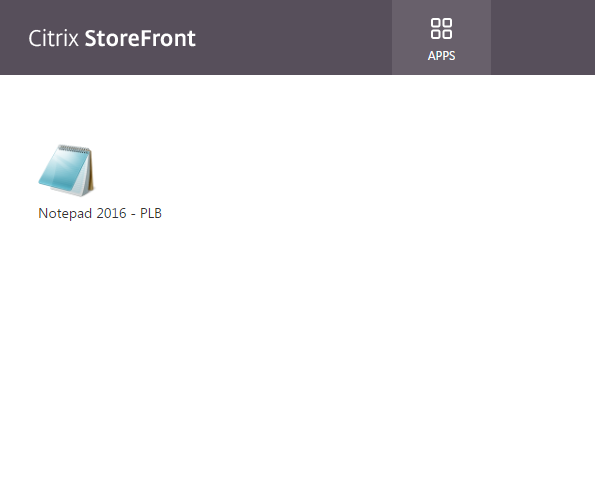
Yes! Perfectly! Can we append a message to the application? Looking at Citrix’s extensions this one looks promising:
onAppHTMLGeneration(element)
Called when HTML is generated for one or more app tile, passing the parent container. Intended for deep customization. (Warning this sort of change is likely to be version specific
Ok. That warning sucks. My whole post is based on StoreFront 3.9 so I cannot guarantee these modifications will work in future versions or previous versions. Your Mileage May Vary.
So what elements could we manipulate to add our text?
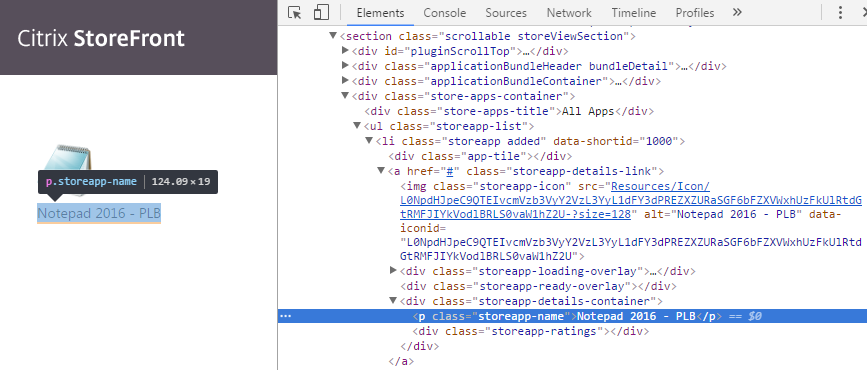
Could we add another “p class=storeapp-name” (this is just text) for our messaging? The onAppHTMLGeneration function says it is returned when the HTML is generated for an app, so what does this look like?
I added the following to script.js:
CTXS.Extensions.onAppHTMLGeneration = function(element) {
	//this function is not guaranteed to work across Storefront versions.  Ensure proper testing is conducted when upgrading.
	//tested on StoreFront 3.9
	console.log(element);
}
And this was the result in the Chrome Console:
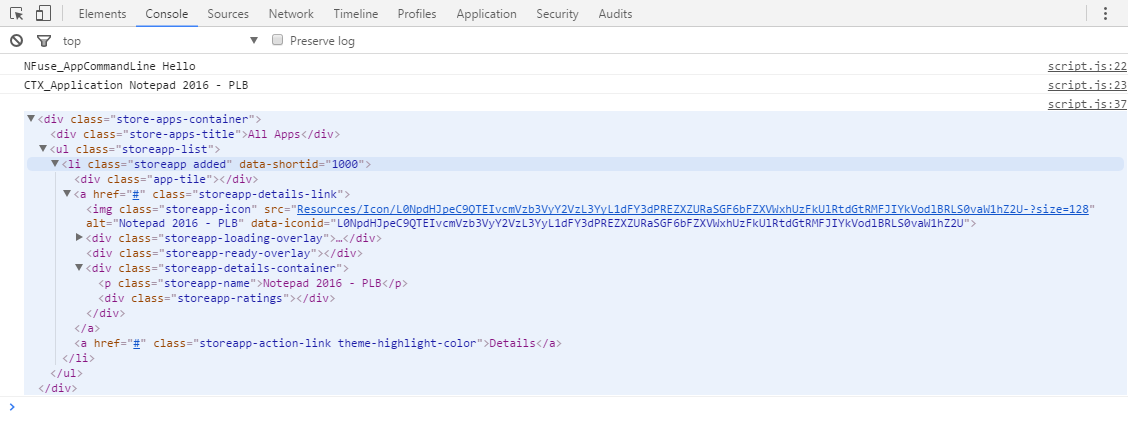
So this is returning an DomHTMLElement. DOMHTMLElements have numerous methods to add/create/append/modify data to them. Perfect. Doing some research (I’m not a web developer) I found that you can modify the content of an element by this style command:
CTXS.Extensions.onAppHTMLGeneration = function(element) {
	//this function is not guaranteed to work across Storefront versions.  Ensure proper testing is conducted when upgrading.
	//tested on StoreFront 3.9
	$( "div.storeapp-details-container" ).append( "whatever text you want here" );
};
This results in the following:
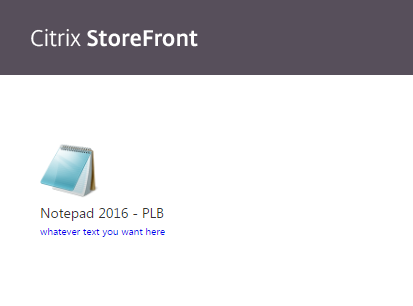
We have text!
Great.
My preference is to have the text match the application name’s format. I also wanted to test if I could add a link to the text. So I modified my css line:
CTXS.Extensions.onAppHTMLGeneration = function(element) {
	//this function is not guaranteed to work across Storefront versions.  Ensure proper testing is conducted when upgrading.
	//tested on StoreFront 3.9
	$( "div.storeapp-details-container" ).append( "<p class=\"storeapp-name\"><br></p>" );
	$( "div.storeapp-details-container" ).append( "<p class=\"storeapp-name\">If your application does not appear within a few seconds, <a href=\"http://www.google.ca\">click to connect</a></p>" );
}
The result?
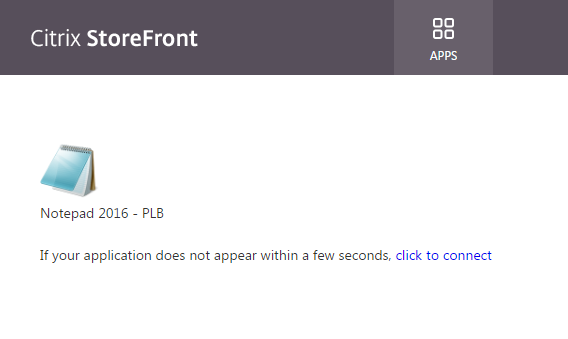
Oh man. This is looking good. My ‘click to connect’ link isn’t working at this point, it just goes to google, but at least I know I can add a URL and have it work! Now I just need to generate a URL and set that to replace ‘click to connect’.
When I made my HTTPListener I purposefully made it with the following:
Start-HTTPListener -Port 80 -Url "Citrix/PLBWeb/ica_launcher" -Auth Anonymou
The reason why I had it set to share the url of the Citrix Store is the launchurl generated by Storefront is:
Resources/LaunchIca/WEQ3Lk5vdGVwYWQgMjAxNiAtIFBMQg--.ic
The full path for the URL is actually:
http://bottheory.local/Citrix/PLBWeb/Resources/LaunchIca/WEQ3Lk5vdGVwYWQgMjAxNiAtIFBMQg--.ic
So the request actually starts at the storename. And if I want this to work with a URL re-write service like Netscaler I suspect I need to keep to relative paths. So to reach my custom ica_launcher I can just put this in my script.js file:
//generated launch URL
var launchURL = "ica_launcher?CTX_Application=" + CTX_Application + "&NFuse_AppCommandLine=" + NFuse_AppCommandLin
and then I can replace my ‘click to connect’ link with:
CTXS.Extensions.onAppHTMLGeneration = function(element) {
	//this function is not guaranteed to work across Storefront versions.  Ensure proper testing is conducted when upgrading.
	//tested on StoreFront 3.9
	$( "div.storeapp-details-container" ).append( "<p class=\"storeapp-name\"><br></p>" );
	$( "div.storeapp-details-container" ).append( "<p class=\"storeapp-name\">If your application does not appear within a few seconds, <a href=\"" + launchURL + "\">click to connect</a></p>" );
}
The result?
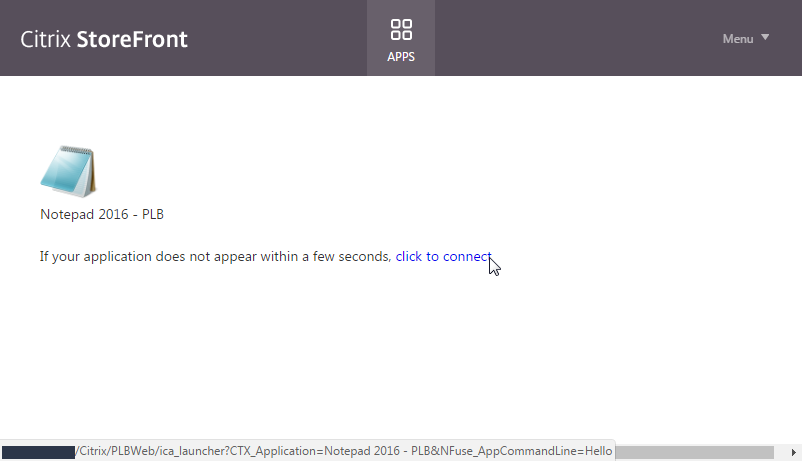
The url on the “click to connect” goes to my launcher! And it works! Excellent!
Now I have one last thing I need to get working. If I click the ‘Notepad 2016 - PLB’ icon I get the regular Storefront ica file, so I don’t get my LongCommandLine added into it. Can I change where it’s trying to launch from?
Citrix appears to offer one extension that may allow this:
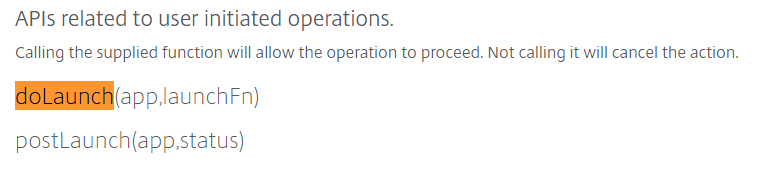
Huh. Well. That’s not much documentation at all.
Fortunately, a Citrix blog post came to rescue with some more information:
Hook APIs That Allow Delays / Cancellations
doLaunch
doSubscribe
doRemove
doInstall
On each of these the customization might show a dialog, perform some checks (etc) but ultimately should call "action" if (and only if) they want the operation to proceed.
CTXS.Extensions.doLaunch =  function(app, action) {
     // call 'action' function if/when action should proceed
	 action();
}
This extension is taking an object (app). What properties does this object have? I did a simple console.log and examined the object:
CTXS.Extensions.doLaunch =  function(app, action) {
    // call 'action' function if/when action should proceed
    console.log(app);
    action();
}
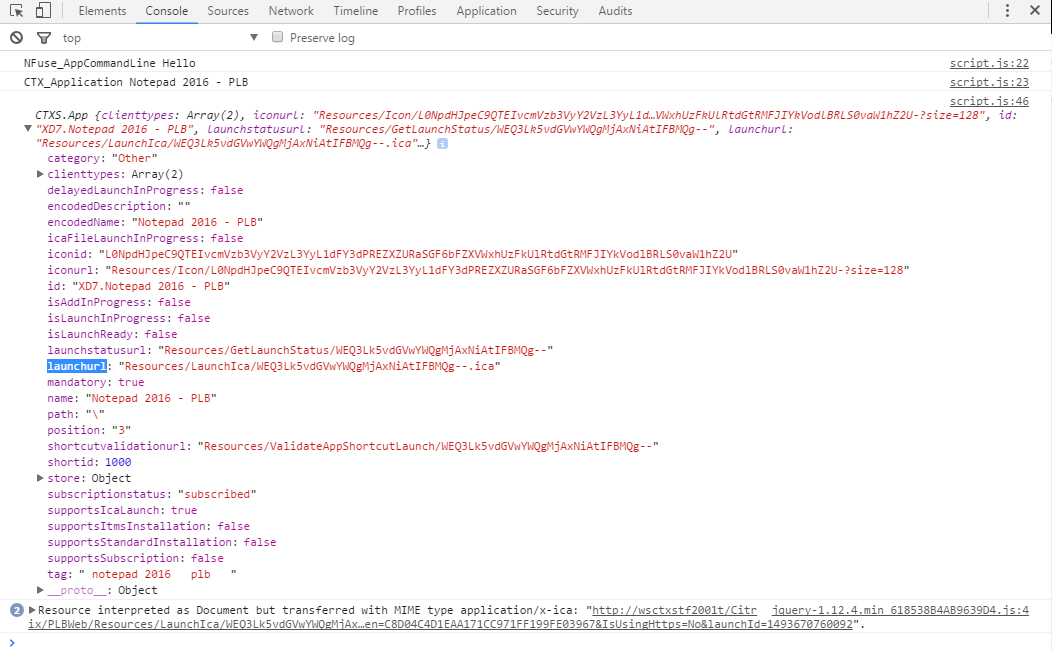
Well, look that that. There is a property called 'launchurl'. Can we modify this property and have it point to our custom launcher?
I modified my function as such:
CTXS.Extensions.doLaunch =  function(app, action) {
    // call 'action' function if/when action should proceed
	//modify launchurl to our PowerShell ICA creator
	app.launchurl = launchURL;
        console.log(app);
    action();
}
The result?
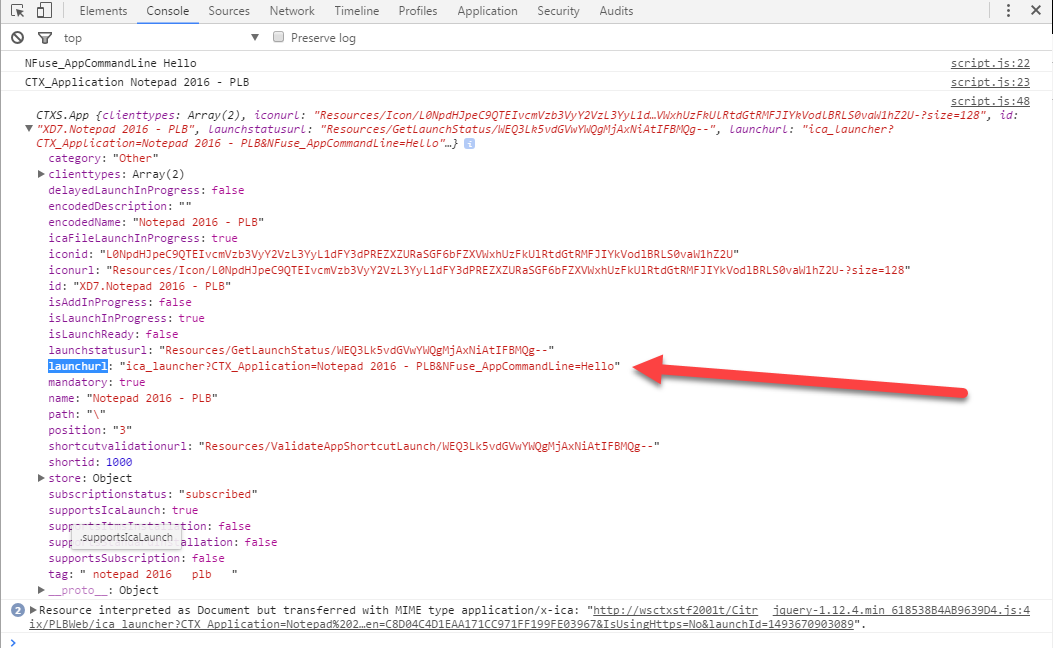
A modified launchurl!!!!
Excellent!
And launching it does return the ica file from my custom ica_launcher!
Lastly, I want to autolaunch my program. It turns out, this is pretty simple. Just add the following the script.js file:
//autolaunch application
CTXS.Extensions.noteApp = function(app) {
    if (app.encodedName.indexOf(CTX_Application) != -1) {
        CTXS.ExtensionAPI.launch(app);
    }
}
Beautiful. My full script.js file looks like so:
// Edit this file to add your customized JavaScript or load additional JavaScript files.

//grab the URL and parse out the parameters we want (application name, launch parameters)
var getUrlParameter = function getUrlParameter(sParam) {
	var sPageURL = decodeURIComponent(window.location.search.substring(1)),
		sURLVariables = sPageURL.split('&'),
		sParameterName,
		i;

	for (i = 0; i < sURLVariables.length; i++) {
		sParameterName = sURLVariables[i].split('=');

		if (sParameterName[0] === sParam) {
			return sParameterName[1] === undefined ? true : sParameterName[1];
		}
	}
};

var NFuse_AppCommandLine = getUrlParameter('NFuse_AppCommandLine');
var CTX_Application = getUrlParameter('CTX_Application');

console.log("NFuse_AppCommandLine " + NFuse_AppCommandLine);
console.log("CTX_Application " + CTX_Application);


CTXS.Extensions.excludeApp = function(app) {
    // return true or false if we don't match the target app name
	//we only want to show the application name found in the URI
	//if the app name does not equal the URI name then we hide it.
	if (app.name!= CTX_Application) {
		return true;
	}
};

//generated launch URL
var launchURL = "ica_launcher?CTX_Application=" + CTX_Application + "&NFuse_AppCommandLine=" + NFuse_AppCommandLine

CTXS.Extensions.doLaunch =  function(app, action) {
    // call 'action' function if/when action should proceed
	//modify launchurl to our PowerShell ICA creator
	app.launchurl = launchURL;
    action();
};

CTXS.Extensions.onAppHTMLGeneration = function(element) {
	//this function is not guaranteed to work across Storefront versions.  Ensure proper testing is conducted when upgrading.
	//tested on StoreFront 3.9
	$( "div.storeapp-details-container" ).append( "<p class=\"storeapp-name\"><br></p>" );
	$( "div.storeapp-details-container" ).append( "<p class=\"storeapp-name\">If your application does not appear within a few seconds, <a href=\"" + launchURL + "\">click to connect</a></p>" );
};

//autolaunch application
CTXS.Extensions.noteApp = function(app) {
    if (app.encodedName.indexOf(CTX_Application) != -1) {
        CTXS.ExtensionAPI.launch(app);
    }
};
And that's it. We are able to accomplish this with a Powershell script, and two customization files. I think this has a better chance of 'working' across Storefront versions then the SDK attempt I did earlier, or creating my own custom Storefront front end.