During the course of load testing FMA to see how it compares with IMA in terms of performance I encountered some oddities with FMA. It definitely is more efficient at enumerating XenApp applications compared to IMA. But… The differences in my testing may have been overstated.
During the load testing I captured some performance counters. One of them, “Citrix XML Service - enumerate resources - Concurrent Transactions” seemed to line up almost perfectly with the load wcat was applying to the broker. BUT… It capped out. It seemed to cap at 200-220 concurrent connections.
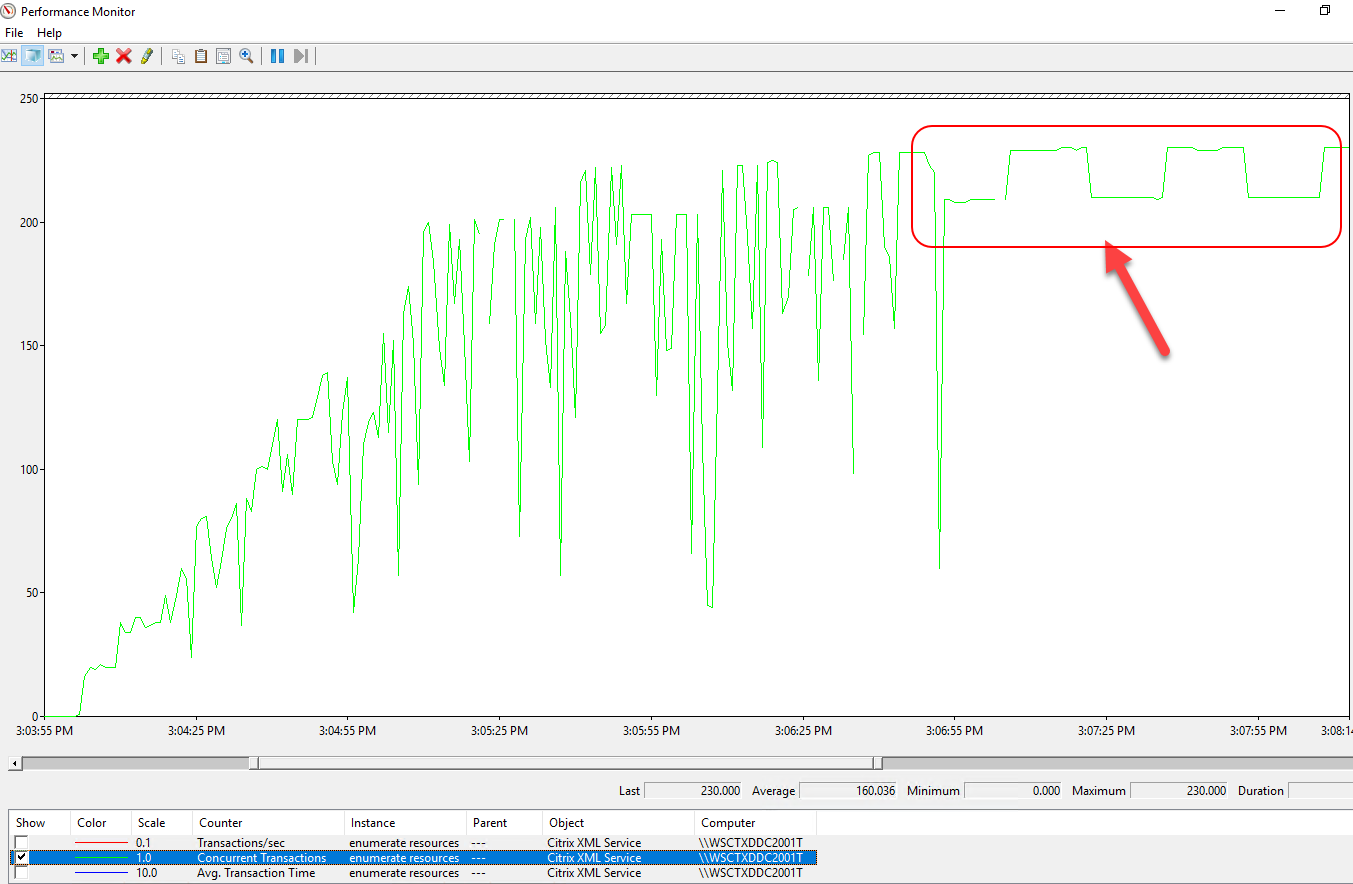
The slope of the increase in the concurrent transactions should have continued but it stops. I had set a maximum of 1000 concurrent connections via WCAT but it stops then does this weird ‘stepping’. When this limit appears to be reached, that appears to be when the “performance” of FMA succeeds IMA significantly.
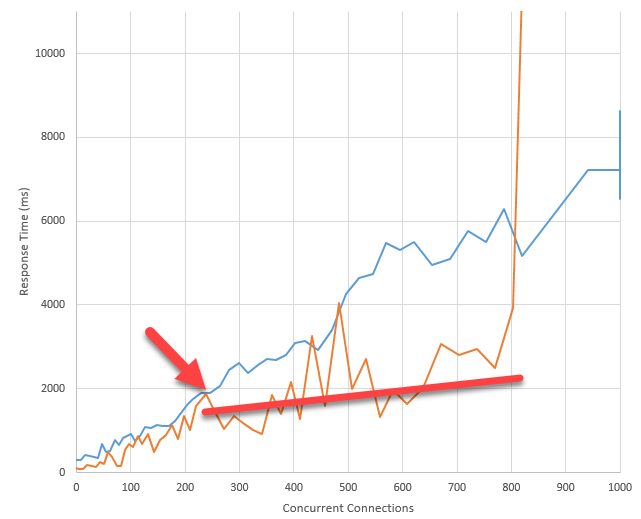
(ORANGE is FMA, BLUE is IMA).
What I’m considering is that FMA is taking all requests up to that limit and then ‘queuing’ them. I have no proof of that outside of the Perf Counter just hitting that ceiling. And when the concurrent connections hit ~800 and the response time soared, was the broker actually working?
No. It was not working. The responses I got when the connections hit 800+ looked like this:
<?xml version="1.0" encoding="UTF-8"?>
<!DOCTYPE NFuseProtocol SYSTEM "NFuse.dtd"[]>
<NFuseProtocol version="5.9">
  <ResponseAppData>
  <ErrorId>unspecified</ErrorId>
  <LeasingStatus>working</LeasingStatus>
  </ResponseAppData>
</NFuseProtocol>
ErrorID ‘unspecified’. Undoubtedly, it appears there is a timer somewhere that if the broker cannot respond to requests within a reasonable amount of time (20 seconds?) that it returns this error code.
So is the amount of processing the broker can handle a hardcoded limit? I scanned the startup of the service with Procmon to see what registry keys/values the BrokerService was looking for.
HKLM\SOFTWARE\Citrix\DesktopServer\BrokerStartupRetryPeriodLimitMs
HKLM\SOFTWARE\Citrix\DesktopServer\BrokerStartupRetryPeriodStartMaxMs
HKLM\SOFTWARE\Citrix\DesktopServer\ConnectionLeasing\MaxItemsPerSyncCycle
HKLM\SOFTWARE\Citrix\DesktopServer\ConnectionLeasing\PendingFailureMaxSecs
HKLM\SOFTWARE\Citrix\DesktopServer\ConnectionLeasing\SyncCleanupDelaySecs
HKLM\SOFTWARE\Citrix\DesktopServer\ConnectionLeasing\SyncIntervalSecs
HKLM\SOFTWARE\Citrix\DesktopServer\ConnectionLeasing\SyncLocation
HKLM\SOFTWARE\Citrix\DesktopServer\ConnectionLeasing\SyncStartDelayMins
HKLM\SOFTWARE\Citrix\DesktopServer\ConnectionLeasing\UploadQueueIdleMaxSecs
HKLM\SOFTWARE\Citrix\DesktopServer\ConnectionLeasing\UploadQueueMaxItems
HKLM\SOFTWARE\Citrix\DesktopServer\ControllerStartupRetryPeriodLimitMs
HKLM\SOFTWARE\Citrix\DesktopServer\ControllerStartupRetryPeriodStartMaxMs
HKLM\SOFTWARE\Citrix\DesktopServer\DataStore\Connections\Controller\ConnectivityRetryDelaySecs
HKLM\SOFTWARE\Citrix\DesktopServer\DataStore\Connections\Controller\MaxConnectivityLossSecs
HKLM\SOFTWARE\Citrix\DesktopServer\DataStore\Connections\Controller\MaxTxRetries
HKLM\SOFTWARE\Citrix\DesktopServer\DataStore\Connections\Controller\MaxTxRetryIntervalMs
HKLM\SOFTWARE\Citrix\DesktopServer\DataStore\Connections\Controller\MinTxRetryIntervalMs
HKLM\SOFTWARE\Citrix\DesktopServer\DataStore\Connections\Controller\ProviderName
HKLM\SOFTWARE\Citrix\DesktopServer\DataStore\Connections\Controller\ReaperDeferralPeriodSecs
HKLM\SOFTWARE\Citrix\DesktopServer\DisablePerformanceCounters
HKLM\SOFTWARE\Citrix\DesktopServer\HostingStartupRetryPeriodLimitMs
HKLM\SOFTWARE\Citrix\DesktopServer\HostingStartupRetryPeriodStartMaxMs
HKLM\SOFTWARE\Citrix\DesktopServer\LHC\BackgroundTaskIntervalMS
HKLM\SOFTWARE\Citrix\DesktopServer\MaxPendingSessions
HKLM\SOFTWARE\Citrix\DesktopServer\MaxWorkers
HKLM\SOFTWARE\Citrix\DesktopServer\MinimumAcceptableVdaMajorVersion
HKLM\SOFTWARE\Citrix\DesktopServer\MinThreadPoolThreads
HKLM\SOFTWARE\Citrix\DesktopServer\WaitForDebuggerAttachedTimeoutSeconds
HKLM\SOFTWARE\Citrix\DesktopServer\WorkerProxy\ListOfProxies
HKLM\SOFTWARE\Citrix\DesktopServer\WorkerProxy\ProxyPortNumber
HKLM\SOFTWARE\Citrix\DesktopServer\WorkerProxy\WebSocket_ArraySegmentPool_SegmentByteSize
HKLM\SOFTWARE\Citrix\DesktopServer\WorkerProxy\WebSocket_ArraySegmentPool_SegmentsCount
HKLM\SOFTWARE\Citrix\DesktopServer\WorkerProxy\WebSocket_CompressionLevel
HKLM\SOFTWARE\Citrix\DesktopServer\WorkerProxy\WebSocket_Enabled
HKLM\SOFTWARE\Citrix\DesktopServer\WorkerProxy\WebSocket_MaxBatchSize
HKLM\SOFTWARE\Citrix\DesktopServer\WorkerProxy\WebSocket_MaxDispatchConcurrency
HKLM\SOFTWARE\Citrix\DesktopServer\WorkerProxy\WebSocket_MaxDispatchThreadIdleTime
HKLM\SOFTWARE\Citrix\DesktopServer\WorkerProxy\WebSocket_MaxPendingAcks
HKLM\SOFTWARE\Citrix\DesktopServer\WorkerProxy\WebSocket_SendMultipleAcks
HKLM\SOFTWARE\Citrix\DesktopServer\WorkerProxy\WebSocket_SendTimeout
HKLM\SOFTWARE\Citrix\DesktopServer\WorkerProxy\WebSocket_UseJsonEncoding
HKLM\SOFTWARE\Citrix\DesktopServer\XmlListeners
HKLM\SOFTWARE\Citrix\DesktopServer\XmlServicesEnableNonSsl
HKLM\SOFTWARE\Citrix\DesktopServer\XmlServicesEnableSsl
HKLM\SOFTWARE\Citrix\DesktopServer\XmlServicesTargetAddress
HKLM\SOFTWARE\Citrix\DesktopServer\XmsStartupRetryPeriodLimitMs
HKLM\SOFTWARE\Citrix\DesktopServer\XmsStartupRetryPeriodStartMaxMs
I found a document from Citrix that details *some* of these registry keys.
There is a registry value that determines the maximum number of concurrent requests the FMA broker will process:
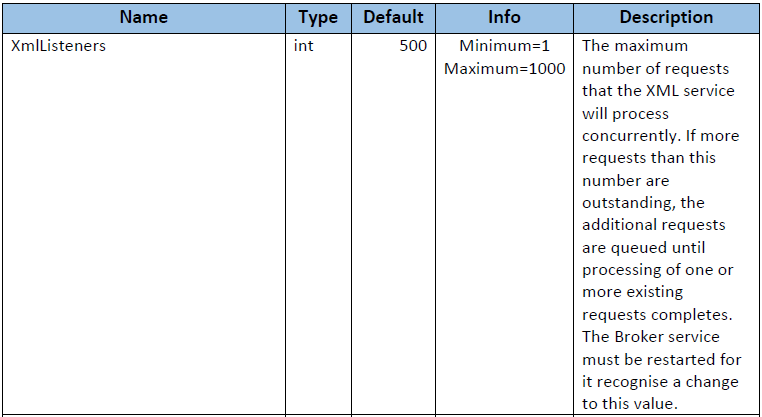
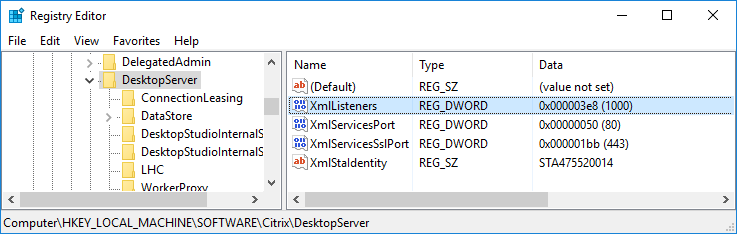
I added that key and restarted the service. What was the impact?
16vCPU
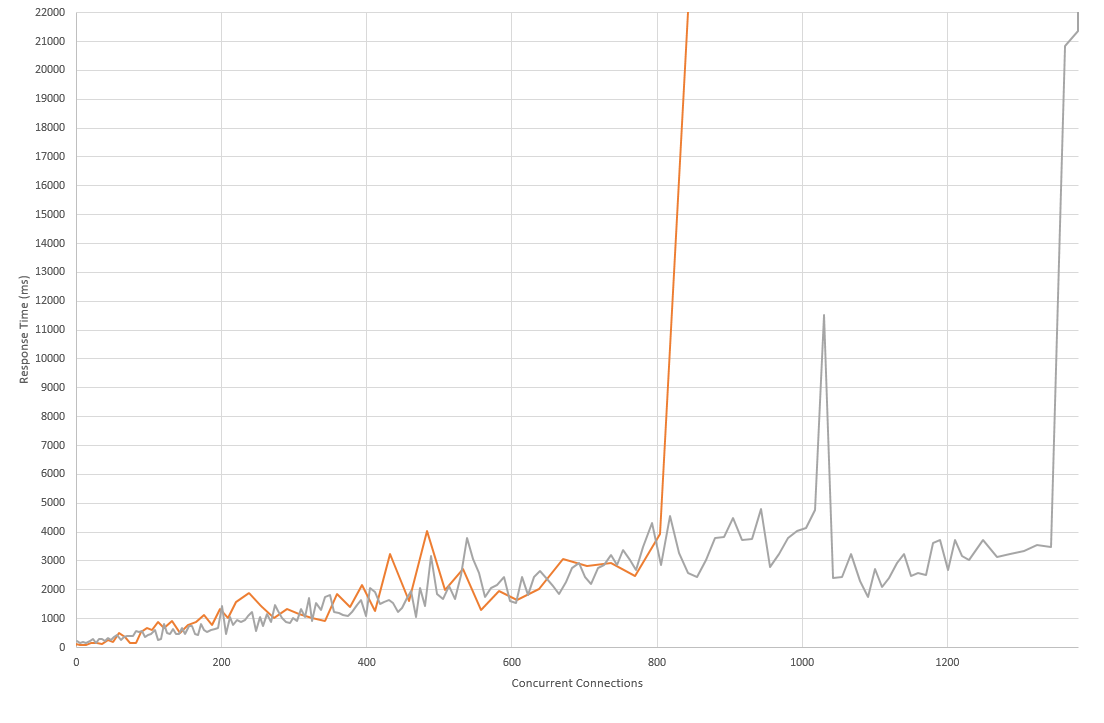
Very positive. The 800 concurrent limit was easily bypassed. Why is this limited to 500 by default? Changing this value to 1000 had a massive improvement in terms of how many concurrent connections it could handle. It pushed itself to 1350 concurrent connections before it broke. If I had to push for a single tweak to FMA, this one might be it. Mind you, the Performance Counter was still capping itself around 220 concurrent connections, so I’m not sure if that’s a limit of the counter or something else but it is VERY accurate until that point. If I start my WCAT test and go to 50 the perf counter goes to 50. If I choose 80, it goes to 80. If I choose 173 it goes to exactly 173. So it is odd.
During the course of my investigation I found a registry key that shows Citrix has decided any request over 20 seconds to the broker will fail. This key is:

I suspect this is my “unspecified” error. 20 seconds is a really long time for a broker to respond to a request though, if you were a user this would suck. However, is it better to increase this value? I have it on my todo list to try and increase it for my testing to see what happens, but values like the Storefront or Netscaler XML requests to see if the brokers are responding are handicapped to 20 seconds with this value. So it’s probably important to have them match to reduce any further timeout you may encounter. For instance, it would not make sense to set a 60 second timeout in a Netscaler XML broker test if the broker is going to timeout at 20 seconds anyways.
Next will be testing this with Local Host Cache to see if this causes any impact.