We setup a Citrix Unified Gateway for a proof of concept and were having an issue getting the HTML5 Receiver to connect for external connections. It was presenting an error message: “Citrix Receiver cannot connect to the server”. We followed this documentation. It states, for our use case:
What would probably help is having a proxy that can parse out all websocket traffic and convert to ICA/CGP traffic without any need of changes to XA/XD. Netscaler Gateway does exactly this… …NetScaler Gateway also doesn”t need any special configuration for listening over websockets…
Connections via NetScaler Gateway:
…When a gateway is involved, the connections are similar in all Receivers. Here, Gateway acts as WebSocket proxy and in-turn opens ICA/CGP/SSL native socket connections to backend XenApp and XenDesktop. …
…So using a NetScaler Gateway would help here for ease of deployment. Connection to gateway is SSL/TLS and gateway to XenApp/XenDesktop is ICA/CGP….
And additional documentation here.
WebSocket connections are also disabled by default on NetScaler Gateway. For remote users accessing their desktops and applications through NetScaler Gateway, you must create an HTTP profile with WebSocket connections enabled and either bind this to the NetScaler Gateway virtual server or apply the profile globally. For more information about creating HTTP profiles, see HTTP Configurations.
Ok. So we did the following:
And then we tried launching our application:
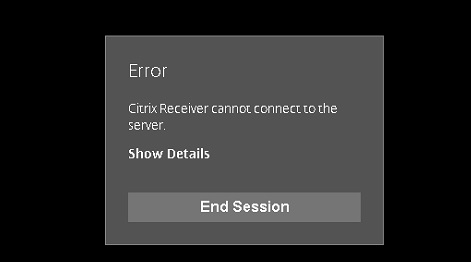
We started our investigation. The first thing we did was test to see if HTML5 Receiver works at all. We configured and enabled websockets on our XenApp servers and then logged into the Storefront server directly, and internally. We were able to launch applications without issue.
The second thing we did was enable logging for HTML5 receiver:
To view Citrix Receiver for HTML5 logs
To assist with troubleshooting issues, you can view Citrix Receiver for HTML5 logs generated during a session.
- Log on to the Citrix Receiver for Web site.
- In another browser tab or window, navigate to siteurl/Clients/HTML5Client/src/ViewLog.html, where siteurlis the URL of the Citrix Receiver for Web site, typically http://server.domain/Citrix/StoreWeb.
- On the logging page, click Start Logging.
- On the Citrix Receiver for Web site, access a desktop or application using Citrix Receiver for HTML5.
The log file generated for the Citrix Receiver for HTML5 session is shown on the logging page. You can also download the log file for further analysis.
This was the log file it generated:
start Session
SESSION:|:BROWSERINFO:|:navigator =Mozilla/5.0 (Windows NT 10.0; WOW64) AppleWebKit/537.36 (KHTML, like Gecko) Chrome/54.0.2840.87 Safari/537.36
SESSION:|:BROWSERINFO:|:os =WINDOWS
SESSION:|:BROWSERINFO:|:browser =CHROME;version=54
SESSION:|:PREFERENCE:|:ajax=true
SESSION:|:CONNECTION:|:ICA:|:ica type=autoXhr
SESSION:|:CONNECTION:|:LOADTIME:|:ica load time =115
SESSION:|:CONNECTION:|:LOADTIME:|:script load =3102
SESSION:|:PREFERENCE:|:language=en
SESSION:|:CONNECTION:|:LOADTIME:|:language =3116
SESSION:|:CONNECTION:|:initializing session
SESSION:|:CONNECTION:|:UI:|:initializing ui-interface
SESSION:|:CONNECTION:|:LOADTIME:|:ui initialize =18
 SESSION:|:CONNECTION:|:ICA:|:ClientVersion 2.2.0.216
SESSION:|:CONNECTION:|:ICA:|:initializing ica-interface
SESSION:|:CONNECTION:|:LOADTIME:|:ica initialize =9
SESSION:|:ICA:|:Encryption level : Basic
SESSION:|:ICA:|:CHANNEL:|:supported channelCTXCPM
SESSION:|:ICA:|:CHANNEL:|:supported channelCTXTW
SESSION:|:ICA:|:CHANNEL:|:supported channelCTXTWI
SESSION:|:ICA:|:CHANNEL:|:supported channelCTXCLIP
SESSION:|:ICA:|:CHANNEL:|:supported channelCTXCAM
SESSION:|:ICA:|:CHANNEL:|:supported channelCTXMM
SESSION:|:ICA:|:CHANNEL:|:supported channelCTXCTL
SESSION:|:ICA:|:CHANNEL:|:supported channelCTXEUEM
SESSION:|:ICA:|:CHANNEL:|:supported channelCTXFILE
INIT :|: CONNECTION :|: TRANSPORT DRIVER :|: TRYING FOR SOCKET CONNECTION ON netscalergateway.testurl.com : 443
INIT :|: CONNECTION :|: WEB SOCKET :|: INFO :|: websocket-url=wss://netscalergateway.testurl.com:443
INIT :|: CONNECTION :|: WEB SOCKET :|: INFO :|: Current Protocol Index is : 0
INIT :|: CONNECTION :|: TRANSPORT DRIVER :|: SOCKET CONNECTED. Setting CGP Channel
INIT :|: CONNECTION :|: CGP SOCKET :|: INFO :|: Start Initializing CGP Socket
INIT :|: CONNECTION :|: CGP SOCKET :|: INFO :|: Finish Initializing CGP SOCKET
INIT :|: CONNECTION :|: WEB SOCKET :|: INFO :|: websocket-url=wss://netscalergateway.testurl.com:443
INIT :|: CONNECTION :|: WEB SOCKET :|: INFO :|: Current Protocol Index is : 1
INIT :|: CONNECTION :|: WEB SOCKET :|: INFO :|: websocket-url=wss://netscalergateway.testurl.com:443
INIT :|: CONNECTION :|: WEB SOCKET :|: INFO :|: Current Protocol Index is : 2
SESSION:|:ICA:|:TRANSPORT:|:DRIVER:|:close with code=1006
The “Close with code=1006” seemed to imply it was a “websocket” issue from google searches.
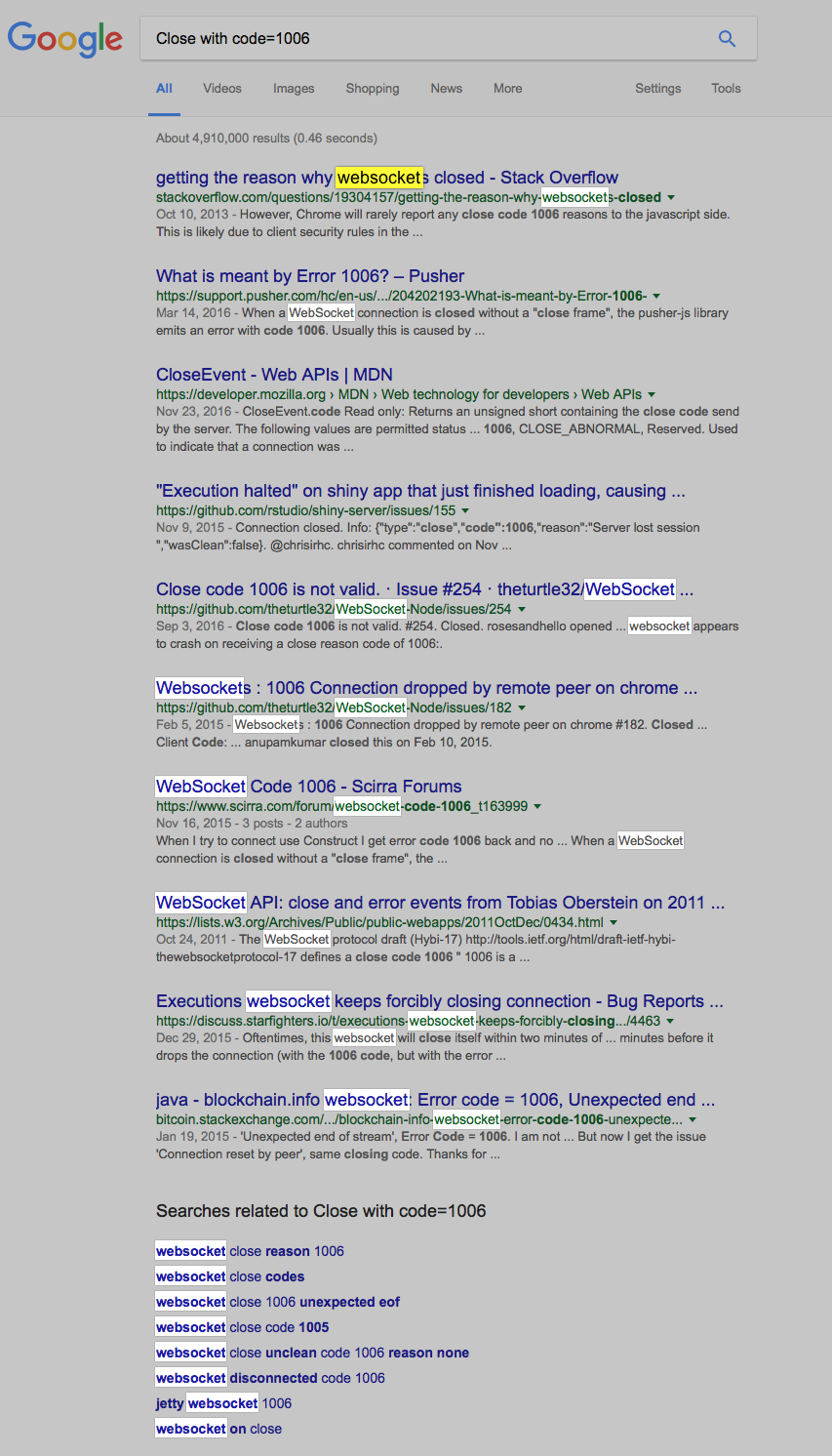
The last few events prior to the error are “websocket” doing… something.
I proceeded to spin up a home lab with XenApp and a Netscaler configured for HTML5 Receiver and tried connecting. It worked flawlessly via the Netscaler. I enabled logging and took another look:
start Session
SESSION:|:BROWSERINFO:|:navigator =Mozilla/5.0 (Windows NT 6.1; WOW64; Trident/7.0; SLCC2; .NET CLR 2.0.50727; .NET CLR 3.5.30729; .NET CLR 3.0.30729; .NET4.0C; .NET4.0E; InfoPath.3; rv:11.0) like Gecko
SESSION:|:BROWSERINFO:|:os =WINDOWS
SESSION:|:BROWSERINFO:|:browser =MSIE;version=11
SESSION:|:PREFERENCE:|:ajax=true
SESSION:|:CONNECTION:|:ICA:|:ica type=autoOpener
SESSION:|:CONNECTION:|:LOADTIME:|:script load =301
SESSION:|:CONNECTION:|:LOADTIME:|:ica load time =341
SESSION:|:PREFERENCE:|:language=en
SESSION:|:CONNECTION:|:LOADTIME:|:language =342
SESSION:|:CONNECTION:|:initializing session
SESSION:|:CONNECTION:|:UI:|:initializing ui-interface
SESSION:|:CONNECTION:|:LOADTIME:|:ui initialize =28
 SESSION:|:CONNECTION:|:ICA:|:ClientVersion 2.2.0.216
SESSION:|:CONNECTION:|:ICA:|:initializing ica-interface
SESSION:|:SESSION MANAGER:|:START:|:command =1501
SESSION:|:SESSION MANAGER:|:END:|:command =1501
SESSION:|:SESSION MANAGER:|:START:|:command =1503
SESSION:|:SESSION MANAGER:|:WINDOW:|:SET_ENGINEICA
SESSION:|:SESSION MANAGER:|:END:|:command =1503
SESSION:|:SESSION MANAGER:|:START:|:command =1503
SESSION:|:SESSION MANAGER:|:WINDOW:|:SET_ENGINECTXCTL
SESSION:|:SESSION MANAGER:|:END:|:command =1503
SESSION:|:SESSION MANAGER:|:START:|:command =1503
SESSION:|:SESSION MANAGER:|:WINDOW:|:SET_ENGINECTXCLIP
SESSION:|:SESSION MANAGER:|:END:|:command =1503
SESSION:|:SESSION MANAGER:|:START:|:command =1503
SESSION:|:SESSION MANAGER:|:WINDOW:|:SET_ENGINECTXGUSB
SESSION:|:SESSION MANAGER:|:END:|:command =1503
SESSION:|:SESSION MANAGER:|:START:|:command =319
SESSION:|:SESSION MANAGER:|:WRAPPER:|:process command
SESSION:|:SESSION MANAGER:|:START:|:command =1502
SESSION:|:SESSION MANAGER:|:END:|:command =1502
SESSION:|:SESSION MANAGER:|:START:|:command =0
SESSION:|:SESSION MANAGER:|:WINDOW:|:SESSION_LAUNCH_APPLICATION
SESSION:|:ICA:|:Encryption level : Basic
SESSION:|:ICA:|:CHANNEL:|:supported channelCTXCPM
SESSION:|:ICA:|:CHANNEL:|:supported channelCTXTW
SESSION:|:ICA:|:CHANNEL:|:supported channelCTXTWI
SESSION:|:ICA:|:CHANNEL:|:supported channelCTXCLIP
SESSION:|:ICA:|:CHANNEL:|:supported channelCTXMM
SESSION:|:ICA:|:CHANNEL:|:supported channelCTXCTL
SESSION:|:ICA:|:CHANNEL:|:supported channelCTXEUEM
SESSION:|:ICA:|:CHANNEL:|:supported channelCTXFILE
INIT :|: CONNECTION :|: TRANSPORT DRIVER :|: TRYING FOR SOCKET CONNECTION ON netscaler.bottheory.local : 443
INIT :|: CONNECTION :|: WEB SOCKET :|: INFO :|: websocket-url=wss://netscaler.bottheory.local:443
INIT :|: CONNECTION :|: WEB SOCKET :|: INFO :|: Current Protocol Index is : 0
INIT :|: CONNECTION :|: TRANSPORT DRIVER :|: SOCKET CONNECTED. Setting CGP Channel
INIT :|: CONNECTION :|: CGP SOCKET :|: INFO :|: Start Initializing CGP Socket
INIT :|: CONNECTION :|: CGP SOCKET :|: INFO :|: Finish Initializing CGP SOCKET
SESSION:|:SESSION MANAGER:|:NONSEAMLESS:|:ica connection with new connection
SESSION:|:SESSION MANAGER:|:END:|:command =0
SESSION:|:CONNECTION:|:LOADTIME:|:ica initialize =42
SESSION:|:CONNECTION:|:initializing session
SESSION:|:CONNECTION:|:LOADTIME:|:ui initialize =2
 SESSION:|:CONNECTION:|:ICA:|:ClientVersion 2.2.0.216
SESSION:|:CONNECTION:|:LOADTIME:|:ica initialize =3
INIT :|: CONNECTION :|: TRANSPORT:|: WEBSOCKET :|: connected
INIT :|: CONNECTION :|: WEB SOCKET :|: INFO :|: WEB SOCKET IS READY TO SEND/RECEIVE DATA.
SESSION :|: CGP :|: STATE :|: CGP-CORE :|: Changing core state from :0 To 1
SESSION :|: CGP :|: ReliabilityParamsCapability :|: INFO:|:Adding Reliability Params Capability to Bind Request.
SESSION :|: CGP :|: CGP SOCKET :|: INFO :|: TCP Handshake Sent!!!!
SESSION :|: CGP :|: CGP-CORE :|: Hit the State Signature
SESSION :|: CGP :|: CGP-CORE :|: INFO:|: Start process Signature
SESSION :|: CGP :|: CGP-CORE :|: INFO:|: Processing Bind response
SESSION :|: CGP :|: CGP-CORE :|: INFO:|: Setting Capability of service ID: 0
SESSION :|: CGP :|: CGP-CORE :|: INFO:|: Setting Capability of capability ID: 6
SESSION :|: CGP :|: CGP-CORE :|: INFO:|: Security Ticket Capability Handling hit
SESSION :|: CGP :|: CGP-CORE :|: INFO:|: Setting Capability of service ID: 0
SESSION :|: CGP :|: CGP-CORE :|: INFO:|: Setting Capability of capability ID: 5
SESSION :|: CGP :|: CGP-CORE :|: INFO:|: Session Reliability Capability Handling hit
 SESSION :|: CGP :|: CGP-CORE :|: INFO:|: RECONNECT FLAG is 0
SESSION :|: CGP :|: CGP-CORE :|: INFO:|: Setting Capability of service ID: 0
SESSION :|: CGP :|: CGP-CORE :|: INFO:|: Setting Capability of capability ID: 9
SESSION :|: CGP :|: CGP-CORE :|: INFO:|: Reliability Params Capability Handling hit
SESSION :|: CGP :|: CGP-CORE :|: INFO:|: The server sent values of  RELIABILITY TIMEOUT : 180 UI FLAGS : 1 UI DIMMING PERCENTAGE : 80 TCP TIMEOUT: 60
SESSION :|: CGP :|: CGP-CORE :|: INFO:|: Setting Capability of service ID: 0
SESSION :|: CGP :|: CGP-CORE :|: INFO:|: Setting Capability of capability ID: 7
SESSION :|: CGP :|: CGP-CORE :|: INFO:|: Keep Alives Capability Handling hit
SESSION :|: CGP :|: CGP-CORE :|: INFO:|: Setting Capability of service ID: 0
SESSION :|: CGP :|: CGP-CORE :|: INFO:|: Setting Capability of capability ID: 1
SESSION :|: CGP :|: CGP-CORE :|: INFO:|: Bind Capability Handling hit
SESSION :|: CGP :|: STATE :|: CGP-CORE :|: Changing core state from :1 To 2
SESSION :|: CGP :|: CGP-CORE :|: INFO:|: Session Connected after Bind Response
SESSION :|: CGP :|: CGP-CORE :|: INFO:|: End of Processing Bind Response data
SESSION :|: CGP :|: CGP SOCKET :|: INFO :|: CGP HANDSHAKE SUCCESSFUL. Sending CHANNEL OPEN REQUEST
SESSION :|: CGP :|: CGP SOCKET :|: INFO :|: TCP Handshake Complete!!!!
SESSION:|:ICA:|:WINSTATION:|:DRIVER:|:init request
SESSION:|:ICA:|:TIMEZONE:|Windows OS EN returning timezone Mountain Standard Time
SESSION:|:ICA:|:TIMEZONE:|Windows OS EN returning timezone Mountain Standard Time
SESSION:|:ICA:|:TIMEZONE:|:time zone name: Mountain Standard Time bias 420 dstOffset 60
SESSION:|:ICA:|:TIMEZONE:|Windows OS EN returning timezone Mountain Standard Time
So there is a lot of differences but we focus on the point of failure in our enterprise netscaler we see it seems to retry or try different indexes (3 in total, 0, 1 and 2).
So there is a lot of evidence that websockets seem to be culprit. We have tried removing Netscaler from the connection picture by connecting directly to Storefront and HTML5 receiver works. We have configured both Netscaler and Storefront (with what we think) is a correct configuration. And still we are getting a failure.
I opened up a call to Citrix.
It was a fairly frustrating experience. I had tech’s ask me to go to “Program Files\Citrix\Reciever” and get the receiver version (hint, hint, this does not exist with HTML5). I captured packets of the failure “in motion” and they told me, “it’s not connecting to your XenApp server”. - Yup. That’s the Problem.
It seems that HTML5 is either so new (it’s not now), so simple (it’s not really), or tech’s are just poorly trained. I reiterated to them “why does it make 3 websocket connections on the ‘bad’ netscaler? Why does the ‘good’ netscaler appear to connect the first time without issue?” I felt the tech’s ignore and beat around the bush regarding websockets and more focus put on the “Storefront console”. Storefront itself was NOT logging ANYTHING to the event logs. Apparently this is weird for a storefront failure. I suspected Storefront was operating correctly and I was getting frustrated we weren’t focusing on what I suspected was the problem (websockets). So I put the case on hold so I could focus on doing the troubleshooting myself instead of going around in circles on setting HTML5 to “always use” or “use only when native reciever is not detected”.
Reviewing the documentation for the umpteenth time this “troubleshooting connections” tidbit came out:
Troubleshooting Connections:
In cases where you are not able to connect some of the following points might help in finding out the problem. They also can be used while opening support case or seeking help in forums:
1) Logging: Basic connection related logs are logged by Receiver for HTML5 and Receiver for Chrome.
2) Browser console logs: Browsers would show errors related to certificates or network related failures here.
-
Receiver for HTML5: Open developer tools for HDX session browser tab. Tip: In Windows, use F12 shortcut in address bar of session page.
-
Receiver for Chrome: Go to chrome://inspect, click on Apps on left side. Click on inspect for Citrix Receiver pages (Main.html, SessionWindow.html etc)
The browser may show a log? I wish I would have thought of that earlier. And I wish Citrix would have put that in the actual “Receiver for HTML5” documentation as opposed to buried in a blog article.
So I opened the Console in Chrome, launched my application and reviewed the results:
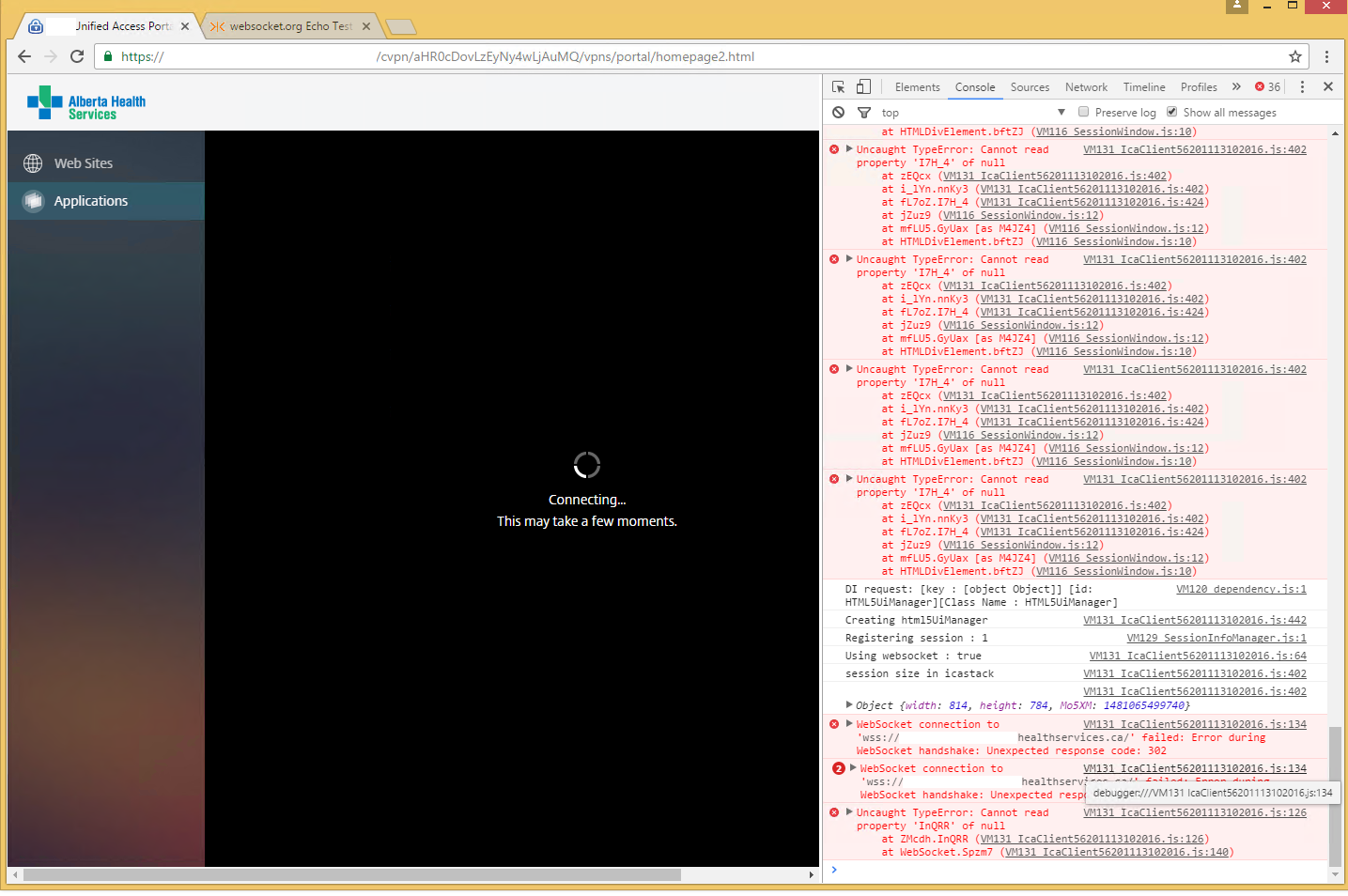
We finally have some human readable information.
Websocket connections are failing during the handshake “Unexpected response code: 302”
What heck does 302 mean? I installed Fiddler and did another launch withe Fiddler tracing:
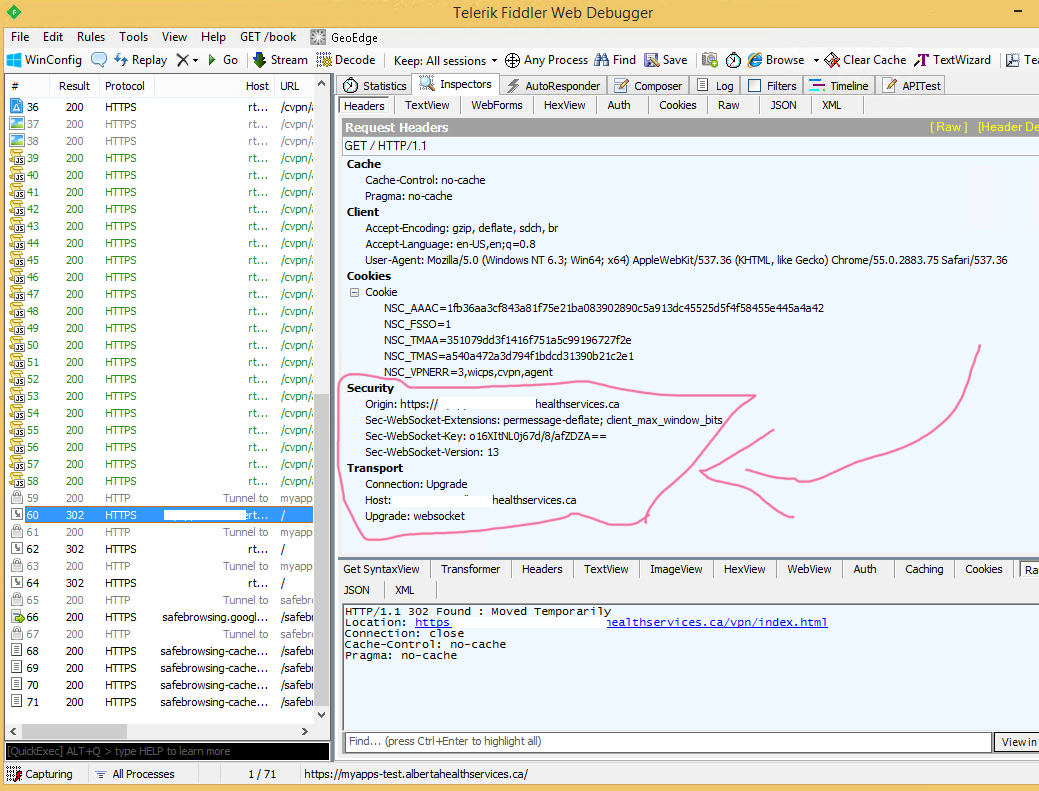
I highlighted the area where it tells us it’s attempting to connect with websockets. We can see in the response packet we are getting redirected, that’s what ‘302’ means. I then found a website that lets you test your server to ensure websockets are working. I tried it on our ‘bad’ netscaler:
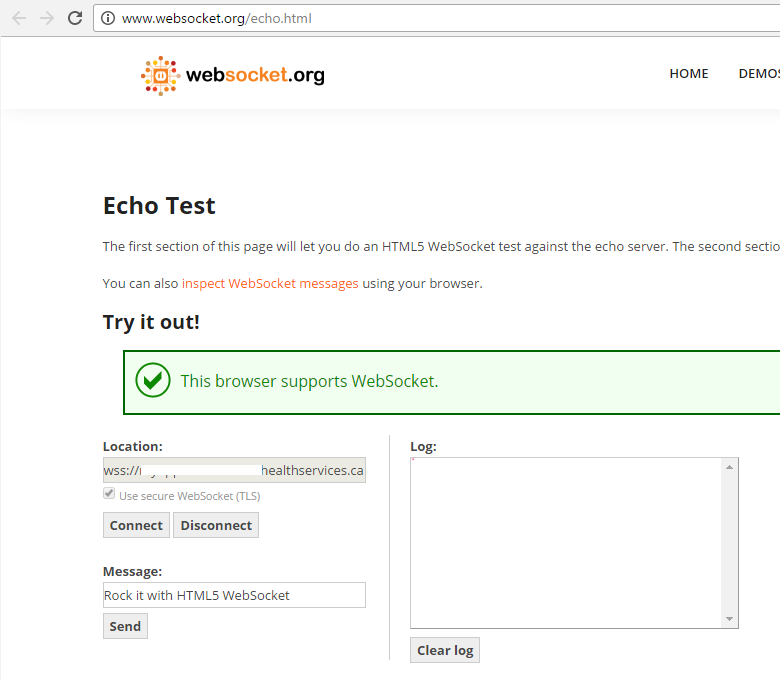
Hitting ‘Connect’ left nothing in the log. However, when I tried it with my ‘good’ netscaler…
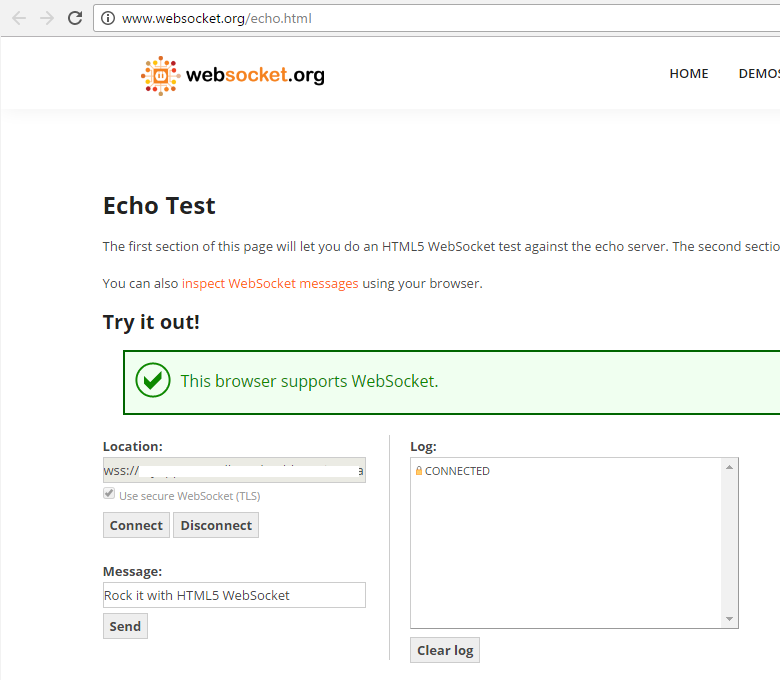
It works! So we can test websockets without having to launch and close the application over and over…
So we started to investigate the Netscaler. We found numerous policies that did URL or content redirection that would be taking place with the packet formulated like so. We then compared our Netscaler to the one in my homelab and did find one, subtle difference:
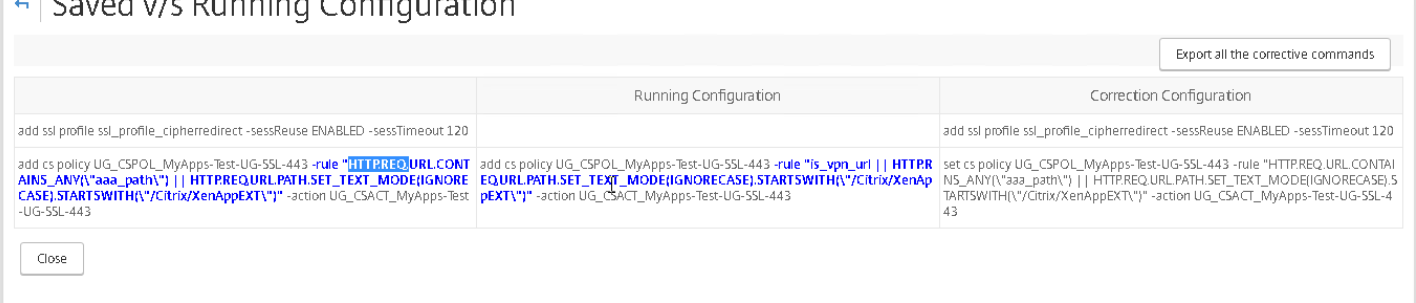
The one on the left is showing a rule for HTTP.REQ.URL.CONTAINS_ANY(“aaa_path”) where the one on the right just shows “is_vpn_url”. Investigating further it was stated that our team was trying to get AAA authentication working and this was an option set during a troubleshooting stage. Apparently, it was forgotten or overlooked when the issue was resolved (it was not applicable and can be removed). So we set it back to having the “is_vpn_url” and retried…
It worked! I tried the ‘websockets.org’ test and it connected now! Looking in the Chrome console showed:
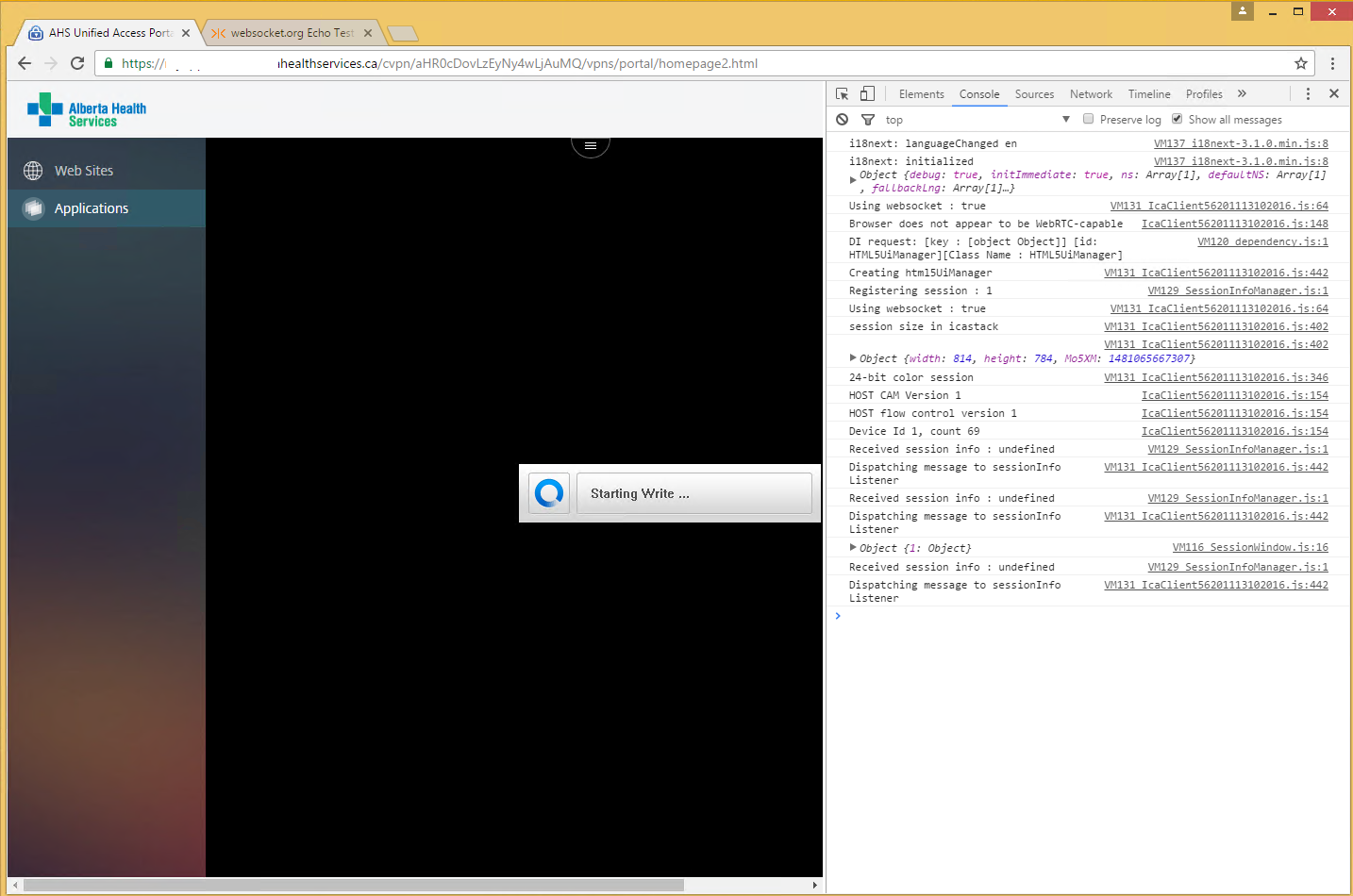
Success! It doesn’t pause on the websocket connection and the console logging shows some interesting information. Fiddler, with the working connection, now displayed the following:
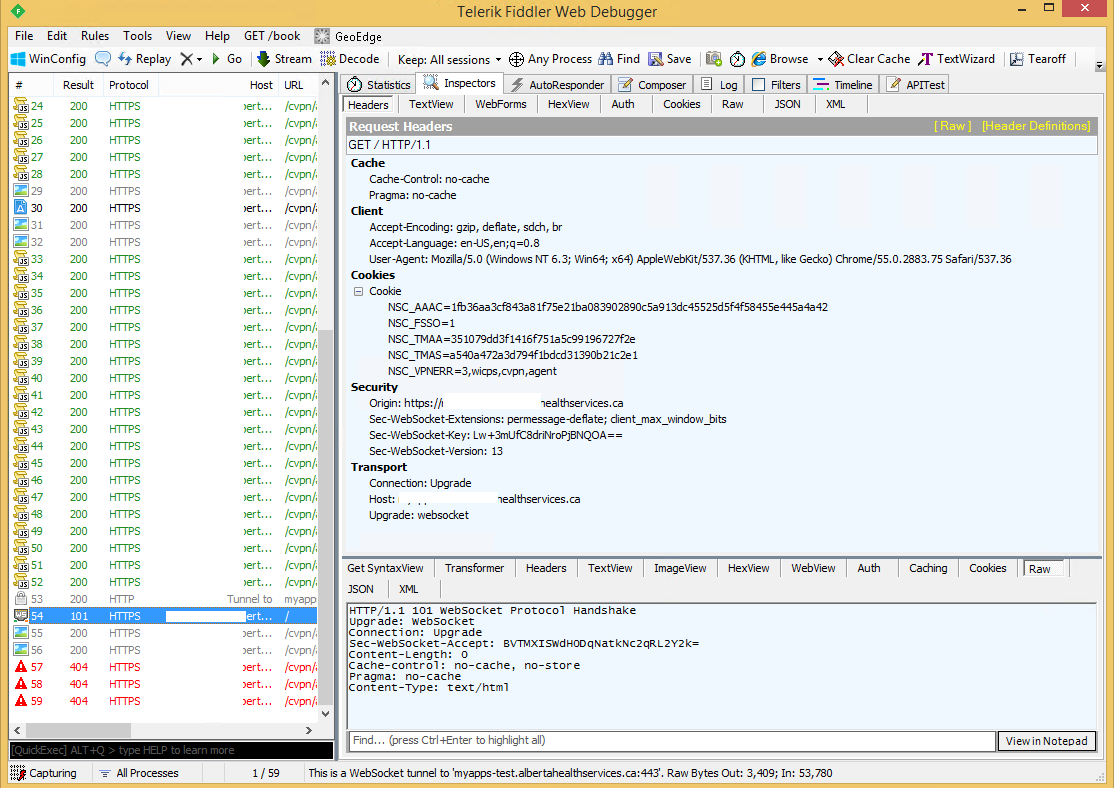
Look! A handshark response!
So, to review what we learned:
- Connections via Netscaler to HTML5 reciever do NOT require (but is possible) a SSL connection on each target XenApp device
- Connection via Netscaler work over standard port (2598/1494) and do not require any special configuration on your XenApp server.
- You can use ‘http://www.websocket.org/echo.html’ to test your Netscaler to ensure websockets are open and working.
- Fiddler can tell you verbose information on your websocket connection and their contents.
- The web browser’s Javascript console is perfect to look at verbose messages in HTML5.
And with that, we are working and happy, Good Night!