Continuing on from my previous post, we were still having certain users with logons in the dozens of seconds to minutes. I wanted to find out why and see if there is anything further that could be done.

After identifying a user with a long logon with ControlUp I ran the ‘Analyze Logon Duration’ script:
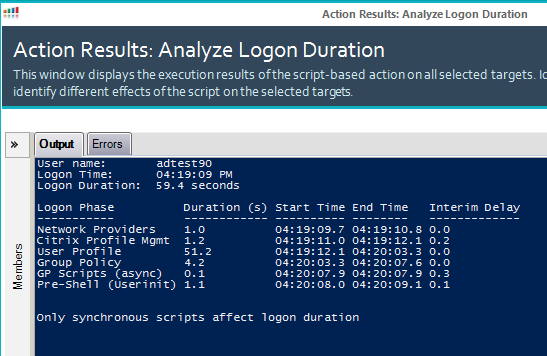
Jeez, 59.4 seconds to logon with 51.2 seconds of that spent on the User Profile portion. What is going on? I turned to process monitor to capture the logon process:
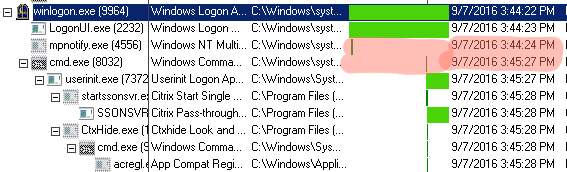
Well, there appears to be a 1 minute gap between the cmd.exe command from when WinLogon.exe starts it. The stage it ‘freezes’ at is “Please wait for the user profile service”.
Since there is no data recorded by Process Monitor I tested by deleting the users profile. It made no difference, still 60 seconds. But, since I now know it’s not the user profile it must be something else. Experience has taught me to blame the user object and look for network paths. 50 seconds or so just *feels* like a network timeout. So I examined the users AD object:
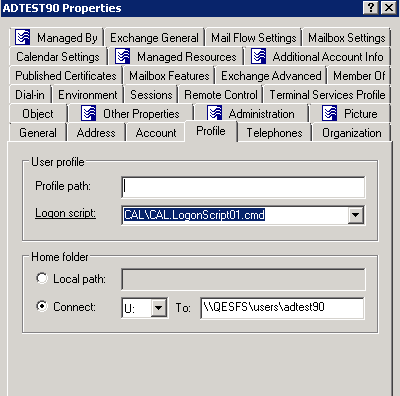
Well well well, we have a path. Is it valid?
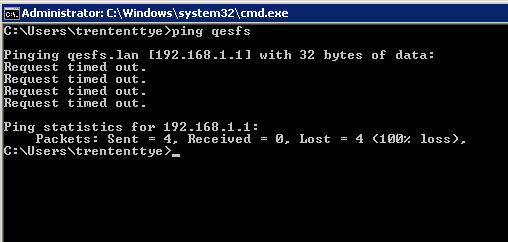
It is not valid. So is my suspicion correct? I removed the Home Directory path and relaunched:

Well that’s much, much better!
So now I want ControlUp to identify this potential issue. Unfortunately, I don’t really see any events I can key in on that says ‘Attempting to map home drive’. But what we can do is pull that AD attribute and test to see if it’s valid and let us know if it’s not. This is the output I now generate:
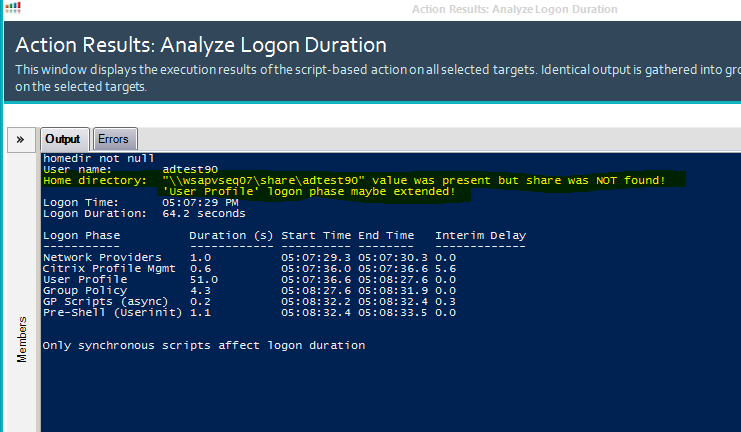
I revised the messaging slightly as I’ve found the ‘Group Policy’ phase can be affected if GPP Drive Maps reference the home directory attribute as well.
So I took my previous script and updated it further. This time with a check for valid home directories. I also added some window sizing information to give greater width for the response as ‘Interim Delay’ was getting truncated when there were long printer names. Here is the further updated script:
#expand output window so it looks better in ControlUp
$pshost = get-host
$pswindow = $pshost.ui.rawui
$newsize = $pswindow.buffersize
$newsize.height = 3000
$newsize.width = 128
$pswindow.buffersize = $newsize


$newsize = $pswindow.windowsize
$newsize.height = 50
$newsize.width = 128
$pswindow.windowsize = $newsize
function Get-PsEvent {

 param (
 [String]$PhaseName,
 [String]$StartProvider,
 [String]$EndProvider,
 [String]$StartXPath,
 [String]$EndXPath,
 [int]$CUAddition
 )

 #$ErrorActionPreference = 'SilentlyContinue'

 try {
 $StartEvent = Get-WinEvent -MaxEvents 1 -ProviderName $StartProvider -FilterXPath $StartXPath -ErrorAction Stop
 if ($StartProvider -eq 'Microsoft-Windows-Security-Auditing' -and $EndProvider -eq 'Microsoft-Windows-Security-Auditing') {
 $EndEvent = Get-WinEvent -MaxEvents 1 -ProviderName $EndProvider -FilterXPath ("{0}{1}" -f $EndXPath,@"

and *[EventData[Data[@Name='ProcessId']
and (Data=`'$($StartEvent.Properties[4].Value)`')]]
"@)

 }
 elseif ($CUAddition) {
 $EndEvent = $StartEvent
 $EndEvent = ($StartEvent.TimeCreated).AddSeconds($CUAddition)

 }

 else {
 $EndEvent = Get-WinEvent -MaxEvents 1 -ProviderName $EndProvider -FilterXPath $EndXPath
 }
 }

 catch {
 if ($PhaseName -ne 'Citrix Profile Mgmt') {
 if ($StartProvider -eq 'Microsoft-Windows-Security-Auditing' -or $EndProvider -eq 'Microsoft-Windows-Security-Auditing' ) {
 "Could not find $PhaseName events (requires audit process tracking)"
 }
 else {
 "Could not find $PhaseName events"
 }
 Return
 }
 }
 $EventInfo = @{}

 if ((($EndEvent).GetType()).Name -eq 'DateTime') {
 $Duration = New-TimeSpan -Start $StartEvent.TimeCreated -End $EndEvent
 $EventInfo.EndTime = $EndEvent
 }
 else {
 $Duration = New-TimeSpan -Start $StartEvent.TimeCreated -End $EndEvent.TimeCreated
 $EventInfo.EndTime = $EndEvent.TimeCreated

 }

 $Script:EventProperties = $StartEvent.Properties

 $EventInfo.PhaseName = $PhaseName
 $EventInfo.StartTime = $StartEvent.TimeCreated

 $EventInfo.Duration = $Duration.TotalSeconds

 $PSObject = New-Object -TypeName PSObject -Property $EventInfo

 if ($EventInfo.Duration) {
 $Script:Output += $PSObject
 }
}

function Get-LogonDurationAnalysis {

param (
 [Parameter(Mandatory=$true)]
 [String]$Username,
 [Parameter(Mandatory=$true)]
 [String]$UserDomain,
 [Parameter(Mandatory=$true)]
 [String]$clientName,
 [int]$CUDesktopLoadTime
 )

$ErrorActionPreference = 'SilentlyContinue'

$Script:Output = @()


try {

$LogonEvent = Get-WinEvent -MaxEvents 1 -ProviderName Microsoft-Windows-Security-Auditing -FilterXPath @"
*[System[(EventID='4624')]]
and *[EventData[Data[@Name='TargetUserName']
and (Data=`"$UserName`")]]
and *[EventData[Data[@Name='TargetDomainName']
and (Data=`"$UserDomain`")]]
and *[EventData[Data[@Name='LogonType']
and (Data=`"2`" or Data=`"10`" or Data=`"11`")]]
and *[EventData[Data[@Name='ProcessName']
and (Data=`"C:\Windows\System32\winlogon.exe`")]]
"@ -ErrorAction Stop

}

catch {
Throw 'Could not find EventID 4624 (Successfully logged on event) in the Windows Security log.'
}

$Logon = New-Object -TypeName PSObject

Add-Member -InputObject $Logon -MemberType NoteProperty -Name LogonTime -Value $LogonEvent.TimeCreated
Add-Member -InputObject $Logon -MemberType NoteProperty -Name FormatTime -Value (Get-Date -Date $LogonEvent.TimeCreated -UFormat %r)
Add-Member -InputObject $Logon -MemberType NoteProperty -Name LogonID -Value ($LogonEvent.Properties[7]).Value
Add-Member -InputObject $Logon -MemberType NoteProperty -Name WinlogonPID -Value ($LogonEvent.Properties[16]).Value
Add-Member -InputObject $Logon -MemberType NoteProperty -Name UserSID -Value ($LogonEvent.Properties[4]).Value


$ISO8601Date = Get-Date -Date $Logon.LogonTime
$ISO8601Date = $ISO8601Date.ToUniversalTime()
$ISO8601Date = $ISO8601Date.ToString("s")


#test to see if cmd.exe was launched by Winlogon.exe instead of userinit.exe
if ($KB924034_fix = Get-WinEvent -MaxEvents 1 -ProviderName Microsoft-Windows-Security-Auditing -FilterXPath @"
*[System[(EventID='4688')]]
and *[EventData[Data[@Name='ProcessId']
and (Data=`'$($Logon.WinlogonPID)`')]]
and *[EventData[Data[@Name='NewProcessName']
and (Data='C:\Windows\System32\cmd.exe')]]
"@ -ErrorAction Stop) {
 #write-host "KB924034 tweak found. Setting ID of this process as the parent of userinit.exe2"
 $UserinitXPath = @"
*[System[(EventID='4688')]]
and *[EventData[Data[@Name='ProcessId']
and (Data=`'$($KB924034_fix.Properties[4].Value)`')]]
and *[EventData[Data[@Name='NewProcessName']
and (Data='C:\Windows\System32\userinit.exe')]]
"@
 } else {
$UserinitXPath = @"
*[System[(EventID='4688')]]
and *[EventData[Data[@Name='ProcessId']
and (Data=`'$($Logon.WinlogonPID)`')]]
and *[EventData[Data[@Name='NewProcessName']
and (Data='C:\Windows\System32\userinit.exe')]]
"@
}


$NPStartXpath = @"
*[System[(EventID='4688')]]
and *[EventData[Data[@Name='ProcessId']
and (Data=`'$($Logon.WinlogonPID)`')]]
and *[EventData[Data[@Name='NewProcessName']
and (Data='C:\Windows\System32\mpnotify.exe')]]
"@

$NPEndXPath = @"
*[System[(EventID='4689')]]
and *[EventData[Data[@Name='ProcessName']
and (Data=`"C:\Windows\System32\mpnotify.exe`")]]
"@

$ProfStartXpath = @"
*[System[(EventID='10')
and TimeCreated[@SystemTime > '$ISO8601Date']]]
and *[EventData[Data and (Data='$UserName')]]
"@

$ProfEndXpath = @"
*[System[(EventID='1')
and TimeCreated[@SystemTime>='$ISO8601Date']]]
and *[System[Security[@UserID='$($Logon.UserSID)']]]
"@

$UserProfStartXPath = @"
*[System[(EventID='1')
and TimeCreated[@SystemTime>='$ISO8601Date']]]
and *[System[Security[@UserID='$($Logon.UserSID)']]]
"@

$UserProfEndXPath = @"
*[System[(EventID='2')
and TimeCreated[@SystemTime>='$ISO8601Date']]]
and *[System[Security[@UserID='$($Logon.UserSID)']]]
"@

$GPStartXPath = @"
*[System[(EventID='4001')
and TimeCreated[@SystemTime>='$ISO8601Date']]]
and *[EventData[Data[@Name='PrincipalSamName']
and (Data=`"$UserDomain\$UserName`")]]
"@

$GPEndXPath = @"
*[System[(EventID='8001')]]
and *[EventData[Data[@Name='PrincipalSamName']
and (Data=`"$UserDomain\$UserName`")]]
"@

$GPScriptStartXPath = @"
*[System[(EventID='4018')
and TimeCreated[@SystemTime>='$ISO8601Date']]]
and *[EventData[Data[@Name='PrincipalSamName']
and (Data=`"$UserDomain\$UserName`")]]
and *[EventData[Data[@Name='ScriptType']
and (Data='1')]]
"@

$GPScriptEndXPath = @"
*[System[(EventID='5018')
and TimeCreated[@SystemTime>='$ISO8601Date']]]
and *[EventData[Data[@Name='PrincipalSamName']
and (Data=`"$UserDomain\$UserName`")]]
and *[EventData[Data[@Name='ScriptType']
and (Data='1')]]
"@

$ShellXPath = @"
*[System[(EventID='4688')]]
and *[EventData[Data[@Name='SubjectLogonId']
and (Data=`'$($Logon.LogonID)`')]]
and *[EventData[Data[@Name='NewProcessName']
and (Data=`"C:\Program Files (x86)\Citrix\system32\icast.exe`" or Data=`"C:\Windows\explorer.exe`")]]
"@

$ExplorerXPath = @"
*[System[(EventID='4688')]]
and *[EventData[Data[@Name='SubjectLogonId']
and (Data=`'$($Logon.LogonID)`')]]
and *[EventData[Data[@Name='NewProcessName']
and (Data=`"C:\Windows\explorer.exe`")]]
"@


Get-PsEvent -PhaseName 'Network Providers' -StartProvider 'Microsoft-Windows-Security-Auditing' -EndProvider 'Microsoft-Windows-Security-Auditing' `
-StartXPath $NPStartXpath -EndXPath $NPEndXPath

if (Get-WinEvent -ListProvider 'Citrix Profile management') {

 Get-PsEvent -PhaseName 'Citrix Profile Mgmt' -StartProvider 'Citrix Profile management' -EndProvider 'Microsoft-Windows-User Profiles Service' `
 -StartXPath $ProfStartXpath -EndXPath $ProfEndXpath
}

Get-PsEvent -PhaseName 'User Profile' -StartProvider 'Microsoft-Windows-User Profiles Service' -EndProvider 'Microsoft-Windows-User Profiles Service' `
-StartXPath $UserProfStartXPath -EndXPath $UserProfEndXPath

Get-PsEvent -PhaseName 'Group Policy' -StartProvider 'Microsoft-Windows-GroupPolicy' -EndProvider 'Microsoft-Windows-GroupPolicy' `
-StartXPath $GPStartXPath -EndXPath $GPEndXPath

Get-PsEvent -PhaseName 'GP Scripts' -StartProvider 'Microsoft-Windows-GroupPolicy' -EndProvider 'Microsoft-Windows-GroupPolicy' `
-StartXPath $GPScriptStartXPath -EndXPath $GPScriptEndXPath

if ($Script:EventProperties[3].Value -eq $true) {
 if ($Script:Output[-1].PhaseName -eq 'GP Scripts') {
 $Script:Output[-1].PhaseName = 'GP Scripts (sync)'
 }
}
else {
 if ($Script:Output[-1].PhaseName -eq 'GP Scripts') {
 $Script:Output[-1].PhaseName = 'GP Scripts (async)'
 }
}


Get-PsEvent -PhaseName 'Pre-Shell (Userinit)' -StartProvider 'Microsoft-Windows-Security-Auditing' -EndProvider 'Microsoft-Windows-Security-Auditing' `
-StartXPath $UserinitXPath -EndXPath $ShellXPath


if ($CUDesktopLoadTime) {
Get-PsEvent -PhaseName 'Shell' -StartProvider 'Microsoft-Windows-Security-Auditing' -StartXPath $ExplorerXPath -CUAddition $CUDesktopLoadTime

}

if ($Script:Output[-1].PhaseName -eq 'Shell' -or $Script:Output[-1].PhaseName -eq 'Pre-Shell (Userinit)') {

$TotalDur = "{0:N1}" -f (New-TimeSpan -Start $Logon.LogonTime -End $Script:Output[-1].EndTime | Select-Object -ExpandProperty TotalSeconds) `
+ " seconds"
}

else
{

$TotalDur = 'N/A'

}

#############NEED NEW ARGUMENT: CLIENTNAME
###################### Find how long it took to load printers into the session
###################### This impacts logon when 'wait for printers before starting application' is set
###################### This will not find any printers if the 'wait' is not set because (odds are anyways)
###################### that no printer events will be generated before pre-shell ends.
if (-not($clientName -eq "0")) {
 if (-not(($script:output | where {$_.phaseName -eq "Pre-Shell (Userinit)"}).Duration -eq $null)) {
 $preShellEndTime = (($script:output | where {$_.phaseName -eq "Pre-Shell (Userinit)"}).EndTime)
 #set end search
 $endShellTime = $Logon.LogonTime + [timespan]::FromSeconds($preShellDuration)


 $PrinterSearchISO8601Date = $preShellEndTime
 $PrinterSearchISO8601Date = $PrinterSearchISO8601Date.ToUniversalTime()
 $PrinterSearchISO8601Date = $PrinterSearchISO8601Date.ToString("s")


 $PrinterStartXPath = @"
*[System[TimeCreated[@SystemTime>='$ISO8601Date'
and @SystemTime<='$PrinterSearchISO8601Date']]]
"@

 $printerEvents = Get-WinEvent -ProviderName "Microsoft-Windows-PrintService" -FilterXPath $PrinterStartXPath | ?{$_.message -like "*$clientName*"} | sort -Property TimeCreated

 #get list of printers:
 $listOfPrinters = @()
 foreach ($printerEvent in $printerEvents) {
 if ($printerEvent.Id -eq "300") {
 $listOfPrinters += ($printerEvent.Message -split "Printer " -split " on " -split "\(from")[1]
 }
 }

 #printer total load time
 $EventInfo = @{}
 $Duration = New-TimeSpan -Start $printerEvents[0].TimeCreated -End $printerEvents[-1].TimeCreated
 $phaseName = "Pre-Shell Printer load time:"
 $EventInfo.PhaseName = $PhaseName
 $EventInfo.Duration = $Duration.TotalSeconds
 $EventInfo.EndTime = $printerEvents[-1].TimeCreated
 $EventInfo.StartTime = $printerEvents[0].TimeCreated

 $PSObject = New-Object -TypeName PSObject -Property $EventInfo

 if ($EventInfo.Duration) {
 $Script:Output += $PSObject
 }

 #get the timespan of each printer creation start event ("Settings for printer X") and end event ("Printer X on Y")
 $EventInfo = @{}
 foreach ($printerEvent in $printerEvents) {
 foreach ($printer in $listOfPrinters) {
 $phaseName = "Printer: $printer"
 if ($printerEvent.message -like "*$printer*" -and $printerEvent.Id -eq "306") {
 $printerEventStart = $printerEvent.TimeCreated
 }
 if ($printerEvent.message -like "*$printer*" -and $printerEvent.Id -eq "300") {
 $printerEventEnd = $printerEvent.TimeCreated
 $Duration = New-TimeSpan -Start $printerEventStart -End $printerEventEnd
 $EventInfo.PhaseName = $PhaseName
 $EventInfo.Duration = $Duration.TotalSeconds
 $EventInfo.EndTime = $printerEventEnd
 $EventInfo.StartTime = $printerEventStart

 $PSObject = New-Object -TypeName PSObject -Property $EventInfo

 if ($EventInfo.Duration) {
 $Script:Output += $PSObject
 }
 }


 }
 }
 }
}
###################### Printer scan finished

###################### Query AD for home directory attribute and test to see if it works
$homedir = ([ADSISEARCHER]"samaccountname=$($args_fix[1])").Findone().Properties.homedirectory
$HomeDirMessage = "Not Present"
if ($homedir -ne $null) {
 write-host "homedir not null"
 if ((test-path $homedir) -eq $false) {
 $HomeDirMessage = """$homedir""" + " value was present but share was NOT found!`
`t`t 'User Profile' or 'Group Policy' logon phase maybe extended!"
 } else {
 $HomeDirMessage = """$homedir""" + " value was present and share was found."
 }
}


$Script:Output = $Script:Output | Sort-Object StartTime

for($i=1;$i -le $Script:Output.length-1;$i++) {

 $Deltas = New-TimeSpan -Start $Script:Output[$i-1].EndTime -End $Script:Output[$i].StartTime
 $Script:Output[$i] | Add-Member -MemberType NoteProperty -Name TimeDelta -Value $Deltas -Force


}

$Deltas = New-TimeSpan -Start $Logon.LogonTime -End $Script:Output[0].StartTime
$Script:Output[0] | Add-Member -MemberType NoteProperty -Name TimeDelta -Value $Deltas -Force

Write-Host "User name:`t $UserName`
Home directory:`t $homeDirMessage `
Logon Time:`t $($Logon.FormatTime) `
Logon Duration:`t $TotalDur"

$Format = @{Expression={$_.PhaseName};Label="Logon Phase"}, `
@{Expression={'{0:N1}' -f $_.Duration};Label="Duration (s)"}, `
@{Expression={'{0:hh:mm:ss.f}' -f $_.StartTime};Label="Start Time"}, `
@{Expression={'{0:hh:mm:ss.f}' -f $_.EndTime};Label="End Time"}, `
@{Expression={'{0:N1}' -f ($_.TimeDelta | Select-Object -ExpandProperty TotalSeconds)};Label="Interim Delay"}
$Script:Output | Format-Table $Format -AutoSize

Write-Host "Only synchronous scripts affect logon duration"


}

$args_fix = ($args[0] -split '\\')
Get-LogonDurationAnalysis -Username $args_fix[1] -UserDomain $args_fix[0] -clientName $args[1] -CUDesktopLoadTime $args[2