We have applications that require printers be loaded before the application is started. This is usually because the application will check for a specific printer or default printer and if one is not set (because it hasn’t mapped into the session) then it’ll throw up a dialog or not start entirely.
So we have this value ‘unchecked’ for some applications:

But how does this impact our logon times?
Well… Our organization just underwent a print server migration/upgrade where some print servers were decommissioned and don’t exist. But some users still have them or references to them on their end points. We do have policies that only map your default printer, but some users are on a policy to map ‘all’ printers they have on their system.
What’s the impact?
 </p>
</p>
Waiting for printers before starting the application...
 </p>
</p>
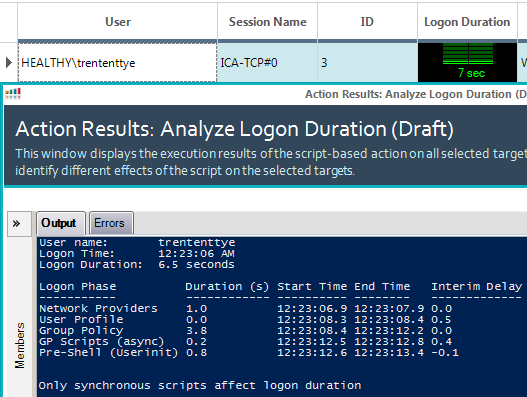
Without waiting for printers
16 Seconds? How is that so?
Well, it turns out waiting for printers and the subsystem components to support them add a fair amount of time, and then worse is network printers that don’t go anywhere anymore. I’ve seen these logons wait for connection before timing out, all the while the user sits there and waits. The script that comes with ControlUp for analyzing logons is good, but I wanted to know more on why some systems had long logon times and the only clue was Pre-Shell (userinit) taking up all the time. So I dug into the print logs and found a way to measure their impact.
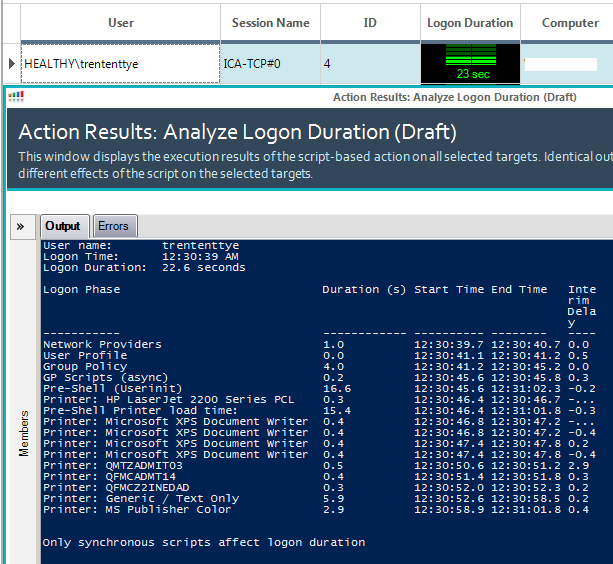
With my modified script we can clearly see waiting for the printers takes ~15.4s with a few printers over a few seconds and the rest at 0.5 seconds or so. One thing about this process is that mapping printers is synchronous. So when or if 1 stalls, the whole process gets stuck. All my printers were local except for the ‘Generic / Text Only’ which was a network printer where I powered off the server. It hung the longest at 5.9 seconds, but I’ve seen ‘non-existant’ network mapped printers hang for 150 seconds or so…
To facilitate finding the printers we need to pass the clientName to the server and the Print Service Logs need to be enabled.
You can enable the print service logs on server 2008R2 by executing the following:
REG ADD "HKLM\SOFTWARE\Microsoft\Windows\CurrentVersion\WINEVT\Channels\Microsoft-Windows-PrintService/Operational" /V "Enabled" /T REG_DWORD /D 1 /F >NUL
REG ADD "HKLM\SOFTWARE\Microsoft\Windows\CurrentVersion\WINEVT\Channels\Microsoft-Windows-PrintService/Operational" /V "MaxSize" /T REG_DWORD /D 20971520 /F >NUL
REG ADD "HKLM\SOFTWARE\Microsoft\Windows\CurrentVersion\WINEVT\Channels\Microsoft-Windows-PrintService/Operational" /V "MaxSizeUpper" /T REG_DWORD /D 0 /F >NUL
WEVTUTIL SL Microsoft-Windows-PrintService/Operational /E:TRUE
The ControlUp arguments need to look like this now:
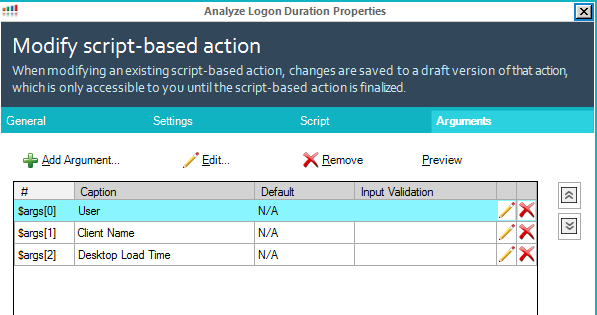
Here is my updated script:
function Get-PsEvent {

    param (
        [String]$PhaseName,
        [String]$StartProvider,
        [String]$EndProvider,
        [String]$StartXPath,
        [String]$EndXPath,
        [int]$CUAddition
        )

        #$ErrorActionPreference = 'SilentlyContinue'

        try {
            $StartEvent = Get-WinEvent -MaxEvents 1 -ProviderName $StartProvider -FilterXPath $StartXPath -ErrorAction Stop
            if ($StartProvider -eq 'Microsoft-Windows-Security-Auditing' -and $EndProvider -eq 'Microsoft-Windows-Security-Auditing') {
                $EndEvent = Get-WinEvent -MaxEvents 1 -ProviderName $EndProvider -FilterXPath ("{0}{1}" -f $EndXPath,@"

and *[EventData[Data[@Name='ProcessId']
and (Data=`'$($StartEvent.Properties[4].Value)`')]]
"@)

            }
            elseif ($CUAddition) {
                $EndEvent = $StartEvent
                $EndEvent = ($StartEvent.TimeCreated).AddSeconds($CUAddition)

            }

            else {
                $EndEvent = Get-WinEvent -MaxEvents 1 -ProviderName $EndProvider -FilterXPath $EndXPath
            }
       }

        catch {
            if ($PhaseName -ne 'Citrix Profile Mgmt') {
                if ($StartProvider -eq 'Microsoft-Windows-Security-Auditing' -or $EndProvider -eq 'Microsoft-Windows-Security-Auditing' ) {
                    "Could not find $PhaseName events (requires audit process tracking)"
                }
                else {
                    "Could not find $PhaseName events"
                }
                Return
            }
        }
        $EventInfo = @{}

        if ((($EndEvent).GetType()).Name -eq 'DateTime') {
            $Duration = New-TimeSpan -Start $StartEvent.TimeCreated -End $EndEvent
            $EventInfo.EndTime = $EndEvent
        }
        else {
            $Duration = New-TimeSpan -Start $StartEvent.TimeCreated -End $EndEvent.TimeCreated
            $EventInfo.EndTime = $EndEvent.TimeCreated

        }

        $Script:EventProperties = $StartEvent.Properties

        $EventInfo.PhaseName = $PhaseName
        $EventInfo.StartTime = $StartEvent.TimeCreated

        $EventInfo.Duration = $Duration.TotalSeconds

        $PSObject = New-Object -TypeName PSObject -Property $EventInfo

        if ($EventInfo.Duration) {
            $Script:Output += $PSObject
        }
}

function Get-LogonDurationAnalysis {

param (
    [Parameter(Mandatory=$true)]
    [String]$Username,
    [Parameter(Mandatory=$true)]
    [String]$UserDomain,
    [Parameter(Mandatory=$true)]
    [String]$clientName,
    [int]$CUDesktopLoadTime
    )

$ErrorActionPreference = 'SilentlyContinue'

$Script:Output = @()


try {

$LogonEvent = Get-WinEvent -MaxEvents 1 -ProviderName Microsoft-Windows-Security-Auditing -FilterXPath @"
*[System[(EventID='4624')]]
and *[EventData[Data[@Name='TargetUserName']
and (Data=`"$UserName`")]]
and *[EventData[Data[@Name='TargetDomainName']
and (Data=`"$UserDomain`")]]
and *[EventData[Data[@Name='LogonType']
and (Data=`"2`" or Data=`"10`" or Data=`"11`")]]
and *[EventData[Data[@Name='ProcessName']
and (Data=`"C:\Windows\System32\winlogon.exe`")]]
"@ -ErrorAction Stop

}

catch {
Throw 'Could not find EventID 4624 (Successfully logged on event) in the Windows Security log.'
}

$Logon = New-Object -TypeName PSObject

Add-Member -InputObject $Logon -MemberType NoteProperty -Name LogonTime -Value $LogonEvent.TimeCreated
Add-Member -InputObject $Logon -MemberType NoteProperty -Name FormatTime -Value (Get-Date -Date $LogonEvent.TimeCreated -UFormat %r)
Add-Member -InputObject $Logon -MemberType NoteProperty -Name LogonID -Value ($LogonEvent.Properties[7]).Value
Add-Member -InputObject $Logon -MemberType NoteProperty -Name WinlogonPID -Value ($LogonEvent.Properties[16]).Value
Add-Member -InputObject $Logon -MemberType NoteProperty -Name UserSID -Value ($LogonEvent.Properties[4]).Value


$ISO8601Date = Get-Date -Date $Logon.LogonTime
$ISO8601Date = $ISO8601Date.ToUniversalTime()
$ISO8601Date = $ISO8601Date.ToString("s")


#test to see if cmd.exe was launched by Winlogon.exe instead of userinit.exe
if ($KB924034_fix = Get-WinEvent -MaxEvents 1 -ProviderName Microsoft-Windows-Security-Auditing -FilterXPath @"
*[System[(EventID='4688')]]
and *[EventData[Data[@Name='ProcessId']
and (Data=`'$($Logon.WinlogonPID)`')]]
and *[EventData[Data[@Name='NewProcessName']
and (Data='C:\Windows\System32\cmd.exe')]]
"@ -ErrorAction Stop) {
    #write-host "KB924034 tweak found.  Setting ID of this process as the parent of userinit.exe2"
    $UserinitXPath = @"
*[System[(EventID='4688')]]
and *[EventData[Data[@Name='ProcessId']
and (Data=`'$($KB924034_fix.Properties[4].Value)`')]]
and *[EventData[Data[@Name='NewProcessName']
and (Data='C:\Windows\System32\userinit.exe')]]
"@
    } else {
$UserinitXPath = @"
*[System[(EventID='4688')]]
and *[EventData[Data[@Name='ProcessId']
and (Data=`'$($Logon.WinlogonPID)`')]]
and *[EventData[Data[@Name='NewProcessName']
and (Data='C:\Windows\System32\userinit.exe')]]
"@
}


$NPStartXpath = @"
*[System[(EventID='4688')]]
and *[EventData[Data[@Name='ProcessId']
and (Data=`'$($Logon.WinlogonPID)`')]]
and *[EventData[Data[@Name='NewProcessName']
and (Data='C:\Windows\System32\mpnotify.exe')]]
"@

$NPEndXPath = @"
*[System[(EventID='4689')]]
and *[EventData[Data[@Name='ProcessName']
and (Data=`"C:\Windows\System32\mpnotify.exe`")]]
"@

$ProfStartXpath = @"
*[System[(EventID='10')
and TimeCreated[@SystemTime > '$ISO8601Date']]]
and *[EventData[Data and (Data='$UserName')]]
"@

$ProfEndXpath = @"
*[System[(EventID='1')
and  TimeCreated[@SystemTime>='$ISO8601Date']]]
and *[System[Security[@UserID='$($Logon.UserSID)']]]
"@

$UserProfStartXPath = @"
*[System[(EventID='1')
and  TimeCreated[@SystemTime>='$ISO8601Date']]]
and *[System[Security[@UserID='$($Logon.UserSID)']]]
"@

$UserProfEndXPath = @"
*[System[(EventID='2')
and  TimeCreated[@SystemTime>='$ISO8601Date']]]
and *[System[Security[@UserID='$($Logon.UserSID)']]]
"@

$GPStartXPath = @"
*[System[(EventID='4001')
and  TimeCreated[@SystemTime>='$ISO8601Date']]]
and *[EventData[Data[@Name='PrincipalSamName']
and (Data=`"$UserDomain\$UserName`")]]
"@

$GPEndXPath = @"
*[System[(EventID='8001')]]
and *[EventData[Data[@Name='PrincipalSamName']
and (Data=`"$UserDomain\$UserName`")]]
"@

$GPScriptStartXPath = @"
*[System[(EventID='4018')
and  TimeCreated[@SystemTime>='$ISO8601Date']]]
and *[EventData[Data[@Name='PrincipalSamName']
and (Data=`"$UserDomain\$UserName`")]]
and *[EventData[Data[@Name='ScriptType']
and (Data='1')]]
"@

$GPScriptEndXPath = @"
*[System[(EventID='5018')
and  TimeCreated[@SystemTime>='$ISO8601Date']]]
and *[EventData[Data[@Name='PrincipalSamName']
and (Data=`"$UserDomain\$UserName`")]]
and *[EventData[Data[@Name='ScriptType']
and (Data='1')]]
"@

$ShellXPath = @"
*[System[(EventID='4688')]]
and *[EventData[Data[@Name='SubjectLogonId']
and (Data=`'$($Logon.LogonID)`')]]
and *[EventData[Data[@Name='NewProcessName']
and (Data=`"C:\Program Files (x86)\Citrix\system32\icast.exe`" or Data=`"C:\Windows\explorer.exe`")]]
"@

$ExplorerXPath = @"
*[System[(EventID='4688')]]
and *[EventData[Data[@Name='SubjectLogonId']
and (Data=`'$($Logon.LogonID)`')]]
and *[EventData[Data[@Name='NewProcessName']
and (Data=`"C:\Windows\explorer.exe`")]]
"@


Get-PsEvent -PhaseName 'Network Providers' -StartProvider 'Microsoft-Windows-Security-Auditing' -EndProvider 'Microsoft-Windows-Security-Auditing' `
-StartXPath $NPStartXpath -EndXPath $NPEndXPath

if (Get-WinEvent -ListProvider 'Citrix Profile management') {

    Get-PsEvent -PhaseName 'Citrix Profile Mgmt' -StartProvider 'Citrix Profile management' -EndProvider 'Microsoft-Windows-User Profiles Service' `
    -StartXPath $ProfStartXpath -EndXPath $ProfEndXpath
}

Get-PsEvent -PhaseName 'User Profile' -StartProvider 'Microsoft-Windows-User Profiles Service' -EndProvider 'Microsoft-Windows-User Profiles Service' `
-StartXPath $UserProfStartXPath -EndXPath $UserProfEndXPath

Get-PsEvent -PhaseName 'Group Policy' -StartProvider 'Microsoft-Windows-GroupPolicy' -EndProvider 'Microsoft-Windows-GroupPolicy' `
-StartXPath $GPStartXPath -EndXPath $GPEndXPath

Get-PsEvent -PhaseName 'GP Scripts' -StartProvider 'Microsoft-Windows-GroupPolicy' -EndProvider 'Microsoft-Windows-GroupPolicy' `
-StartXPath $GPScriptStartXPath -EndXPath $GPScriptEndXPath

if ($Script:EventProperties[3].Value -eq $true) {
    if ($Script:Output[-1].PhaseName -eq 'GP Scripts') {
        $Script:Output[-1].PhaseName = 'GP Scripts (sync)'
    }
}
else {
    if ($Script:Output[-1].PhaseName -eq 'GP Scripts') {
        $Script:Output[-1].PhaseName = 'GP Scripts (async)'
    }
}


Get-PsEvent -PhaseName 'Pre-Shell (Userinit)' -StartProvider 'Microsoft-Windows-Security-Auditing' -EndProvider 'Microsoft-Windows-Security-Auditing' `
-StartXPath $UserinitXPath -EndXPath $ShellXPath


if ($CUDesktopLoadTime) {
Get-PsEvent -PhaseName 'Shell' -StartProvider 'Microsoft-Windows-Security-Auditing' -StartXPath $ExplorerXPath -CUAddition $CUDesktopLoadTime

}

if ($Script:Output[-1].PhaseName -eq 'Shell' -or $Script:Output[-1].PhaseName -eq 'Pre-Shell (Userinit)') {

$TotalDur = "{0:N1}" -f (New-TimeSpan -Start $Logon.LogonTime -End $Script:Output[-1].EndTime | Select-Object -ExpandProperty TotalSeconds) `
+ " seconds"
}

else
{

$TotalDur = 'N/A'

}

#############NEED NEW ARGUMENT: CLIENTNAME
###################### Find how long it took to load printers into the session
###################### This impacts logon when 'wait for printers before starting application' is set
###################### This will not find any printers if the 'wait' is not set because (odds are anyways)
###################### that no printer events will be generated before pre-shell ends.
if (-not($clientName -eq "0")) {
    if (-not(($script:output | where {$_.phaseName -eq "Pre-Shell (Userinit)"}).Duration -eq $null)) {
        $preShellEndTime = (($script:output | where {$_.phaseName -eq "Pre-Shell (Userinit)"}).EndTime)
        #set end search
        $endShellTime = $Logon.LogonTime + [timespan]::FromSeconds($preShellDuration)


        $PrinterSearchISO8601Date = $preShellEndTime
        $PrinterSearchISO8601Date = $PrinterSearchISO8601Date.ToUniversalTime()
        $PrinterSearchISO8601Date = $PrinterSearchISO8601Date.ToString("s")


        $PrinterStartXPath = @"
*[System[TimeCreated[@SystemTime>='$ISO8601Date'
and @SystemTime<='$PrinterSearchISO8601Date']]]
"@

        $printerEvents = Get-WinEvent -ProviderName "Microsoft-Windows-PrintService" -FilterXPath $PrinterStartXPath | ?{$_.message -like "*$clientName*"} | sort -Property TimeCreated

        #get list of printers:
        $listOfPrinters = @()
        foreach ($printerEvent in $printerEvents) {
            if ($printerEvent.Id -eq "300") {
                $listOfPrinters += ($printerEvent.Message -split "Printer " -split " on " -split "\(from")[1]
            }
        }

        #printer total load time
        $EventInfo = @{}
        $Duration = New-TimeSpan -Start $printerEvents[0].TimeCreated -End $printerEvents[-1].TimeCreated
        $phaseName = "Pre-Shell Printer load time:"
        $EventInfo.PhaseName = $PhaseName
        $EventInfo.Duration = $Duration.TotalSeconds
        $EventInfo.EndTime = $printerEvents[-1].TimeCreated
        $EventInfo.StartTime = $printerEvents[0].TimeCreated

        $PSObject = New-Object -TypeName PSObject -Property $EventInfo

        if ($EventInfo.Duration) {
            $Script:Output += $PSObject
        }

        #get the timespan of each printer creation start event ("Settings for printer X") and end event ("Printer X on Y")
        $EventInfo = @{}
        foreach ($printerEvent in $printerEvents) {
            foreach ($printer in $listOfPrinters) {
            $phaseName = "Printer: $printer"
                if ($printerEvent.message -like "*$printer*" -and $printerEvent.Id -eq "306") {
                    $printerEventStart = $printerEvent.TimeCreated
                }
                if ($printerEvent.message -like "*$printer*" -and $printerEvent.Id -eq "300") {
                    $printerEventEnd = $printerEvent.TimeCreated
                    $Duration = New-TimeSpan -Start $printerEventStart -End $printerEventEnd
                    $EventInfo.PhaseName = $PhaseName
                    $EventInfo.Duration = $Duration.TotalSeconds
                    $EventInfo.EndTime = $printerEventEnd
                    $EventInfo.StartTime = $printerEventStart

                    $PSObject = New-Object -TypeName PSObject -Property $EventInfo

                    if ($EventInfo.Duration) {
                        $Script:Output += $PSObject
                    }
                }


            }
        }
    }
}
###################### Printer scan finished

$Script:Output = $Script:Output | Sort-Object StartTime

for($i=1;$i -le $Script:Output.length-1;$i++) {

    $Deltas = New-TimeSpan -Start $Script:Output[$i-1].EndTime -End $Script:Output[$i].StartTime
    $Script:Output[$i] | Add-Member -MemberType NoteProperty -Name TimeDelta -Value $Deltas -Force


}

$Deltas = New-TimeSpan -Start $Logon.LogonTime -End $Script:Output[0].StartTime
$Script:Output[0] | Add-Member -MemberType NoteProperty -Name TimeDelta -Value $Deltas -Force

Write-Host "User name:`t $UserName `
Logon Time:`t $($Logon.FormatTime) `
Logon Duration:`t $TotalDur"

$Format = @{Expression={$_.PhaseName};Label="Logon Phase"}, `
@{Expression={'{0:N1}' -f $_.Duration};Label="Duration (s)"}, `
@{Expression={'{0:hh:mm:ss.f}' -f $_.StartTime};Label="Start Time"}, `
@{Expression={'{0:hh:mm:ss.f}' -f $_.EndTime};Label="End Time"}, `
@{Expression={'{0:N1}' -f ($_.TimeDelta | Select-Object -ExpandProperty TotalSeconds)};Label="Interim Delay"}
$Script:Output | Format-Table $Format -AutoSize

Write-Host "Only synchronous scripts affect logon duration"


}

$args_fix = ($args[0] -split '\\')
Get-LogonDurationAnalysis -Username $args_fix[1] -UserDomain  $args_fix[0] -clientName $args[1] -CUDesktopLoadTime $args[2
I hope to dig into other startup components and further drill down into what our user launch process looks like. We wait, and we see