Occasionally, we have Citrix servers that ‘die’ in a peculiar way. What happens may vary when they die but the usual symptoms are something like:
- The server is still somewhat responsive. It responds to pings, RPC requests (tasklist /s %servername%)
- The server is not responsive. You cannot RDP to it, console CTRL-ALT-DEL fails, etc.
This is frustrating because the services appear to be operating so the Citrix server will say, “hey, I’m working! I can take sessions!” And usually these servers won’t have any sessions because logons actually fail so their “& Server Load” is low, so its priority for sessions to be directed to it is higher! So how do we detect these servers with these issues? Unfortunately, I haven’t seen any events in the Event Viewer or anything that stands out to search and find these troublesome servers. Using ControlUp, sometimes it’s obvious because that troublesome server will have a much lower session count than other servers or something else is at fault and triggers the ‘Stress Level’ to go critical. But these flags don’t usually exist if the problem has just occurred, they usually are more visible after time has passed.
Our helpdesk asked if there was a way they could test servers to help pinpoint a troublesome one. I came up with a “Script-based Action” that targets a specific Citrix server and lists all published applications on that server. You then select the application and it generates a ICA file and tries to launch it. You need to have permission to the application on Citrix and Powershell remoting enabled on The XenApp Servers/ZDC’s . So if your a Citrix admin and PS Remoting is enabled this script will work out of the box.
However, I tried to make the script dynamic so you could query The XenApp Servers from a standalone server without installing Citrix Powershell SDK locally. To do this I use PowerShell remoting so you need to have PowerShell remoting enabled on your Citrix servers in your environment. Secondly, if you have ‘lower’ privilege users you need to grant them the ability to connect to the servers via PowerShell remoting (by default only Administrators have access). To grant them access you need to do the following:
Set-PSSessionConfiguration -Name Microsoft.PowerShell32 -showSecurityDescriptorUI -Confirm:$false
Set-PSSessionConfiguration -Name Microsoft.PowerShell -showSecurityDescriptorUI -Confirm:$false
Restart-service -Name "WinRM

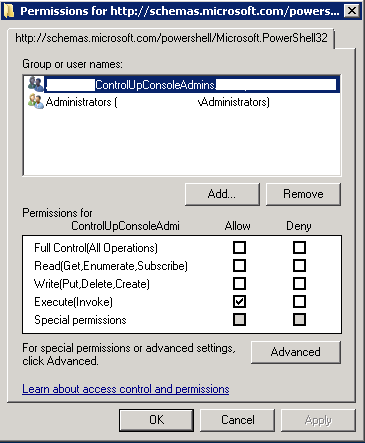
And in the ‘Set-PSSessionConfiguration’ command you need to enable the ‘Invoke’ permissions on your support group:
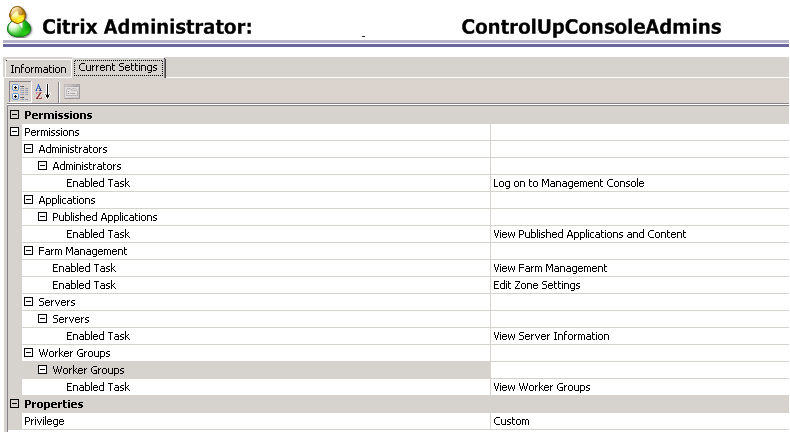
As well, you need to grant view properties on your Citrix farm since the group needs to query application properties, and workergroups (if you publish your applications to workergroups):
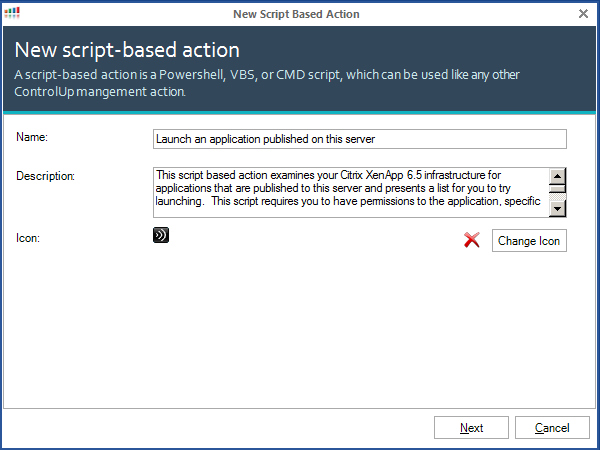
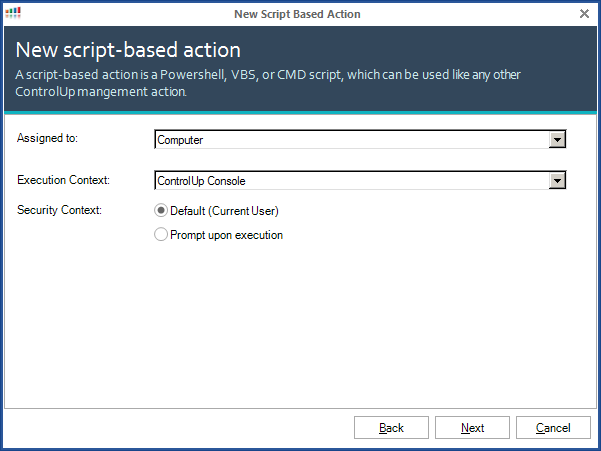
Now that we have our permissions configured we can create our ControlUp Script-Based action:
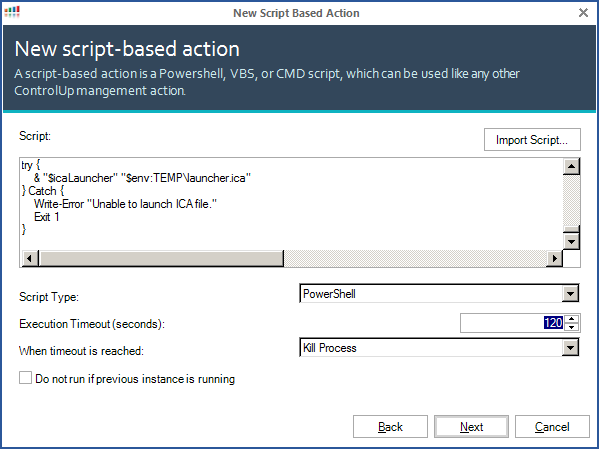
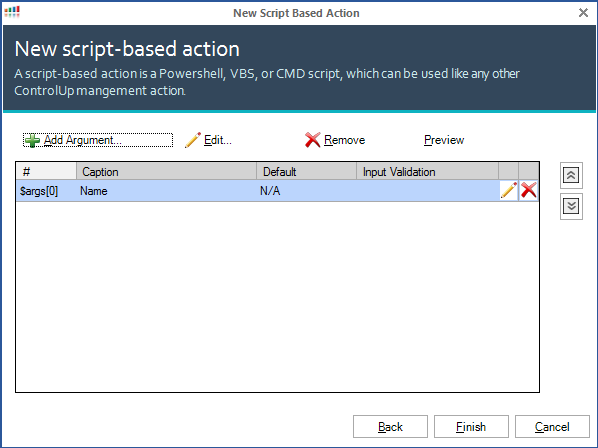
So what does this look like?
And the script:
<#
.SYNOPSIS
 Connects to Citrix XenApp 6.5 server and finds all applications published for that server.
 The script then displays a GUI with the list and presents you a choice to launch your application.
 Requires you to have rights to query XenApp for the published applications list, zones and
 you must have rights to launch the application.
.PARAMETER serverNameToFind
 The name of the server you selected.
.UPDATED 2016-08-27 - Allowed for caching of multiple different farms
                    - Tested with XenApp 5.0 successfully with XenApp Commands CTP4 and PSRemoting enabled on 2003.
#>

#grab the server we are looking for from the powershell arguments
$serverNameToFind = $args[0]


$ErrorActionPreference = "Stop"

#Remote onto the server targted and pull its ZDC from there... The theory is the local ZDC for the
#server will pull the app list faster than a remote ZDC...
$ReturnXAZDC = $null

write-host "Getting Farm Name..."
$ReturnXAFarm = Invoke-Command -ComputerName $serverNameToFind -ScriptBlock {

 Add-PsSnapin Citrix.&.Commands
 #Get Zones
 Try {
 $XAFarmName = (get-xafarm).FarmName
 } Catch {
 # capture any failure and display it in the error section, then end the script with a return
 # code of 1 so that CU sees that it was not successful.
 Write-Error $Error[0] -ErrorAction Continue
 Exit 1
 }
 return $XAFarmName
} -Args $serverNameToFind

write-host "Connecting to server remotely to get its local Zone Data Collector..."
$ReturnXAZDC = Invoke-Command -ComputerName $serverNameToFind -ScriptBlock {

 Add-PsSnapin Citrix.&.Commands
 #Get server information
 $serverObject = (get-xaserver -servername $args[0]).ZoneName

 #Get Zones
 Try {
 $XAZone = get-xaZone
 } Catch {
 # capture any failure and display it in the error section, then end the script with a return
 # code of 1 so that CU sees that it was not successful.
 Write-Error $Error[0] -ErrorAction Continue
 Exit 1
 }

 $ZDC = $null
 foreach ($Zone in get-xazone) {
 if ($serverObject -eq $Zone.ZoneName) {
 $ZDC = $zone.DataCollector
 }
 }
 return $ZDC
} -Args $serverNameToFind

write-host "Remote server reported back its local ZDC: $ReturnXAZDC"

if (-not($ReturnXAZDC -eq $null)) {
 $ZDC = $ReturnXAZDC
} else {
 Write-Error "Unable to determine ZDC remotely. ZDC detected as: $ZDC" -ErrorAction Continue
 Write-Error $Error[1] -ErrorAction Continue
 Exit 1
}

#Ensure Citrix Receiver is installed so we can launch our custom ICA file.
$icaLauncher = $null
if (Test-Path "${env:ProgramFiles(x86)}\Citrix\ICA Client\wfcrun32.exe") { $icaLauncher = "${env:ProgramFiles(x86)}\Citrix\ICA Client\wfcrun32.exe" }
if (Test-Path "${env:ProgramFiles}\Citrix\ICA Client\wfcrun32.exe") { $icaLauncher = "${env:ProgramFiles}\Citrix\ICA Client\wfcrun32.exe" }
if ($icaLauncher -eq $null) {
 write-warning "Citrix Receiver not installed or detected."
 EXIT 1
}

$allApps = $null
#see if there is a recent cached appList and use that instead...
if (test-path "$env:temp\$ReturnXAFarm.xml") {
 write-host "Found a previously cached app list."
 if (Test-Path "$env:temp\$ReturnXAFarm.xml" -OlderThan (Get-Date).AddDays(-1)) {
 write-host "Cache is expired."
 remove-item "$env:temp\$ReturnXAFarm.xml"
 } else {
 $allApps = import-clixml "$env:temp\$ReturnXAFarm.xml"
 }
}

#this next process may take a while (45seconds in my testing) if you have lots of applications/servers/etc. If a cached
#copy of the app list is present we skip this process. We connect to the ZDC as a new PS-Session as invoke-command
#appears to have a size limit or timeout that the "Get-XAApplicationReport" will fail on if the list is too large.
#New-PSSession appears to handle this without issue.
if (-not(test-path "$env:temp\$ReturnXAFarm.xml")) {
 Write-Host "Getting a list of applications and all servers they are published on..."
 Try {
 $SessionCitrix = New-PSSession -ComputerName $ReturnXAZDC
 $allApps = Invoke-Command -session $SessionCitrix -ScriptBlock {

 Add-PsSnapin Citrix.&.Commands
 #Get server information
 $allApps = Get-XAApplicationReport -BrowserName * | select DisplayName,Enabled,Accounts,FolderPath,@{N='ServerNames';E={$_.serverNames+($_|?{$_.WorkerGroupNames}|%{Get-XAWorkerGroup $_.WorkerGroupNames}).ServerNames | sort}}
 $allAppsWithoutDisabled = @()
 foreach ($app in $allApps) {
 if ($app.Enabled -eq $true) {
 $allAppsWithoutDisabled = $allAppsWithoutDisabled += $app
 }
 }
 return $allAppsWithoutDisabled
 }
 # Close Session
 Remove-PSSession $SessionCitrix
 } Catch {
 # capture any failure and display it in the error section, then end the script with a return
 # code of 1 so that CU sees that it was not successful.
 Write-Error $Error[0] -ErrorAction Continue
 Exit 1
 }
}

if (-not($allApps -eq $null)) {
 #we cache the application list in the %temp% in case they do subsequent launches
 $allApps | export-clixml "$env:temp\$ReturnXAFarm.xml"
} else {
 Write-Error "No Applications found on the server or an error getting application list"
 Exit 1
}


#get the group membership of this user
$groupMembership = ([ADSISEARCHER]"samaccountname=$($env:USERNAME)").Findone().Properties.memberof -replace '^CN=([^,]+).+$','$1' | sort

#remove apps from the list that the user doesn't have access too
$allAppsIHaveAccessTo = @()
foreach ($app in $allApps) {
 foreach ($membership in $groupMembership) {
 if ($app.Accounts -like "*$membership*") {
 $allAppsIHaveAccessTo = $allAppsIHaveAccessTo += $app
 break
 }
 }

}

$appListOnServer = @()
foreach ($app in $allAppsIHaveAccessTo) { if ($app.ServerNames -like $serverNameToFind) {$appListOnServer += $app.DisplayName}}

$appListOnServer = $appListOnServer | sort

#blank the selected combobox variable
$global:SelObj = $null

Function Select-GUIObject ($ObjName, $Object) {
 #Generated Form Function
 function GenerateForm {
 ########################################################################
 # Code Generated By: SAPIEN Technologies PrimalForms (Community Edition) v1.0.7.0
 # Generated By: Alan Renouf (http://virtu-al.net)
 ########################################################################

 #region Import the Assemblies
 [reflection.assembly]::loadwithpartialname("System.Windows.Forms") | Out-Null
 [reflection.assembly]::loadwithpartialname("System.Drawing") | Out-Null
 #endregion

 #region Generated Form Objects
 $form1 = New-Object System.Windows.Forms.Form
 #ensure it starts out on-top
 $form1.TopMost = $true
 $button1 = New-Object System.Windows.Forms.Button
 $label1 = New-Object System.Windows.Forms.Label
 $comboBox1 = New-Object System.Windows.Forms.ComboBox
 $InitialFormWindowState = New-Object System.Windows.Forms.FormWindowState
 #endregion Generated Form Objects

 #----------------------------------------------
 #Generated Event Script Blocks
 #----------------------------------------------
 #Provide Custom Code for events specified in PrimalForms.
 $button1_OnClick=
 {
 $global:SelObj = $comboBox1.SelectedItem
 $form1.close()
 }

 $handler_label2_Click=
 {
 }

 $OnLoadForm_StateCorrection=
 {#Correct the initial state of the form to prevent the .Net maximized form issue
 $form1.WindowState = $InitialFormWindowState

 $Object | Foreach {
 $comboBox1.items.add($_)
 $comboBox1.SelectedIndex=0
 }
 $Combobox1.visible = $true
 $label1.visible = $true
 $button1.visible = $true
 $form1.Text = "Please select a $ObjName"
 }

 #----------------------------------------------
 #region Generated Form Code
 $form1.AutoScaleMode = 0
 $form1.Text = "Please wait loading $ObjName...."
 $form1.Name = "form1"
 $form1.DataBindings.DefaultDataSourceUpdateMode = 0
 $System_Drawing_Size = New-Object System.Drawing.Size
 $System_Drawing_Size.Height = 66
 $System_Drawing_Size.Width = 392
 $form1.ClientSize = $System_Drawing_Size
 $form1.FormBorderStyle = 1

 $form1.Controls.Add($InfoLabel)

 $button1.TabIndex = 2
 $System_Drawing_Size = New-Object System.Drawing.Size
 $System_Drawing_Size.Height = 23
 $System_Drawing_Size.Width = 75
 $button1.Size = $System_Drawing_Size
 $button1.Name = "button1"
 $button1.UseVisualStyleBackColor = $True

 $button1.Visible = $False
 $button1.Text = "OK"
 $System_Drawing_Point = New-Object System.Drawing.Point
 $System_Drawing_Point.X = 300
 $System_Drawing_Point.Y = 21
 $button1.Location = $System_Drawing_Point

 $button1.DataBindings.DefaultDataSourceUpdateMode = 0
 $button1.add_Click($button1_OnClick)

 $form1.Controls.Add($button1)

 $label1.TabIndex = 1
 $label1.Font = New-Object System.Drawing.Font("Microsoft Sans Serif",8.25,1,3,1)
 $System_Drawing_Size = New-Object System.Drawing.Size
 $System_Drawing_Size.Height = 23
 $System_Drawing_Size.Width = 50
 $label1.Size = $System_Drawing_Size
 $label1.Name = "label1"
 $label1.Visible = $False
 $label1.Text = "$ObjName"
 $System_Drawing_Point = New-Object System.Drawing.Point
 $System_Drawing_Point.X = 8
 $System_Drawing_Point.Y = 26
 $label1.Location = $System_Drawing_Point

 $label1.DataBindings.DefaultDataSourceUpdateMode = 0

 $form1.Controls.Add($label1)

 $System_Drawing_Point = New-Object System.Drawing.Point
 $System_Drawing_Point.X = 64
 $System_Drawing_Point.Y = 21
 $comboBox1.Location = $System_Drawing_Point
 $comboBox1.Visible = $False
 $comboBox1.DataBindings.DefaultDataSourceUpdateMode = 0
 $comboBox1.FormattingEnabled = $True
 $comboBox1.Name = "comboBox1"
 $comboBox1.TabIndex = 0
 $System_Drawing_Size = New-Object System.Drawing.Size
 $System_Drawing_Size.Height = 21
 $System_Drawing_Size.Width = 217
 $comboBox1.Size = $System_Drawing_Size

 $form1.Controls.Add($comboBox1)

 #endregion Generated Form Code

 #Save the initial state of the form
 $InitialFormWindowState = $form1.WindowState
 #Init the OnLoad event to correct the initial state of the form
 $form1.add_Load($OnLoadForm_StateCorrection)

 #Show the Form)
 $form1.ShowDialog($this)| Out-Null


 } #End Function

 #Call the Function
 GenerateForm
}


Select-GUIObject "App" ($appListOnServer)

if ($selObj -eq $null) {
 Write-error "No App Selected"
 EXIT 1
} else {
write-host "Selected App: $selObj"

write-host "Creating ICA file"
$icaContent = "[Encoding]`n"
$icaContent += "InputEncoding = ISO8859_1`n"
$icaContent += "[WFClient]`n"
$icaContent += "Version=2`n"
$icaContent += "EnableSSOnThruICAFile=On`n"
$icaContent += "ProxyType=Auto`n"
$icaContent += "HttpBrowserAddress={0}:28001`n" -f $ZDC,$IMAPort
$icaContent += "ConnectionBar=0`n"
$icaContent += "`n"
$icaContent += "[ApplicationServers]`n"
$icaContent += "{0}=`n" -f $SelObj
$icaContent += "`n"
$icaContent += "[{0}]`n" -f $SelObj
$icaContent += "Address={0}`n" -f $serverNameToFind
$icaContent += "InitialProgram=#{0}`n" -f $SelObj
$icaContent += "CGPAddress=*:2598`n"
$icaContent += "ClientAudio=On`n"
$icaContent += "DesiredColor=8`n"
$icaContent += "TWIMode = True`n"
$icaContent += "KeyboardTimer = 0`n"
$icaContent += "MouseTimer = 0`n"
$icaContent += "ConnectionBar=0`n"
$icaContent += "EnableSSOnThruICAFile=On `n"
$icaContent += "UseLocalUserAndPassword=On `n"
$icaContent += "TransportDriver=TCP/IP`n"
$icaContent += "WinStationDriver=ICA 3.0`n"
$icaContent += "BrowserProtocol=HTTPonTCP`n"
$icaContent += "Compress=On`n"
$icaContent += "EncryptionLevelSession=Encrypt`n"
$icaContent += "[Encrypt]`n"
$icaContent += "DriverNameWin32=PDCRYPTN.DLL`n"
$icaContent += "DriverNameWin16=PDCRYPTW.DLL`n"
$icaContent += "[Compress]`n"
$icaContent += "DriverName=PDCOMP.DLL`n"
$icaContent += "DriverNameWin16=PDCOMPW.DLL`n"
$icaContent += "DriverNameWin32=PDCOMPN.DLL`n"

$icaContent | out-file -Encoding ASCII $env:TEMP\launcher.ica -Force
}

write-host "Launching Citrix Receiver"
try {
 & "$icaLauncher" "$env:TEMP\launcher.ica"
} Catch {
 Write-Error "Unable to launch ICA file."
 Exit 1
}