We are still in a pilot-preupgrade phase of Citrix Director 7.7 and found an issue where we were getting artifacts with IE11. The artifacts manifested themselves like so:

|
| This is wrong. |
When the search box should look like this:

|
| This is right. |
This issue appears to be caused by a policy our organization uses to enable compatibility view for sites on the Local Intranet:
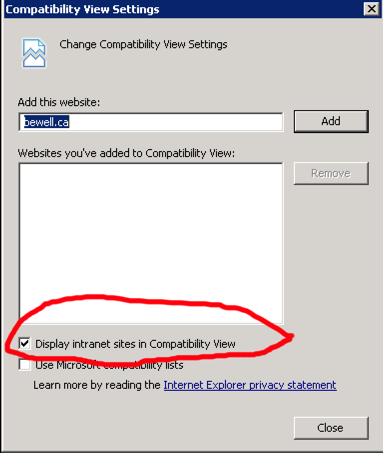
|
| The Culprit |
Citrix says the following about Director and 'Compatibility View':
Because we use a group policy to push this setting out, disabling it and re-enabling it on a site-per-site configuration isn't acceptable. There is an option to set the 'zone assignment' of our Citrix Director server to be on 'Trusted Sites' instead of 'Local Intranet' but this would be another policy that would have to be pushed out to the ~80,000 workstations we have. Instead, there is another option. We can edit the default.html file in the Citrix Director folder and add a line in thesection to tell IE to exclude this site from compatibility mode. To execute this:
Edit the Default.html file ("C:inetpubwwwrootDirectordefault.html") and add this line:
<meta http-equiv="X-UA-Compatible" content="IE=9; IE=8; IE=EDGE" />
To the ‘head’ section. Example:
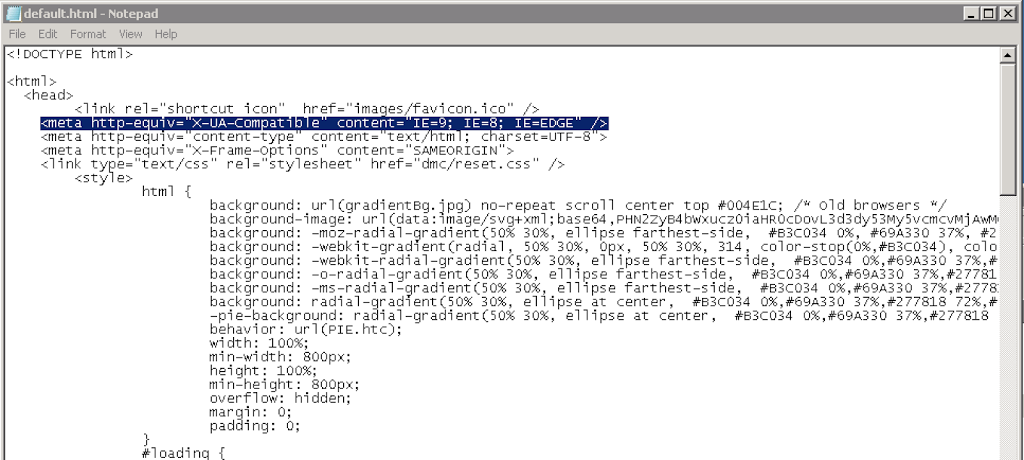
|
| Add the line around here |
Delete your cache and now your website will work without issue.