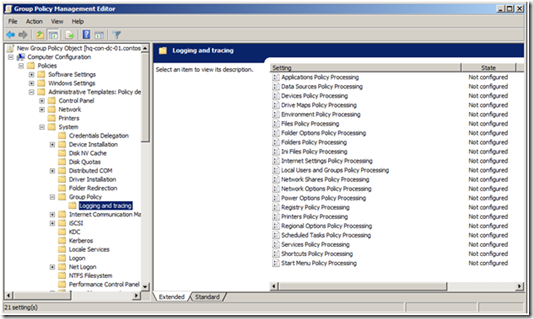
We had a couple issues with scheduled tasks not applying when submitted as a GPP (Group Policy Preference). We turned on tracing via local gpedit.msc (Administrative Templates > System > Group Policy > Logging and tracing). From here we turned on the Scheduled Task logging and events were then stored in the eventvwr.msc (we also turned on tracing which stored a computer.log file here: C:\ProgramData\Group Policy\Trace)
The first error we got was:
2014-10-03 10:42:19.372 [pid=0x59c,tid=0x1294] No item to delete.
2014-10-03 10:42:19.372 [pid=0x59c,tid=0x1294] pWorkItemV2->Create [ hr = 0x80070534 "No mapping between account names and security IDs was done." ]
2014-10-03 10:42:19.372 [pid=0x59c,tid=0x1294] replaceTask [ hr = 0x80070534 "No mapping between account names and security IDs was done." ]
2014-10-03 10:42:19.372 [pid=0x59c,tid=0x1294] Properties handled. [ hr = 0x80070534 "No mapping between account names and security IDs was done." ]
2014-10-03 10:42:19.388 [pid=0x59c,tid=0x1294] EVENT : The computer 'AHS-Add-GlobalPrinters' preference item in the 'CTX XenApp 65 Test {E6775312-AAC0-45C3-8A1C-5F5EA46701A7}' Group Policy object did not apply because it failed with error code '0x80070534 No mapping between account names and security IDs was done.'%100790275
2014-10-03 10:42:19.388 [pid=0x59c,tid=0x1294] Completed class - AHS-Add-GlobalPrinters. [ hr = 0x80070534 "No mapping between account names and security IDs was done." ]
2014-10-03 10:42:19.388 [pid=0x59c,tid=0x1294] Error suppressed. [ hr = 0x80070534 "No mapping between account names and security IDs was done." ]
So it can't map between user ID's. It'd be nice if it told us which mapping failed, but it gives us a pretty good hint. Looking at the XML file the GPP creates (stored here: "C:\ProgramData\Microsoft\Group Policy\History\\Machine\Preferences\ScheduledTasks\ScheduledTasks.xml" )
We saw the following:
<?xml version="1.0" encoding="UTF-8" ?><ScheduledTasks clsid="{CC63F200-7309-4ba0-B154-A71CD118DBCC}">
 <TaskV2 clsid="{D8896631-B747-47a7-84A6-C155337F3BC8}" name="AHS-Add-GlobalPrinters" image="1" changed="2014-10-03 17:15:15" uid="{EDDCD78F-46AC-414A-92B2-65D37D12E3F9}" bypassErrors="0" userContext="0" removePolicy="1" desc="Create Network Printer Queues on Cancer Control XenApp Servers" policyApplied="1">
 <Properties action="R" name="AHS-Add-GlobalPrinters" runAs="NT AUTHORITY\SYSTEM" logonType="S4U">
 <Task version="1.2">
 <RegistrationInfo>
 <Author>HEALTHY\ssalehianadm</Author>
 <Description>Create Network Printer Queues on Cancer Control XenApp Servers</Description></RegistrationInfo>
 <Principals>
 <Principal id="Author">
 <RunLevel>HighestAvailable</RunLevel>
 <LogonType>S4U</LogonType>
 <UserId>BUILTIN\SYSTEM</UserId></Principal></Principals>
 <Settings>
 <IdleSettings>
 <Duration>PT10M</Duration>
 <WaitTimeout>PT1H</WaitTimeout>
 <StopOnIdleEnd>true</StopOnIdleEnd>
 <RestartOnIdle>false</RestartOnIdle></IdleSettings>
 <MultipleInstancesPolicy>IgnoreNew</MultipleInstancesPolicy>
 <DisallowStartIfOnBatteries>true</DisallowStartIfOnBatteries>
 <StopIfGoingOnBatteries>true</StopIfGoingOnBatteries>
 <AllowHardTerminate>false</AllowHardTerminate>
 <AllowStartOnDemand>true</AllowStartOnDemand>
 <Enabled>true</Enabled>
 <Hidden>false</Hidden>
 <ExecutionTimeLimit>PT0S</ExecutionTimeLimit>
 <Priority>7</Priority></Settings>
 <Triggers></Triggers>
 <Actions>
 <Exec>
 <Command>C:\Windows\System32\cmd.exe</Command>
 <Arguments>/c C:\PublishedApplications\AHS-Add-GlobalPrinters.cmd WSLBLPRINT01</Arguments></Exec></Actions></Task></Properties>
 <Filters>
Everything validates. Googling for BUILTIN\SYSTEM brought up that several people were getting the same error when using BUILTIN\SYSTEM. Which makes some sense as "BUILTIN\SYSTEM" isn't a real account. We renamed it to NT AUTHORITY\SYSTEM. This time we got a new error message:
```shell
The computer 'AHS-Add-GlobalPrinters' preference item in the 'CTX XenApp 65 Prod {CB954F1D-7AE5-4706-9BCC-995A0D83CED5}' Group Policy object did not apply because it failed with error code '0x80041316 The task XML contains an unexpected node.' See trace file for more details.
```
This doesn't tell us a whole lot of information. What is the unexpected node? Looking again at the XML file it looked like so:
```xml
HEALTHY\ssalehianadm
Create Network Printer Queues on Cancer Control XenApp Servers
HighestAvailable
S4U
NT AUTHORITY\SYSTEM
PT10M
PT1H
true
false
IgnoreNew
true
true
false
true
true
false
PT0S
7
/c C:\PublishedApplications\AHS-Add-GlobalPrinters.cmd WSLBLPRINT01
```
</div>
</div>
The difference that I can see:
<GroupId>NT AUTHORITY\SYSTEM</GroupId>
The SYSTEM account is NOT a group. We changed how we selected the SYSTEM account by "Browsing" AD, going into the root of the domain, going into the Builtin OU, and selecting SYSTEM. This populated as "NT AUTHORITY\Well-Known-Security-Id-System". This will fail because there is no such user account called "Well-Known-Security-Id-System". At this point we renamed it to "NT AUTHORITY\SYSTEM".
Boom, GPP Scheduled task now worked without issue. Checking the XML the difference by manually selecting the SYSTEM account changed
<GroupId>NT AUTHORITY\SYSTEM</GroupId>
To
<UserId>NT AUTHORITY\SYSTEM</UserId >
SO.
If you are having issues with your GPP Scheduled task item running as the SYSTEM account I would HIGHLY recommend you check your XML file and confirm it is set as "NT AUTHORITY\SYSTEM" and it is surrounded by UserId NOT GroupId.