I recently had a Windows 2008 Server that was unable to execute a VBS script that works with other servers and other combinations of desktops. I decided to break out Process Monitor and try and see if I can figure out what’s going on…
To simplify this process, I found this vbs script that trys to utilize the Scripting.FileSystemObject in a script:
cscript Version.vbs

The VBScript program follows:
Option Explicit

Dim objFSO, strFolder

Call MsgBox("WSH Version: " & Wscript.Version _
& vbCrLF & "VBScript major version: " & ScriptEngineMajorVersion _
& vbCrLf & "VBScript minor version: " & ScriptEngineMinorVersion)

strFolder = "C:\Windows"

Set objFSO = CreateObject("Scripting.FileSystemObject")
If (objFSO.FolderExists(strFolder) = True) Then
Call MsgBox("Folder " & strFolder & " exists" _
& vbCrLf & "and the FileSystemObject works fine")
Else
Call MsgBox("Folder " & strFolder & " does NOT exists" _
& vbCrLf & "but the FileSystemObject works fine")
End I
I ran that script on the affected server and, after clicking OK on the WSH Version dialog, I got this message:
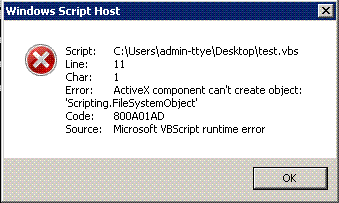
I broke out Process Monitor and monitored on the File System. It sounds like it should be a file system error so we’ll scope that out first. I filtered for everything but wscript.exe (I executed all my command lines as wscript.exe test.vbs) and nothing appeared. So wscript.exe wasn’t even getting to the file system. So I enabled registry filtering and filtered for wscript.exe:
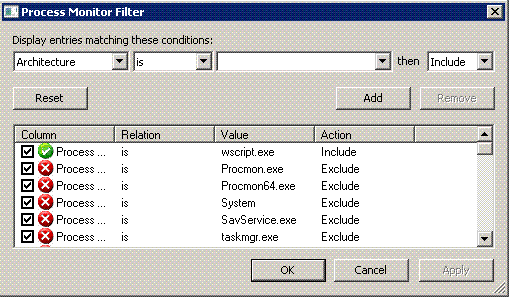
And I reran the script and got this result:
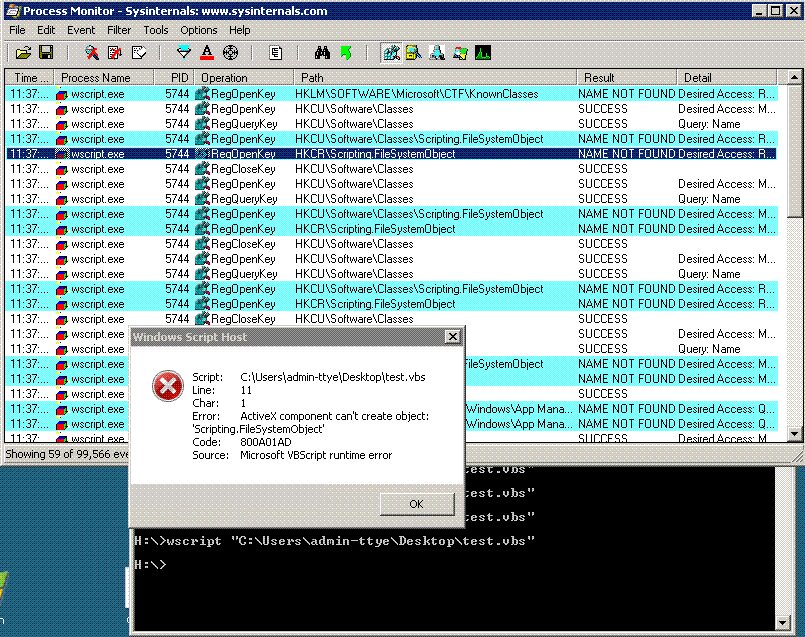
From here I went to another Windows 2008 server and added the missing registry keys (NAME NOT FOUND) and repeated the process again, finding more keys until all were added to the non-functioning server.
I ended up adding the following registry keys:
Windows Registry Editor Version 5.00

[HKEY_CLASSES_ROOT\Scripting.FileSystemObject]
@="FileSystem Object"

[HKEY_CLASSES_ROOT\Scripting.FileSystemObject\CLSID]
@="{0D43FE01-F093-11CF-8940-00A0C9054228}"

[HKEY_CLASSES_ROOT\Wow6432Node\CLSID\{0D43FE01-F093-11CF-8940-00A0C9054228}]
@="FileSystem Object"

[HKEY_CLASSES_ROOT\Wow6432Node\CLSID\{0D43FE01-F093-11CF-8940-00A0C9054228}\InprocServer32]
@="C:\\Windows\\SysWOW64\\scrrun.dll"
"ThreadingModel"="Both"

[HKEY_CLASSES_ROOT\Wow6432Node\CLSID\{0D43FE01-F093-11CF-8940-00A0C9054228}\ProgID]
@="Scripting.FileSystemObject"

[HKEY_CLASSES_ROOT\Wow6432Node\CLSID\{0D43FE01-F093-11CF-8940-00A0C9054228}\TypeLib]
@="{420B2830-E718-11CF-893D-00A0C9054228}"

[HKEY_CLASSES_ROOT\Wow6432Node\CLSID\{0D43FE01-F093-11CF-8940-00A0C9054228}\Version]
@="1.0"

[HKEY_CLASSES_ROOT\Wow6432Node\TypeLib\{420B2830-E718-11CF-893D-00A0C9054228}]

[HKEY_CLASSES_ROOT\Wow6432Node\TypeLib\{420B2830-E718-11CF-893D-00A0C9054228}\1.0]
@="Microsoft Scripting Runtime"

[HKEY_CLASSES_ROOT\Wow6432Node\TypeLib\{420B2830-E718-11CF-893D-00A0C9054228}\1.0\0]

[HKEY_CLASSES_ROOT\Wow6432Node\TypeLib\{420B2830-E718-11CF-893D-00A0C9054228}\1.0\0\win32]
@="C:\\Windows\\SysWOW64\\scrrun.dll"

[HKEY_CLASSES_ROOT\Wow6432Node\TypeLib\{420B2830-E718-11CF-893D-00A0C9054228}\1.0\0\win64]
@="C:\\Windows\\system32\\scrrun.dll"

[HKEY_CLASSES_ROOT\Wow6432Node\TypeLib\{420B2830-E718-11CF-893D-00A0C9054228}\1.0\FLAGS]
@="0"

[HKEY_CLASSES_ROOT\Wow6432Node\TypeLib\{420B2830-E718-11CF-893D-00A0C9054228}\1.0\HELPDIR]
@="C:\\Windows\\system32
For some reason, it is launching the Wscript.exe in a 32bit process (as evidenced by WOW6432Node key). On the working 64bit server I have it is running as a 64bit process.
After entering those registry keys, here is my new result.
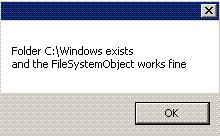
Success! Hopefully, if you encounter the same issue, you are not missing any more, or too many more, registry keys. I wonder why they disappeared, but I don’t have a way to trace that unfortunately.